



Este documento proporciona información sobre cómo navegar y utilizar la página Conexiones en la pestaña Administración de Open iT Server.
Introducción #
La página Conexiones contiene diversos detalles sobre la base de datos actual y las conexiones web de Open iT Server.
Siga estas instrucciones para navegar hasta la página:
- Abra la interfaz web de Open iT Analysis Server mediante un navegador web.
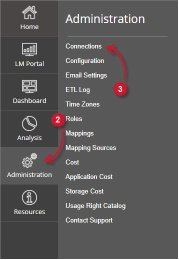
- Sitúe el cursor sobre la pestaña Administración. Espere a que aparezcan las subpestañas.
- Haga clic en la pestaña Conexiones.
Nota: Al hacer clic en la pestaña Administración también se redirige a la página Conexiones.
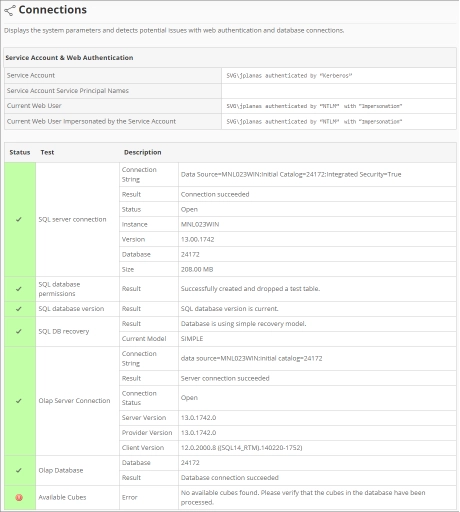
Debería aparecer la página Conexiones.
Requisitos #
Asegúrese de cumplir los siguientes requisitos antes de utilizar la página Conexiones:
- La base de datos SQL se ha creado correctamente.
- Derechos administrativos del usuario web actual.
Cuenta de servicio y autenticación web #
Esta tabla contiene la siguiente información:

- Cuenta de servicio: el nombre de usuario y el tipo de autenticación utilizados para ejecutar servicios en segundo plano para Analysis Server.
- Nombre principal del servicio de la cuenta de servicio: identificador único utilizado por la autenticación Kerberos para asociar la cuenta de servicio a la instancia de servicio.
- Usuario web actual: el nombre de usuario del usuario que está accediendo actualmente a la interfaz web con el tipo de autenticación.
- Usuario web actual suplantado por la cuenta de servicio: el nombre de usuario del usuario web actual suplantado por la cuenta de servicio.
Conexiones a bases de datos #
Esta tabla contiene la siguiente información:
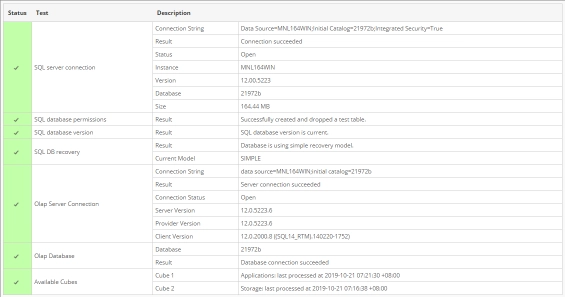
- Estado: muestra una marca (verde) si el estado de una prueba determinada es válido o una cruz (roja) si la prueba tiene errores.
- Prueba – contiene varias pruebas relacionadas con las conexiones a bases de datos:
- Conexión con SQL Server
- Cadena de conexión: cadena utilizada para conectarse a SQL Server.
- Resultado: muestra el estado al conectarse a SQL Server utilizando la cadena de conexión.
- Estado: muestra el estado actual de la conexión con SQL Server, si está abierta o cerrada.
- Instancia: nombre de la instancia utilizada para conectarse a SQL Server.
- Versión: muestra la versión de SQL Server.
- Base de datos: el nombre de la base de datos SQL.
- Tamaño: el tamaño actual de la base de datos SQL.
- Permiso de base de datos SQL
- Resultado: muestra el estado del permiso de la cuenta de servicio para la base de datos.
- Versión de la base de datos SQL
- Resultado: muestra el estado actual del esquema de la base de datos implementado.
- Recuperación de bases de datos SQL
- Resultado: muestra el estado de la recuperación de la base de datos utilizada.
- Modelo actual: cadena que representa la recuperación de la base de datos utilizada actualmente.
- Conexión al servidor Olap
- Cadena de conexión: se utiliza para conectarse a SQL Server Analysis Services.
- Resultado: muestra el estado al conectarse a SQL Server Analysis Services utilizando la cadena de conexión.
- Estado de la conexión: muestra el estado de la conexión actual con SQL Server Analysis Services, si está abierta o cerrada.
- Versión del servidor: muestra la versión de SQL Server Analysis Services.
- Versión del proveedor: muestra la versión del proveedor OLAP utilizada por SQL Server.
- Versión del cliente: muestra la versión del cliente SQL que accede a SQL Server Analysis Services.
- Base de datos Olap
- Base de datos: nombre de la base de datos de SQL Server Analysis Services.
- Resultado: muestra el estado de la conexión con la base de datos OLAP.
- Cubos disponibles: lista de cubos OLAP implementados disponibles. Proporciona el nombre y la última fecha y hora de procesamiento.
- Conexión con SQL Server
Para obtener asistencia o más ayuda sobre la configuración, póngase en contacto con el equipo de asistencia deOpen iT .
Para obtener referencias adicionales, puede visitar nuestra página de Documentación.