


This document provides information on how to navigate and use the ETL Log page under the Open iT Analysis Server Administration tab.
Einführung #
The ETL Log page contains a view to review log messages from the scheduled daily Extract Transform Load (ETL) data process.
Folgen Sie diesen Anweisungen, um die Seite aufzurufen:
- Öffnen Sie die Web-Oberfläche des Open iT Analysis Servers mit einem Web-Browser.
- Bewegen Sie den Mauszeiger über die Registerkarte Verwaltung. Warten Sie, bis die Unterregisterkarten erscheinen.
- Click the ETL Log tab.
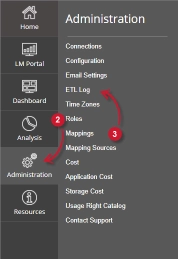
The ETL Log page should be displayed.
Anforderungen #
Ensure to meet the following requirements before using the ETL Log page:
- Die SQL-Datenbank wurde erfolgreich erstellt.
- Verwaltungsrechte des aktuellen Webbenutzers.
ETL Log Details #
The ETL Log table contains the following details:
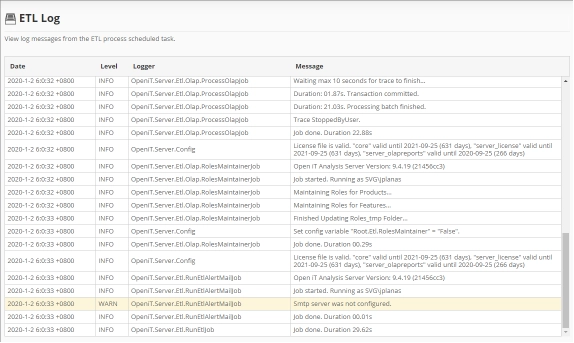
- Date – the time and date a specific log was written.
- Level – the category a specific log message.
- INFO – basic log information of the process.
- WARN – a warning log message encountered in the process.
- ERROR – an error message encountered in the process.
The color of the row will turn into yellow for WARN and red for ERROR.
- Logger – the specific process that writes the log message.
- Message – the log message.
Für Hilfestellung oder weitere Konfigurationsunterstützung wenden Sie sich bitte an Ihr Open iT Support Team.
Weitere Referenzen finden Sie auf unserer Seite Dokumentation.