Open iT-Hosted EventSoftware Intelligence Forum Thailand 2026
Turning software visibility into business value.
Register Here
Open iT de analistasOpen iT líder en la QKS SPARK Matrix™ de 2025
Descubra por qué somos líderes.
Descargar informe completo

BASE DE CONOCIMIENTOS

¿Cómo podemos ayudar?

Analysis Server – Administration – ETL Log

Principales conclusiones
  • The ETL Log page shows log messages from the scheduled daily Extract Transform Load (ETL) data process.
  • Each entry records the date, level, logger, and message, with rows turning yellow for WARN and red for ERROR.

Every day, Open iT Analysis Server runs its scheduled Extract Transform Load process, moving collected license data into the reporting database — and when that job stumbles, the symptoms show up far from the cause. The ETL Log page under the Administration tab is where administrators find out what actually happened: a dated, colour-coded record of every INFO, WARN, and ERROR message the daily process produced. Reading it well is the fastest way to tell a harmless warning from a failure that needs fixing.

This document provides information on how to navigate and use the ETL Log page under the Open iT Analysis Server Administration tab.

Introducción #

The ETL Log page contains a view to review log messages from the scheduled daily Extract Transform Load (ETL) data process.

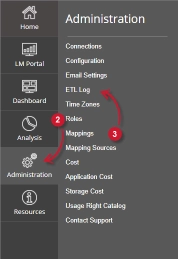
Siga estas instrucciones para navegar hasta la página:

  1. Abra la interfaz web de Open iT Analysis Server mediante un navegador web.
  2. Sitúe el cursor sobre la pestaña Administración. Espere a que aparezcan las subpestañas.
  3. Click the ETL Log tab.
Figure 1. Analysis Server Administration: ETL Log Navigation

The ETL Log page should be displayed.

Requisitos #

Ensure to meet the following requirements before using the ETL Log page:

  1. La base de datos SQL se ha creado correctamente.
  2. Derechos administrativos del usuario web actual.

ETL Log Details #

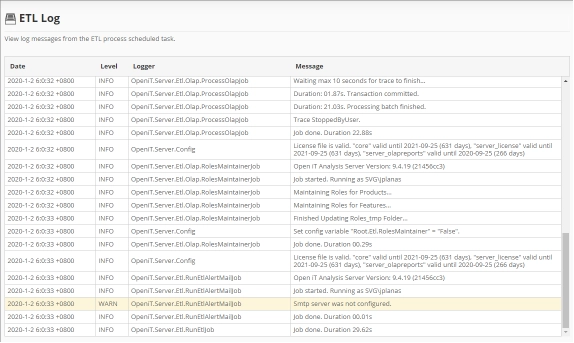
The ETL Log table contains the following details:

Figure 2. Analysis Server Administration ETL log
  • Date – the time and date a specific log was written.
  • Level – the category a specific log message.
    • INFO – basic log information of the process.
    • WARN – a warning log message encountered in the process.
    • ERROR – an error message encountered in the process.

      The color of the row will turn into yellow for WARN and red for ERROR.
  • Logger – the specific process that writes the log message.
  • Message – the log message.

Para obtener asistencia o más ayuda sobre la configuración, póngase en contacto con el equipo de asistencia deOpen iT .

Para obtener referencias adicionales, puede visitar nuestra página de Documentación.

Otras categorías

Auxiliar

Recursos, utilidades o herramientas complementarios que mejoran la funcionalidad básica y dan soporte a diversas necesidades operativas.
Más información

Configuración

Guías y referencias que ayudan a los usuarios a configurar, personalizar y optimizar los ajustes del sistema para que se adapten a sus necesidades específicas.
Más información

Vídeos de demostración

Vídeos breves e informativos que muestran las características del producto, los flujos de trabajo y las mejores prácticas a través de demostraciones en el mundo real.
Más información

Gestores de licencias

Documentación y herramientas para gestionar, supervisar y mantener licencias de software en diferentes sistemas o productos.
Más información

Actualizar

Instrucciones, mejores prácticas y orientación técnica para actualizar Open iT a versiones más recientes, garantizando una transición fluida, segura y eficiente con un tiempo de inactividad mínimo.
Más información

¿Buscas más recursos?

Explore contenido adicional a través de nuestro Portal del cliente o la página de Documentación para cualquier tema que no se trate aquí.

Ir arriba

Hablemos

Le mostraremos cómo puede beneficiarse su empresa de las soluciones de Open iT .
Nota:
Al enviar este formulario, acepta recibir comunicaciones adicionales de Open iT. Su información se procesará de acuerdo con nuestro Aviso de privacidad.