Open iT-Hosted EventSoftware Intelligence Forum Thailand 2026
Turning software visibility into business value.
Register Here
Open iT :Open iT 、2025年QKS SPARK Matrix™においてリーダーOpen iT
当社が業界をリードする理由をご覧ください。
完全版レポートをダウンロード

ナレッジベース

どうすればいいのでしょうか?

Analysis Server – Administration – ETL Log

要点
  • The ETL Log page shows log messages from the scheduled daily Extract Transform Load (ETL) data process.
  • Each entry records the date, level, logger, and message, with rows turning yellow for WARN and red for ERROR.

Every day, Open iT Analysis Server runs its scheduled Extract Transform Load process, moving collected license data into the reporting database — and when that job stumbles, the symptoms show up far from the cause. The ETL Log page under the Administration tab is where administrators find out what actually happened: a dated, colour-coded record of every INFO, WARN, and ERROR message the daily process produced. Reading it well is the fastest way to tell a harmless warning from a failure that needs fixing.

This document provides information on how to navigate and use the ETL Log page under the Open iT Analysis Server Administration tab.

導入

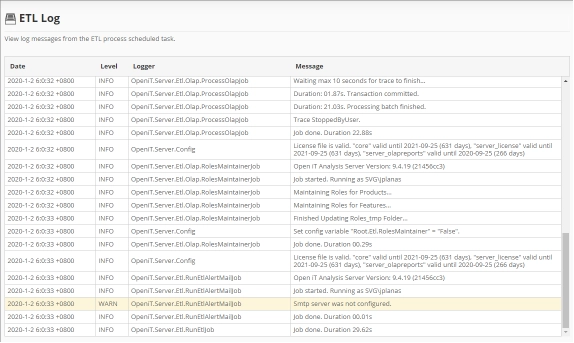
The ETL Log page contains a view to review log messages from the scheduled daily Extract Transform Load (ETL) data process.

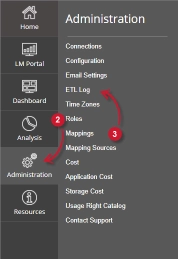
以下の指示に従ってページに移動してください:

  1. Web ブラウザを使用して、Open iT Analysis Server Web インターフェイスを開きます。
  2. 管理」タブにカーソルを合わせる。サブタブが表示されるまで待つ。
  3. Click the ETL Log tab.
Figure 1. Analysis Server Administration: ETL Log Navigation

The ETL Log page should be displayed.

要件 #

Ensure to meet the following requirements before using the ETL Log page:

  1. SQLデータベースが正常に作成されました。
  2. 現在のウェブユーザーの管理権限。

ETL Log Details #

The ETL Log table contains the following details:

Figure 2. Analysis Server Administration ETL log
  • Date – the time and date a specific log was written.
  • Level – the category a specific log message.
    • INFO – basic log information of the process.
    • WARN – a warning log message encountered in the process.
    • ERROR – an error message encountered in the process.

      The color of the row will turn into yellow for WARN and red for ERROR.
  • Logger – the specific process that writes the log message.
  • Message – the log message.

サポートやさらなる設定サポートについては、Open iT サポートチームまでお問い合わせください。

その他の参考資料については、ドキュメンテーションのページをご覧ください。

その他のカテゴリ

Auxiliary

中核機能を強化し、様々な運用上のニーズをサポートする補助リソース、ユーティリティ、またはツール。
もっと見る

コンフィギュレーション

ユーザーが特定の要件に合わせてシステム設定をセットアップ、カスタマイズ、最適化するのに役立つガイドとリファレンス。
もっと見る

デモ映像

実演を通じて製品機能、ワークフロー、ベストプラクティスを紹介する、短く有益な動画。
もっと見る

ライセンスマネージャー

異なるシステムや製品にわたるソフトウェア の管理、監視、および保守のためのドキュメントとツール。
もっと見る

アップグレード

Open iT 新しいバージョンに更新するための手順、ベストプラクティス、および技術的ガイダンス。最小限のダウンタイムで、スムーズかつ安全で効率的な移行を確保します。
もっと見る

さらにリソースをお探しですか?

こちらに記載されていない内容については、カスタマーポータルまたはドキュメントページで追加コンテンツをご確認ください。

トップに戻る

話をしよう

Open iT 、貴社のビジネスにどのようなメリットがあるかをご紹介します。
ご注意:
このフォームを送信することにより、Open iT からの追加の連絡を受け取ることに同意したものとみなされます。 お客様の情報は、当社のプライバシーに関する通知に従って処理されます。