


This document provides information on how to navigate and use the ETL Log page under the Open iT Analysis Server Administration tab.
Introducción #
The ETL Log page contains a view to review log messages from the scheduled daily Extract Transform Load (ETL) data process.
Siga estas instrucciones para navegar hasta la página:
- Abra la interfaz web de Open iT Analysis Server mediante un navegador web.
- Sitúe el cursor sobre la pestaña Administración. Espere a que aparezcan las subpestañas.
- Click the ETL Log tab.
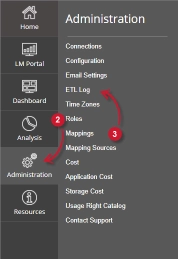
The ETL Log page should be displayed.
Requisitos #
Ensure to meet the following requirements before using the ETL Log page:
- La base de datos SQL se ha creado correctamente.
- Derechos administrativos del usuario web actual.
ETL Log Details #
The ETL Log table contains the following details:
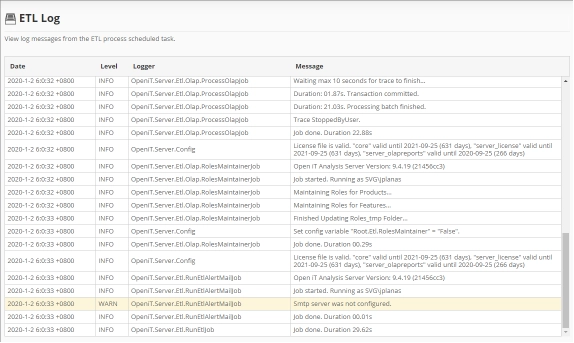
- Date – the time and date a specific log was written.
- Level – the category a specific log message.
- INFO – basic log information of the process.
- WARN – a warning log message encountered in the process.
- ERROR – an error message encountered in the process.
The color of the row will turn into yellow for WARN and red for ERROR.
- Logger – the specific process that writes the log message.
- Message – the log message.
Para obtener asistencia o más ayuda sobre la configuración, póngase en contacto con el equipo de asistencia deOpen iT .
Para obtener referencias adicionales, puede visitar nuestra página de Documentación.