



Ce document fournit des informations sur la navigation et l'utilisation de la page Connexions sous l'onglet Administration d'Open iT Analysis Server.
Introduction #
La page Connexions contient diverses informations sur la base de données actuelle et les connexions Web d'Open iT Analysis Server.
Suivez les instructions suivantes pour accéder à la page :
- Ouvrez l'interface web de l'Open iT Analysis Server à l'aide d'un navigateur web.
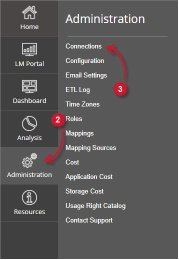
- Placez le curseur sur l'onglet Administration. Attendez que les sous-onglets apparaissent.
- Cliquez sur l'onglet Connexions.
Remarque: cliquer sur l'onglet Administration redirige également vers la page Connexions.
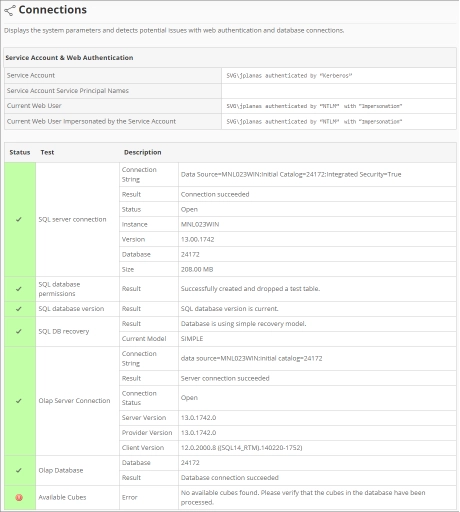
La page Connexions devrait s'afficher.
Exigences #
Assurez-vous de remplir les conditions suivantes avant d'utiliser la page Connexions:
- La base de données SQL est créée avec succès.
- Droits d'administration de l'utilisateur Web actuel.
Compte de service et authentification Web #
Ce tableau contient les informations suivantes :

- Compte de service: nom d'utilisateur et type d'authentification utilisés pour exécuter les services d'arrière-plan pour Analysis Server.
- Nom principal du service du compte de service: identifiant unique utilisé par l'authentification Kerberos pour associer le compte de service à l'instance de service.
- Utilisateur Web actuel – nom d'utilisateur de l'utilisateur qui accède actuellement à l'interface Web avec le type d'authentification.
- Utilisateur Web actuel usurpé par le compte de service: nom d'utilisateur de l'utilisateur Web actuel usurpé par le compte de service.
Connexions à la base de données #
Ce tableau contient les informations suivantes :
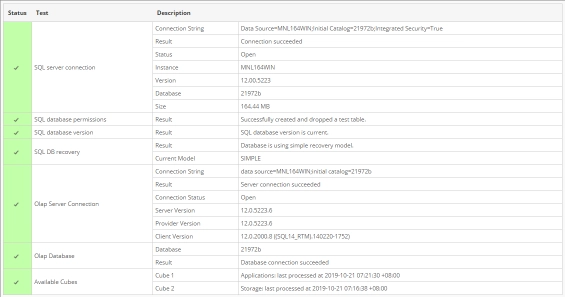
- Statut – affiche une coche (verte) si le statut d'un test donné est valide ou une croix (rouge) si le test comporte des erreurs.
- Test – contient divers tests liés aux connexions à la base de données :
- Connexion SQL Server
- Chaîne de connexion – chaîne utilisée pour se connecter à SQL Server.
- Résultat: affiche l'état lors de la connexion à SQL Server à l'aide de la chaîne de connexion.
- Statut: indique le statut actuel de la connexion au serveur SQL, si elle est ouverte ou fermée.
- Instance – nom de l'instance utilisé pour se connecter à SQL Server.
- Version – affiche la version de SQL Server.
- Base de données – nom de la base de données SQL.
- Taille: taille actuelle de la base de données SQL.
- Autorisation d'accès à la base de données SQL
- Résultat: affiche le statut de l'autorisation du compte de service pour la base de données.
- Version de la base de données SQL
- Résultat: affiche l'état actuel du schéma de base de données déployé.
- Récupération de base de données SQL
- Résultat: affiche l'état de la récupération de la base de données utilisée.
- Modèle actuel – chaîne représentant la récupération de base de données actuellement utilisée.
- Connexion au serveur Olap
- Chaîne de connexion – utilisée pour se connecter à SQL Server Analysis Services.
- Résultat: affiche l'état lors de la connexion à SQL Server Analysis Services à l'aide de la chaîne de connexion.
- État de la connexion: indique l'état de la connexion actuelle à SQL Server Analysis Services, qu'elle soit ouverte ou fermée.
- Version du serveur: affiche la version de SQL Server Analysis Services.
- Version du fournisseur: affiche la version du fournisseur OLAP utilisée par SQL Server.
- Version client – affiche la version du client SQL accédant à SQL Server Analysis Services.
- Base de données Olap
- Base de données: nom de la base de données SQL Server Analysis Services.
- Résultat: affiche l'état de la connexion à la base de données OLAP.
- Cubes disponibles – liste des cubes OLAP déployés disponibles. Elle indique le nom et la dernière date et heure de traitement.
- Connexion SQL Server
Pour obtenir de l'aide ou un support de configuration supplémentaire, veuillez contacter votre équipe de support Open iT.
Pour des références supplémentaires, vous pouvez consulter notre page Documentation.