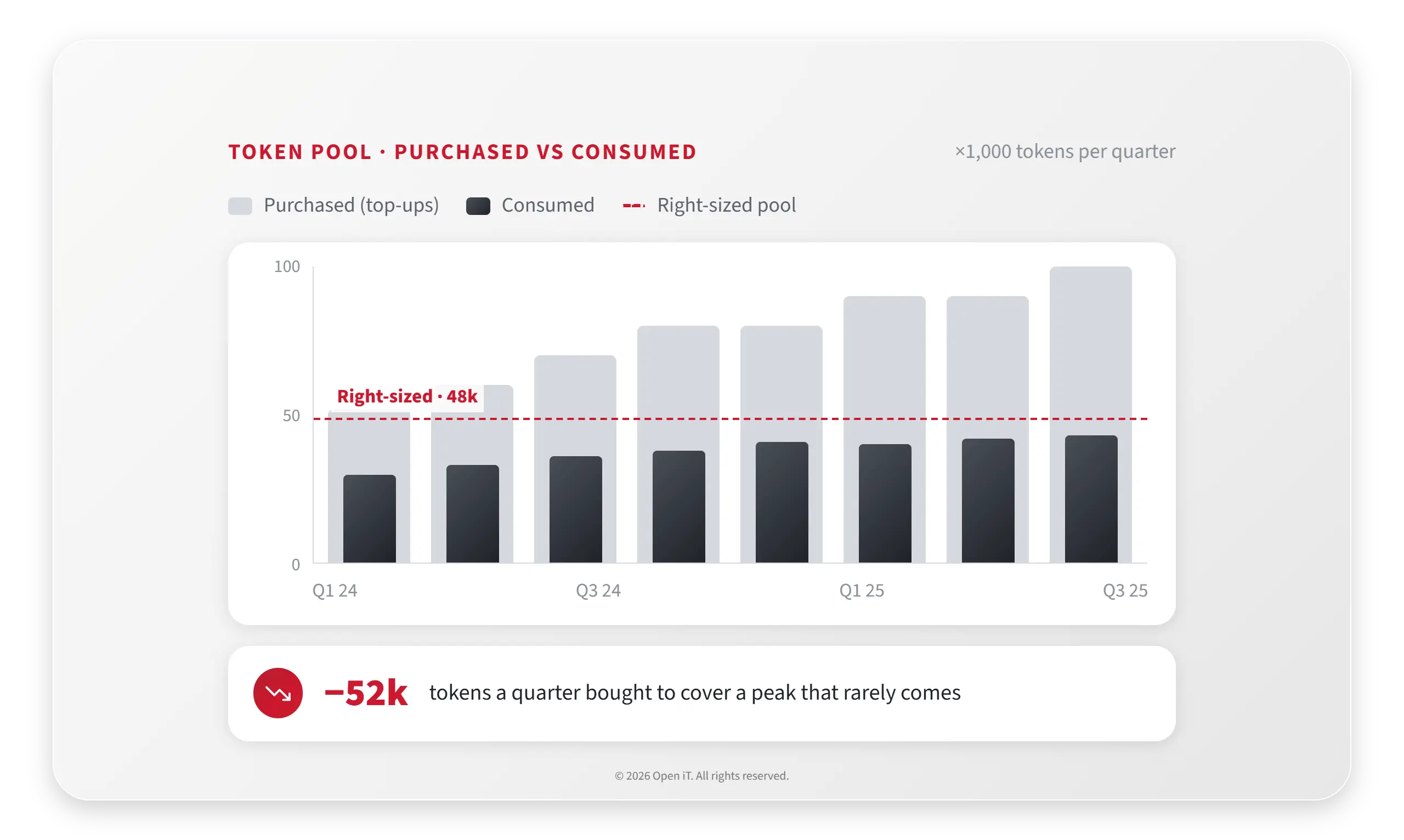
Your AspenTech bill is a token pool nobody can see inside.
Open iT reads AspenTech Sentinel log files to report real token consumption and hours per user, so you can size the SLM_Pool, run chargeback, and reconcile against the vendor report.
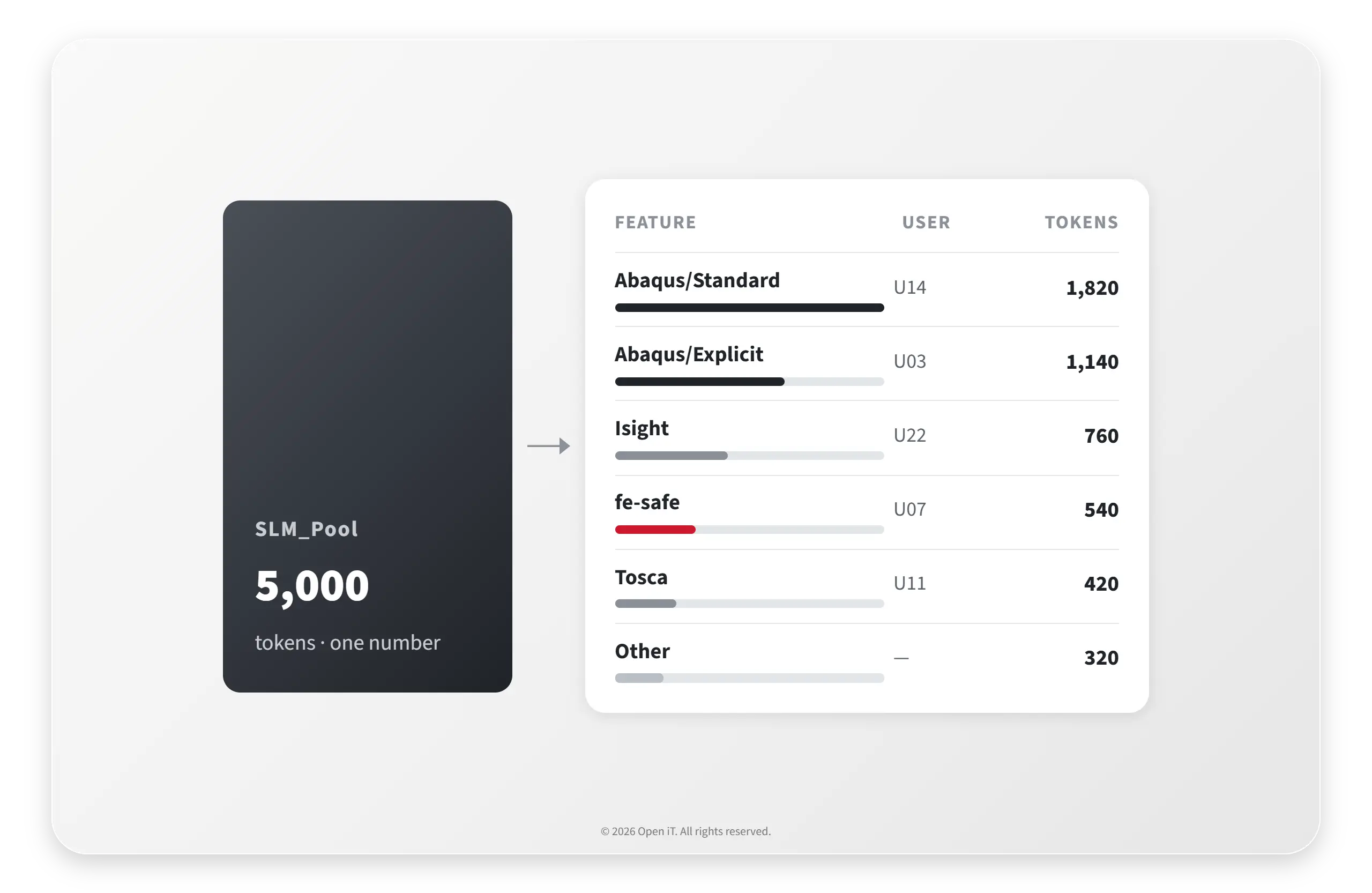
AspenTech bills from a shared pool of tokens. Different features draw different amounts, HYSYS Process alone draws fourteen, and the same log mixes token-based and non-token features. The pool total is not even in the log file. Without proper metering you size the pool by guesswork, top it up when engineers hit a wall, and have no defensible way to charge cost back to the teams that consumed it.
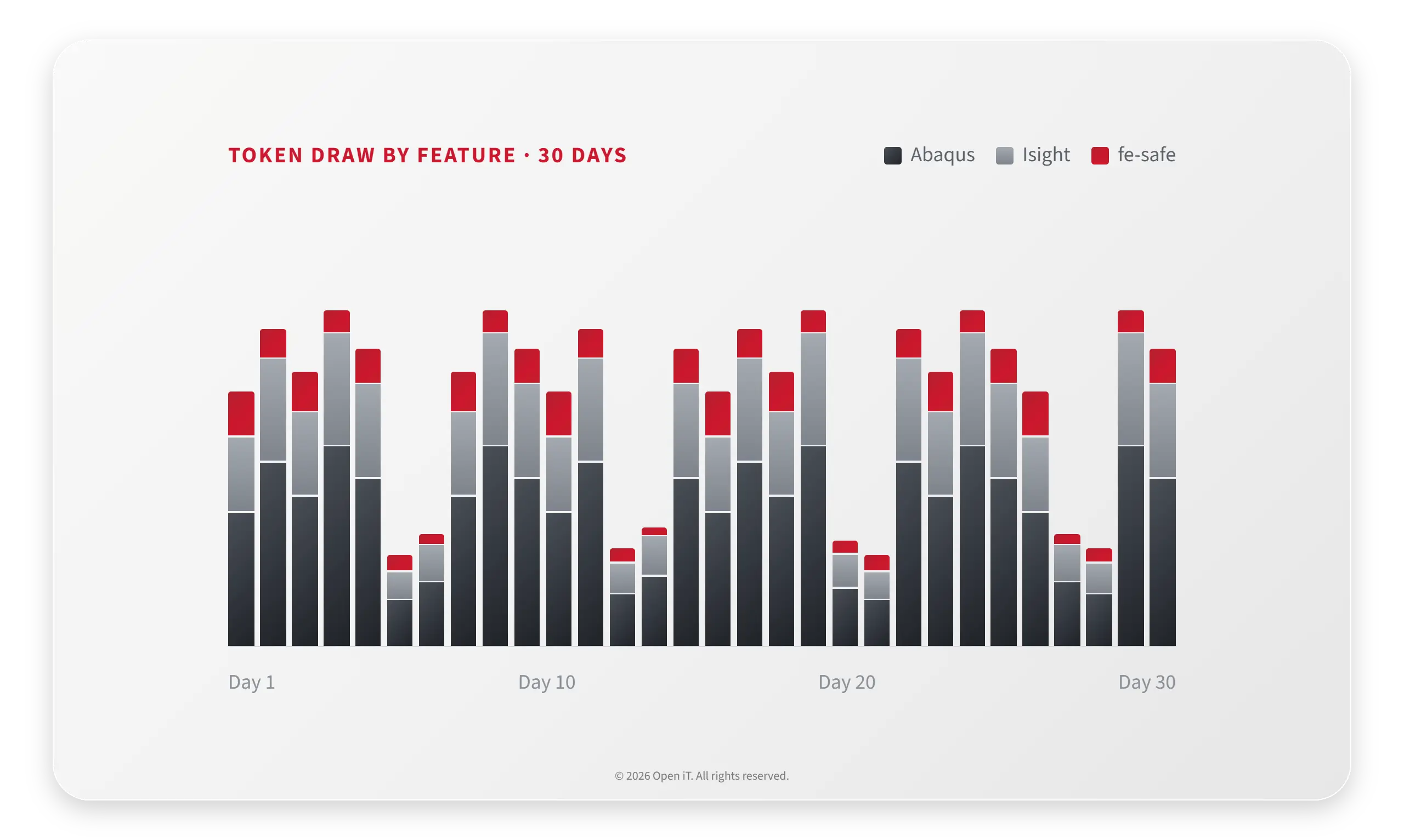
Open iT collects the raw Sentinel log files and reports maximum tokens in use and elapsed time by feature and by user, monthly, in a form that reconciles with the vendor report. It even accounts for the contract detail that usage under five minutes is not billable. You move from guessing the pool to managing it.
What Open iT Does
1
See inside the token pool.
Log-based collection reports real token consumption per feature and per user, so the SLM_Pool stops being a black box and starts being a budget you can manage.
2
Run chargeback that reconciles.
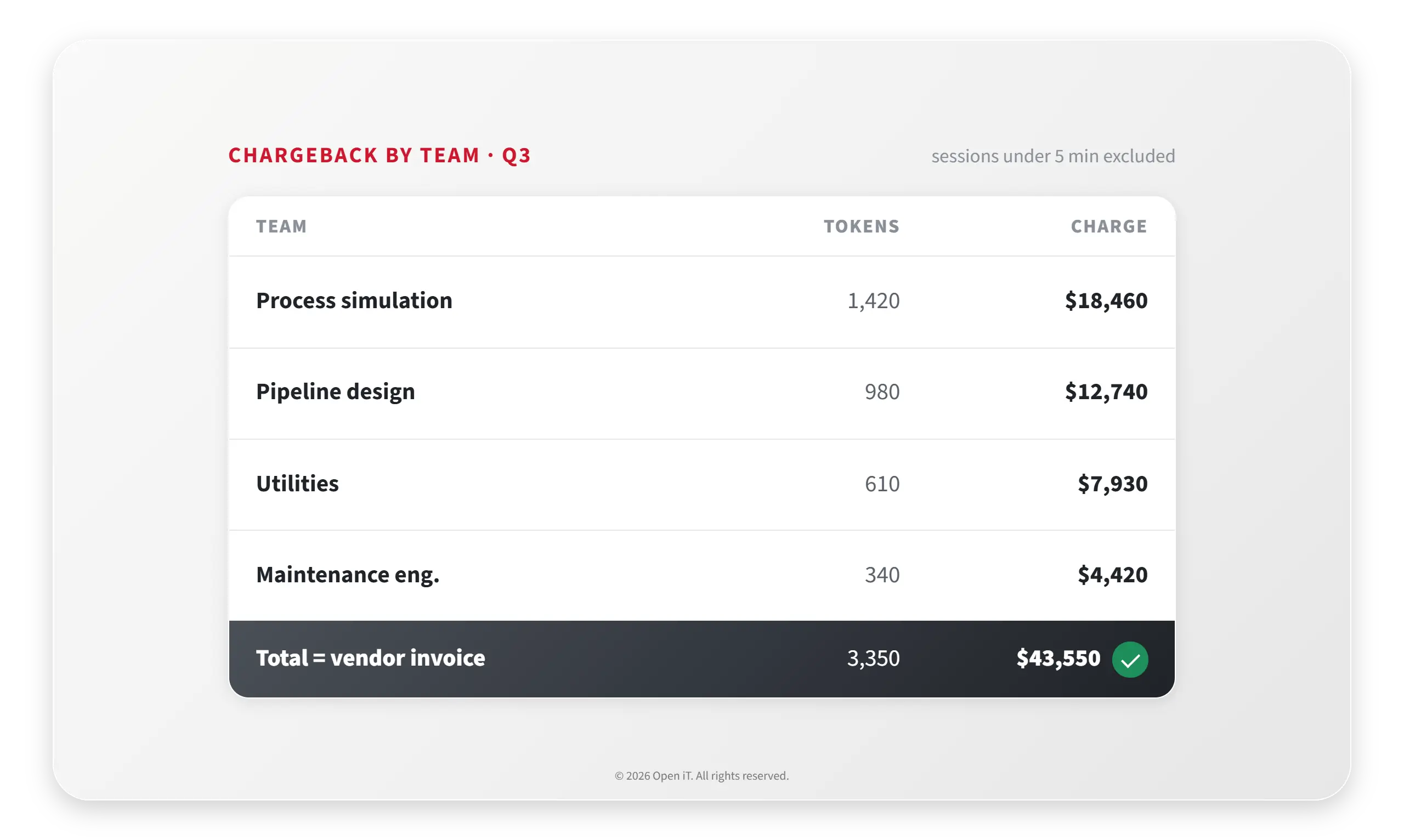
Tokens and elapsed time per user, aligned to the vendor report and net of the sub-five-minute rule, give finance a defensible chargeback rather than a shared line item.
3
Consolidate every plant's license servers.
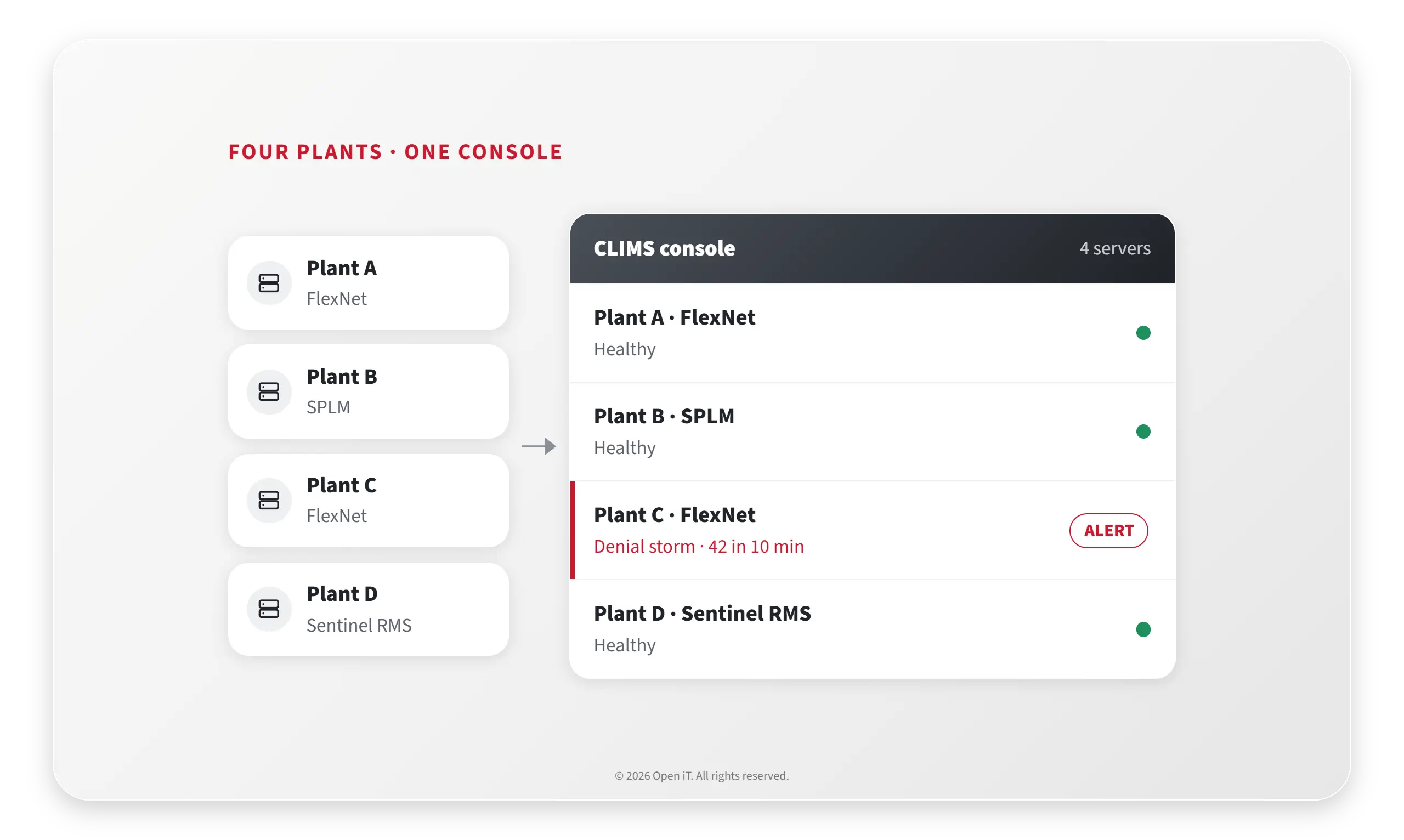
Open iT CLIMS brings multiple process-engineering license managers across sites into one console, so a denial storm or a server failure surfaces in one place instead of many.
4
Size the pool to real demand.
With true consumption visible, set the token pool and seat counts to the demand you can see, and stop over-topping-up to cover a peak that rarely comes.
Shared token pools are billed whether you use them or not. See how much of the pool you over-provision, and what each team’s usage really costs.
Pool over-provision
The SLM_Pool total, shown in the aspenONE SLM License Manager.
$
Your measured concurrent peak. If unknown, Open iT reports it from the log.
%
$0
annual cost of over-provisioned tokens
Peak use
Over-provisioned
Cost per token
$0
Peak utilization of the pool
0%
Over-provisioned tokens
0
Chargeback helper
Tokens multiplied by hours for one team or cost center.
$0
monthly cost to charge back to this team
This team’s share of the pool
0%
Reference from the Sentinel model: one instance of HYSYS Process draws 14 tokens. Feature token costs update on renewals.
How this is calculated
Cost per token = annual pool cost / pool size. Peak utilization = peak tokens in use / pool size. Over-provisioned tokens = pool size minus peak tokens in use. Annual over-provision cost = over-provisioned tokens × cost per token. If a non-billable short-usage share is entered, the peak billable figure is reduced accordingly for a conservative view.
Chargeback: a team’s share = team token-hours / total token-hours. Monthly cost to charge back = share × (annual pool cost / 12). All inputs are yours. Open iT measures the real values from the Sentinel log.
For planning discussion only. Actual savings and chargeback depend on measured token usage, feature token costs, and your specific AspenTech contract terms.
Yes. Open iT reads the Sentinel raw log files and reports token consumption and elapsed time per feature and per user.
Will the numbers match our AspenTech vendor report?
Log-based collection is designed to reconcile with the vendor report, including the rule that usage under five minutes is not billed on some contracts.
Can we charge cost back to teams?
Yes. Reporting by user and token supports defensible chargeback rather than a single shared line item.
Can it manage several plants at once?
Yes. CLIMS consolidates multiple process-engineering license managers across sites into one console.
You cannot manage a pool you cannot see into. Open iT turns the AspenTech token log into a per-feature, per-user, per-team picture that matches the vendor invoice, so you fund the demand you actually have.
Por motivos de seguridad, resuelve este sencillo rompecabezas para confirmar que eres una persona real antes de enviar una contraseña de un solo uso (OTP).
=
Ir arriba
Hablemos
Le mostraremos cómo puede beneficiarse su empresa de las soluciones de Open iT .