Energy, Oil and Gas, and Power

Your Petrel renewal is coming. You have a spreadsheet.

Get your software utilization report

Energy companies run the most expensive domain-specific engineering software in any industry – from reservoir simulation and seismic interpretation to process plant design and power systems analysis. Without independent usage metering, organizations renew licenses on vendor data, carry idle seats through multi-year agreements, and manage fragmented license servers with no central view.

Open iT provides metered usage data, centralized license server management, and automated license harvesting across the full energy software workflow – from exploration to downstream.

50%

of concurrent software sessions idle at any given moment in large energy operations

Get your software utilization report
Logotipo de TotalEnergies

TotalEnergies unlocked 39% in software cost savings by gaining visibility into how E&P applications were actually being used.

01

Millions in software. No one in charge.

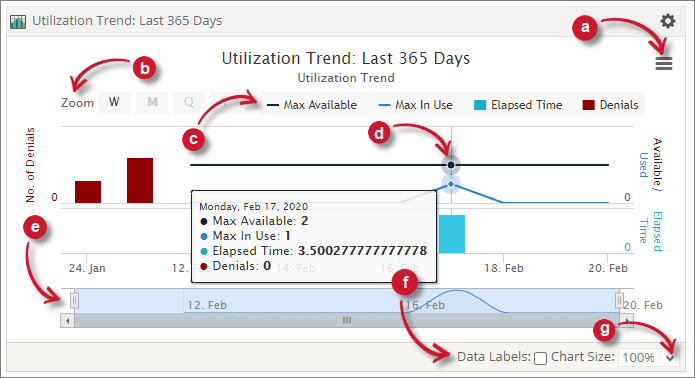
Open iT Utilization Trend report for the last 365 days, showing max available, max in use and denials

If a license server crashes on a Friday afternoon, IT Operations usually finds out Monday morning, not from an alert. Open iT consolidates FlexNet, tNavigator's own LM, Petroleum Experts (PetEx), and SmartPlant License Manager (SPLM) and other LMs into one browser-based console with its own server-down and denial notifications, so the incident surfaces the moment it happens, not after the help desk lights up. The License Utilization report gives IT Ops the one place to look that used to mean logging into four or five separate admin tools. 90+ license managers, one interface, one audit trail.
02

Without an Effective License Position, the vendor’s quote is the only data at the renewal table.

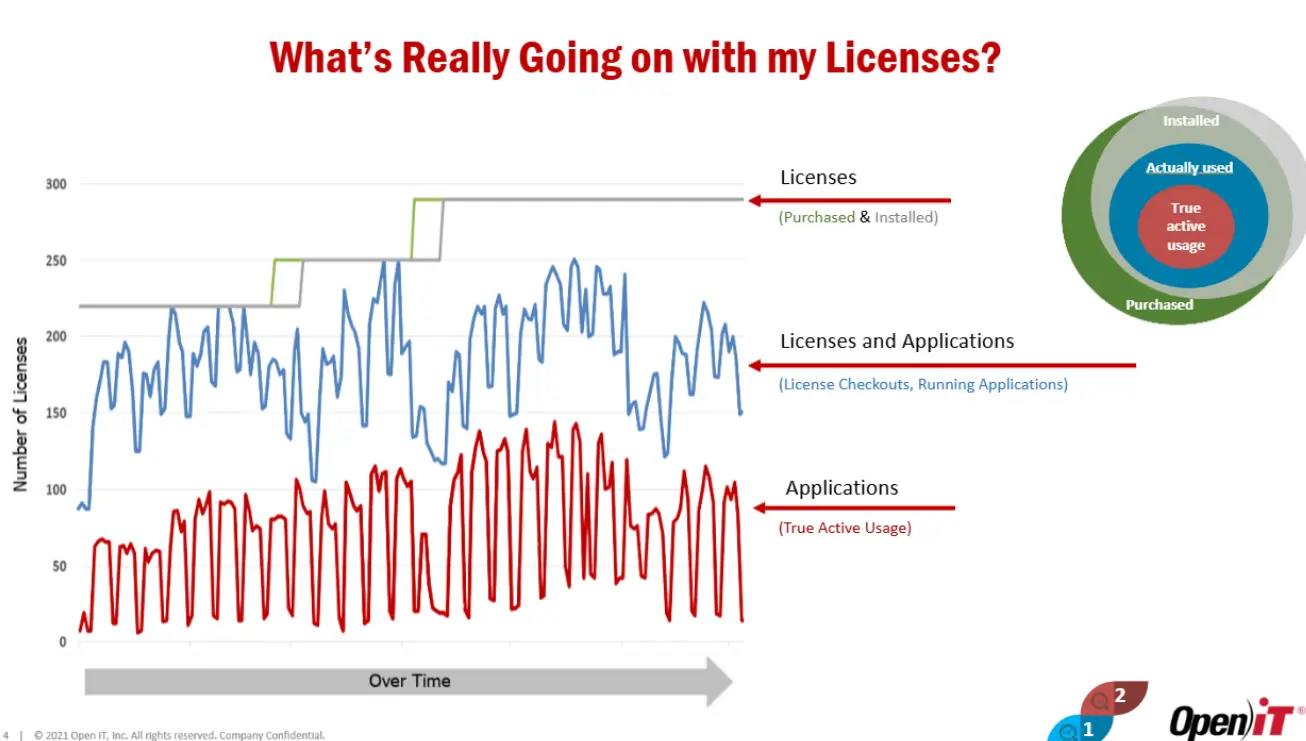
In a large-scale energy operation – thousands of engineers, dozens of specialist applications, one shared cloud environment – up to 50% of concurrent software sessions are idle at any given moment. That is not an edge case. It is the baseline.

Until you have visibility into who is using what, you are renewing licenses at full cost that nobody is actively using. The pattern above is not an anomaly. It is the structural condition of engineering software in energy organizations: high-cost, domain-specific tools checked out by users who are not actively using them, renewed annually on license server data that cannot distinguish between active and idle. The financial consequence compounds with every renewal cycle – not because tools are unused, but because independent data to challenge the vendor’s quote does not exist.

License servers are designed to report checkouts, not use

Every license manager in the energy software estate – FlexNet, tNavigator’s own LM, Petroleum Experts (PetEx), SmartPlant License Manager (SPLM), ETAP – reports the same metric: whether a license is checked out or available. A geoscientist who opens Petrel at 8 a.m., selects their modules, and then attends six hours of meetings is, to every license server in the estate, a fully utilized seat. The figure the vendor presents at renewal is based on previously contracted data. It does not reflect actual usage.

User behaviour in complex applications is structurally idle-producing

In applications like Petrel, RMS, or tNavigator, startup is slow and module loading is slow. Users who have been denied a rarely-used module before – Petrel alone has 70+ individually licensable features – will pre-select it on login to avoid a future denial. The rational response to scarcity produces idle checkouts. This is not misuse; it is the predictable behaviour of engineers working with scarce, expensive tools in a time-pressured environment.

The procurement team negotiates without actual software utilization data

At renewal time, the vendor sends its quote. The procurement or applications manager then starts a chain of manual steps that can take days: a request to whoever manages the license server, a wait for a FlexNet or tNavigator LM export to understand how an application is actually being used and a phone call or site visit to the engineers who use it. What comes back is assembled into a spreadsheet. That spreadsheet, built from surveys and informal conversations across the enterprise, becomes the customer’s side of the negotiation. The predictable outcome: renewal at or near current seat count, user growth absorbed by purchasing additional licenses, the cycle repeating. The optimization opportunity – idle seats, over-provisioned modules, demand that has shifted since the last renewal – remains invisible.

03

Explore by workflow domain

Most energy organizations start with Subsurface – it carries the highest per-seat cost and the most complex idle pattern. If your highest cost is process design or power systems, go directly to Downstream/Process Engineering or Power & Grid.

Domain What you will find there
Subsurface Petrel, tNavigator, RMS, DUG Insight, Zetaware — full subsurface stack including Geology, Geophysics, Reservoir Engineering, and Production Engineering sub-pages
Reservoir Ingeniería tNavigator, PetEx, RMS — simulation seat optimisation, Level 2–3 harvesting, $2–3M Petrel and $2M RMS saving patterns
Petroleum Ingeniería Petroleum Experts Suite (PROSPER, GAP, MBAL), PIPESIM, well lifecycle license management
Drilling & Well Ingeniería Halliburton Suite (StressCheck, WellCat), WellPlan, COMPASS — the $600K Halliburton saving and Level 3 harvesting roadmap
Downstream / Process Ingeniería AVEVA, SmartPlant (SPLM), Honeywell ULM, AspenTech — token model optimisation, process plant license consolidation
Power & Grid ETAP, NEPLAN, PSCAD — power systems analysis license monitoring and optimisation
Subsea & Offshore OrcaFlex, structural analysis tools — offshore license management
Renewables WindPRO, WAsP, PVsyst, Homer Energy — coming as confirmed app support expands

04

How Open iT™ addresses the problem: three levels, one progressive program

Open iT LicenseAnalyzer™ operates across three progressive metering levels. Each level is independently valuable, but the full financial return in energy environments is realized by moving through all three. The sequence is intentional: Level 1 builds the data foundation, Level 2 identifies the opportunity, Level 3 realizes it. In brief: Level 1 tells you what you paid for. Level 2 tells you what was actually used. Level 3 takes back what is idle.

Level 1 – Know what you are paying for

Level 1 collects concurrent usage, elapsed time, denial events, and real-time license server status from 90+ license manager types – polling every hour with customizable sample intervals. For the first time, the procurement team has an independent record of what the estate actually consumed over the past 12 months, at the module and feature level.

The Level 1 renewal process converts a qualitative negotiation (‘we think we need roughly the same number of seats’) into a quantitative one (‘concurrent peak demand over the past 12 months supports this specific seat count, and here is the denial data to show where we are constrained’). The vendor’s information advantage at the negotiating table is neutralized by the existence of an independent data record. This is the condition under which software cost management shifts from reactive compliance to proactive optimization.

Level 2 – Know what is actually being used

Level 2 (True Active Usage) adds OS-level monitoring to the checkout record: keyboard, mouse, CPU, and application I/O activity are tracked per session to determine whether a checked-out seat is genuinely in use. Level 2 operates on Windows, Unix, and macOS with 14+ configurable parameters per application.

The purpose of Level 2 is not to monitor employees – it is to identify candidates for Level 3 harvesting. The criteria: high idle rate (typically >50%), high seat cost, and contract terms that permit reclamation.

Privacy and anonymization

Open iT's user anonymization capability delivers population-level idle analysis – without individual user identification. At one large integrated operator, this resolved every privacy concern raised during legal review, enabling Level 2 to proceed at scale.

Level 3 – Recover what is idle without disrupting the engineer

Level 3 (Managed Usage) automates license reclamation: when a session exceeds the configured idle threshold, the license is returned to the pool and the session is suspended. When the engineer returns, the session resumes from the point of suspension – with work preserved and no re-login or module re-selection required.

The distinction between suspend and terminate is what makes Level 3 viable in energy environments. Terminate returns the license but destroys the session state. For Petrel, whose startup process – opening the application, selecting modules, loading data, configuring views – can take 15–30 minutes, terminate is not an acceptable operational model. Suspend is. Open iT ships a pre-built Petrel autosave script with Level 3. No custom development is required.

The 3 a.m. objection

The Level 3 objection most commonly raised in well operations environments is the 3 a.m. scenario: a drilling engineer wakes to check well progress and cannot immediately access a license. In practice, the suspend-and-resume model means the engineer's existing session is immediately available. They are not requesting a new license – they are resuming one already held. The objection does not apply to the suspend model.

After extensive stakeholder communication with subsurface discipline leads, geoscience asset managers, team leads, and real-time well operations teams, Level 3 was activated at the operator. No user-reported problems occurred in the first phase. Harvesting is now embedded as standard practice – described by users as a feature that makes them ‘considerate co-workers’ rather than a constraint on their work.

Get your independent license position

05

Managing multiple license servers

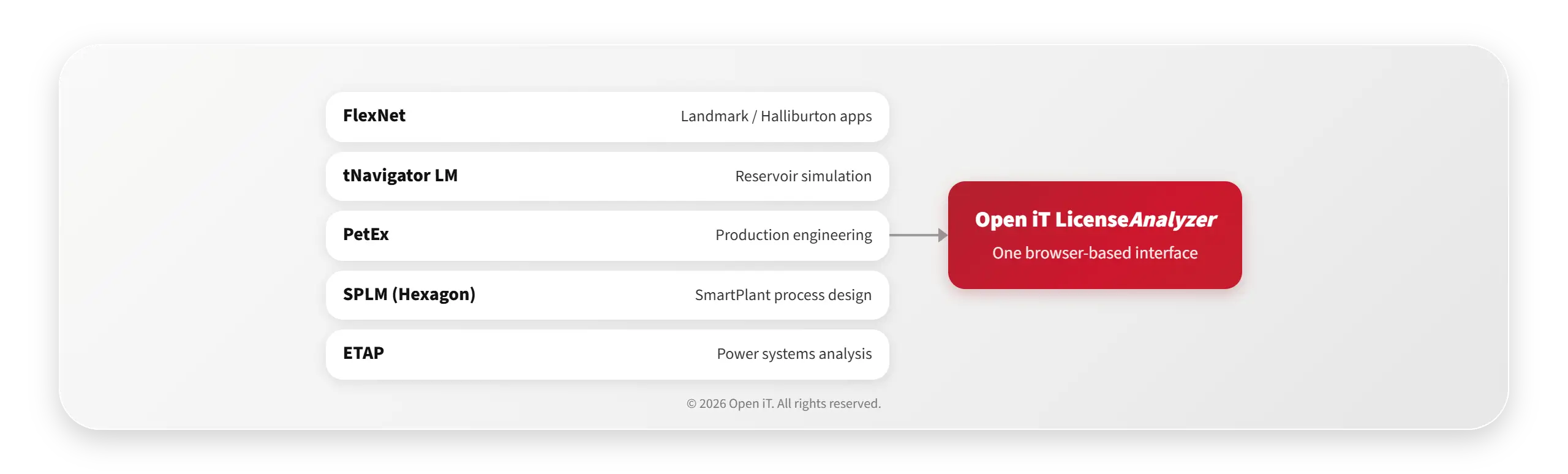
Energy organizations do not run a single license manager. A typical integrated operator runs FlexNet for Landmark/Halliburton applications, tNavigator’s own LM for reservoir simulation, PetEx for production engineering tools, SPLM (Hexagon) for SmartPlant process design, and ETAP’s own manager for power systems – simultaneously, in different geographies, managed by different teams.

Without a centralized administration layer, each license server is a separate operations responsibility: a separate admin console, a separate alert configuration, a separate place to identify a denial storm or a server failure. When a license server fails on a Friday afternoon, the event is discovered Monday morning when engineers cannot work.

Open iT LicenseAnalyzer consolidates all supported license manager types into a single browser-based interface.

06

Does Open iT™ support your software?

If your engineers use it, it is almost certainly on the list. Key applications by domain:

Domain Key applications
Subsurface & Reservoir Petrel (SLB), tNavigator, RMS – plus DUG Insight, Zetaware
Petroleum & Well Engineering Petroleum Experts Suite (PetEx), PIPESIM, Halliburton Suite (StressCheck, WellPlan, COMPASS)
Downstream / Process AVEVA, SmartPlant (Hexagon), Honeywell ULM, AspenTech
Power & Grid ETAP, NEPLAN, PSCAD
Subsea, Offshore & Geoscience OrcaFlex, Itasca, Esri ArcGIS, Fekete, Peloton
See full application support list and metering details

07

For procurement and IT sourcing leaders: what the renewal process looks like with Open iT™ data

In energy organizations with mature Open iT deployments, the software renewal process follows a documented workflow driven by usage data. This is not an aspirational model – it is the process adopted by the product management teams at large integrated operators.

  1. Request the vendor quote no later than one month before renewal. Obtain the contract terms from procurement – this typically takes several weeks, so reviews begin mid-Q3 for year-end renewals.
  2. Review the License Monitor view for the renewal application across the full 12-month period – at the module and feature level, not just headline seat count.
  3. Assess denial data. Is denial volume driven by genuine demand, by user behaviour (pre-selecting scarce modules), or by training events? The distinction determines whether the correct response is to buy more licenses or to optimise distribution.
  4. Identify trimming opportunities: where is concurrent peak demand materially below total license count? This is the negotiation evidence.
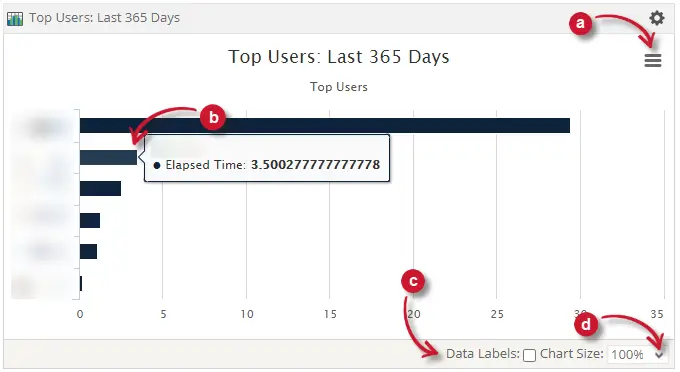
  5. Run the top-user report for each module. Five users provides sufficient data to understand consumption patterns and identify the right internal contacts.
  6. Meet the top users and the product champion. Agree to proposed changes. Document the agreement.
  7. Submit the quote with product champion and budget-holder sign-off to procurement.

Note

Before Open iT, this process was conducted without steps 2, 3, or 4 – the usage data did not exist in a form accessible to the renewal team. Getting a usage report required a manual request to the licensing team, followed by a wait of several days for a Flexera export. Renewals defaulted to the vendor's numbers.

07

Your next renewal is a negotiation. The only question is who has the data.

Your license server cannot tell you whether the engineer who checked out Petrel at 8 a.m. used it for six hours or attended meetings while the seat sat idle. To the license manager, both sessions look identical: occupied.

That gap between what was checked out and what was genuinely active is where renewal costs compound unexamined, cycle after cycle. Open iT LicenseAnalyzer closes it. You arrive at the renewal table with 12 months of independently metered concurrent demand at the module and feature level. The vendor has a quote based on the last contract. You have the evidence to challenge it.

Request a usage data demo

Explore Deeper

Explore by workflow domain

Subsurface

Petrel, tNavigator, RMS, DUG Insight, Zetaware — the full subsurface stack.

Reservoir Engineering

tNavigator, PetEx, RMS — simulation seat optimisation and Level 2–3 harvesting.

Petroleum Engineering

Petroleum Experts Suite (PROSPER, GAP, MBAL), PIPESIM — well lifecycle license management.

Drilling & Well Engineering

Halliburton Suite (StressCheck, WellCat), WellPlan, COMPASS — the $600K Halliburton saving.

Downstream / Process Engineering

AVEVA, SmartPlant (SPLM), Honeywell ULM, AspenTech — token model optimisation.

Power & Grid

ETAP, NEPLAN, PSCAD — power systems analysis license monitoring.

Subsea & Offshore

OrcaFlex, structural analysis tools — offshore license management.

Renewables

WindPRO, WAsP, PVsyst, Homer Energy — coming as confirmed app support expands.

Ir arriba

Hablemos

Le mostraremos cómo puede beneficiarse su empresa de las soluciones de Open iT .
Nota:
Al enviar este formulario, acepta recibir comunicaciones adicionales de Open iT. Su información se procesará de acuerdo con nuestro Aviso de privacidad.