


This document provides information on how to navigate and use the ETL Log page under the Open iT Analysis Server Administration tab.
導入#
The ETL Log page contains a view to review log messages from the scheduled daily Extract Transform Load (ETL) data process.
以下の指示に従ってページに移動してください:
- Web ブラウザを使用して、Open iT Analysis Server Web インターフェイスを開きます。
- 管理」タブにカーソルを合わせる。サブタブが表示されるまで待つ。
- Click the ETL Log tab.
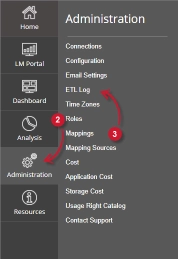
The ETL Log page should be displayed.
要件 #
Ensure to meet the following requirements before using the ETL Log page:
- SQLデータベースが正常に作成されました。
- 現在のウェブユーザーの管理権限。
ETL Log Details #
The ETL Log table contains the following details:
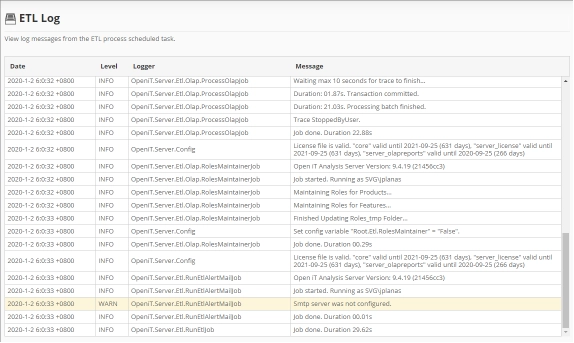
- Date – the time and date a specific log was written.
- Level – the category a specific log message.
- INFO – basic log information of the process.
- WARN – a warning log message encountered in the process.
- ERROR – an error message encountered in the process.
The color of the row will turn into yellow for WARN and red for ERROR.
- Logger – the specific process that writes the log message.
- Message – the log message.
サポートやさらなる設定サポートについては、Open iT サポートチームまでお問い合わせください。
その他の参考資料については、ドキュメンテーションのページをご覧ください。