


This document provides information on how to navigate and use the ETL Log page under the Open iT Analysis Server Administration tab.
Introduction #
The ETL Log page contains a view to review log messages from the scheduled daily Extract Transform Load (ETL) data process.
Suivez les instructions suivantes pour accéder à la page :
- Ouvrez l'interface web de l'Open iT Analysis Server à l'aide d'un navigateur web.
- Placez le curseur sur l'onglet Administration. Attendez que les sous-onglets apparaissent.
- Click the ETL Log tab.
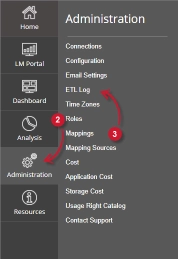
The ETL Log page should be displayed.
Exigences #
Ensure to meet the following requirements before using the ETL Log page:
- La base de données SQL est créée avec succès.
- Droits d'administration de l'utilisateur Web actuel.
ETL Log Details #
The ETL Log table contains the following details:
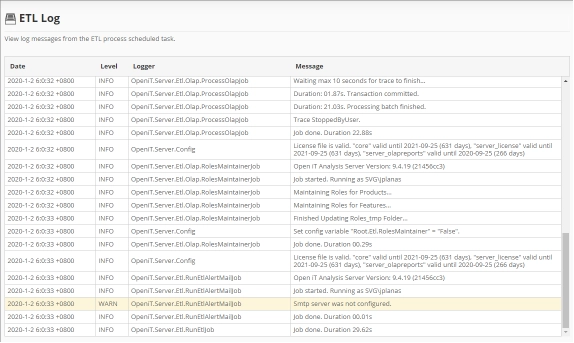
- Date – the time and date a specific log was written.
- Level – the category a specific log message.
- INFO – basic log information of the process.
- WARN – a warning log message encountered in the process.
- ERROR – an error message encountered in the process.
The color of the row will turn into yellow for WARN and red for ERROR.
- Logger – the specific process that writes the log message.
- Message – the log message.
Pour obtenir de l'aide ou un support de configuration supplémentaire, veuillez contacter votre équipe de support Open iT.
Pour des références supplémentaires, vous pouvez consulter notre page Documentation.