


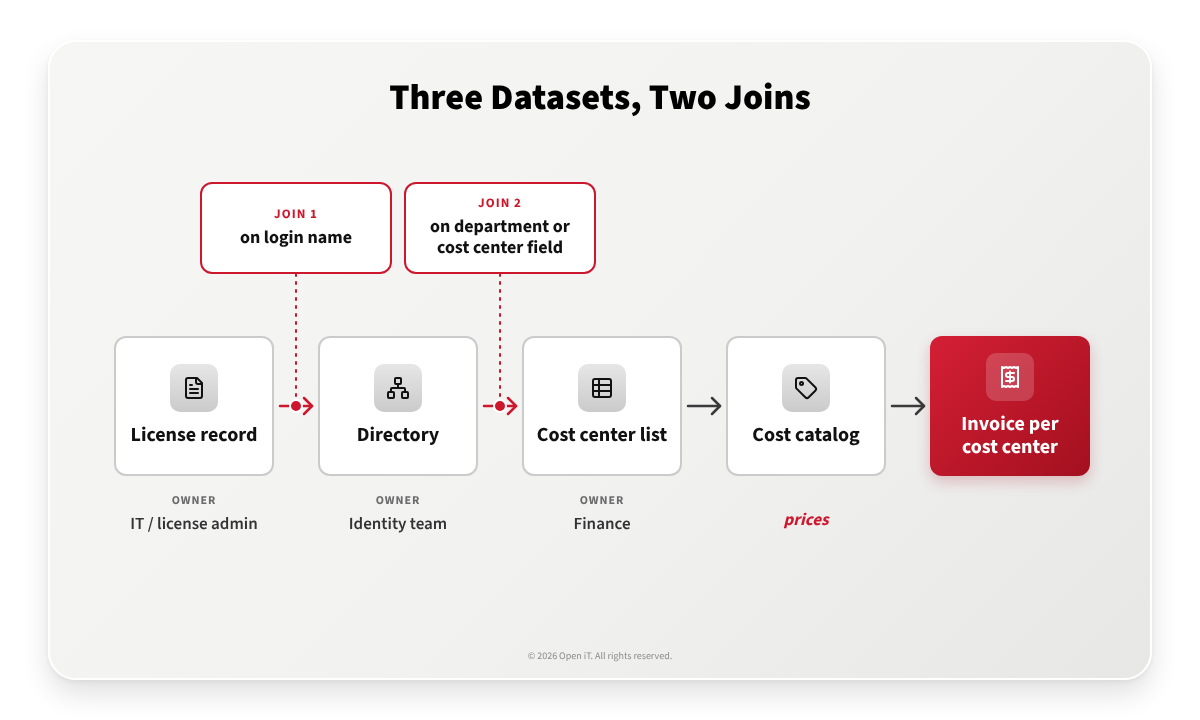
- Software license chargeback joins three datasets: the license record, the directory and finance’s cost center list. Each is owned by a different team.
- The join key is the login name. Check that the name in the license log is the same one the directory holds before you build anything on it.
- Keep history on the organization fields, such as department and location, or last quarter’s usage moves with every person who changes jobs.
- Contractors, suppliers and shared logins are where the join breaks. Plan for them before the first invoice.
Back to the semiconductor manufacturer from IT chargeback model examples. Its license servers record a login name and a computer name for every checkout of NX, Creo or Ansys. Its directory knows each engineer's department, division and office. Its finance team budgets by cost center. None of the three was built to talk to the others.
Chargeback only works when they do. A license-hour with no department behind it can’t be charged to anyone, and a department with no cost center behind it can’t be billed.
How do you link software license usage to Active Directory and cost centers? Collect usage with each user’s login name. Pull department, division and location from Active Directory, keyed on the same login name, refreshed nightly and with history kept. Map each department, or a cost center field from HR, to finance’s cost center codes. Then run last year’s usage through the map and fix every user it can’t place before anyone is billed.
The three datasets and who owns them
| Dataset | Typical owner | What it holds | What it answers |
|---|---|---|---|
| License record | IT or the license administrator | Login name, computer name, application feature, checkout and checkin times | Who used what, where and for how long |
| Directory | The identity team (Active Directory or Microsoft Entra ID) | Login name, email, department, division, office, employee type, manager | Which part of the organization each person belongs to |
| Cost center list | Finanças | Cost center codes, names and budget holders | Whose budget pays |
Each is correct on its own terms. The trouble starts at the seams, where a value in one dataset has to match a value in the next. IT chargeback best practices covers what goes wrong when that map is out of date. This post covers how to build it.
Join 1: the license record to the directory
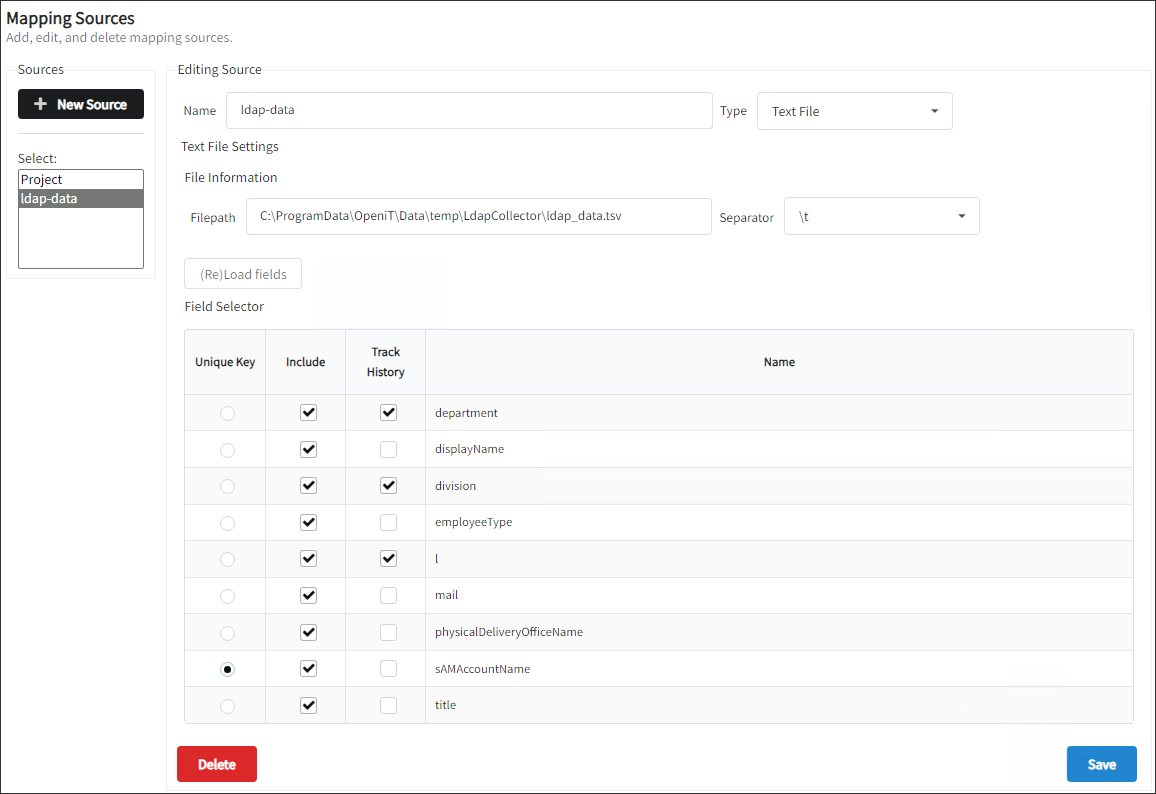
The join key is the login name. In Active Directory that’s usually the sAMAccountName attribute and Open iT’s mapping uses it as the default unique key.
Check two things before you rely on it.
First, that the license log and the directory spell the name the same way. Run one month of usage against the directory and count the login names that find no match. That count tells you how much work the join needs.
Second, that every user can be found. Open iT’s documented setup uses two sources, one keyed on the login name and one on the email address, so a user can be matched by either. That helps where a license service identifies people by their sign-in email.
Shared logins are the case no key can solve. If a test lab runs Ansys under one team account, the log can’t tell the engineers apart. The computer name can, if each workstation belongs to one person. Otherwise, give the shared account its own cost center and charge it as a team.
Keep history, or the past moves with people
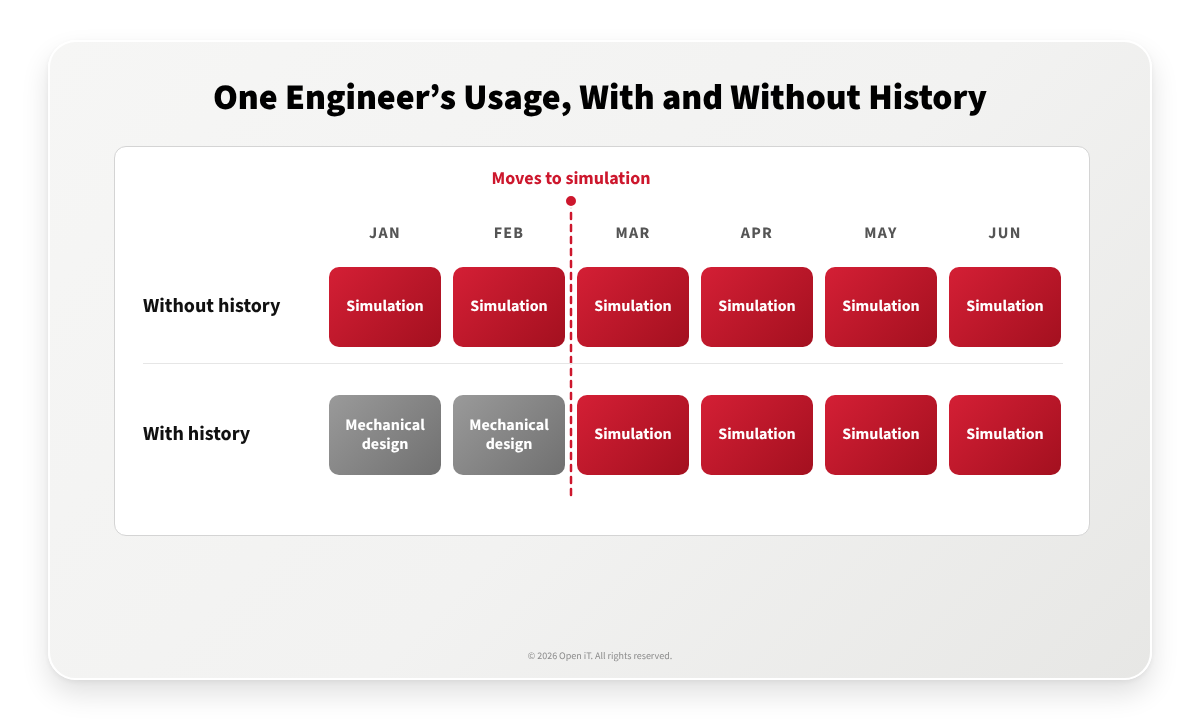
An engineer moves from mechanical design to the simulation group in March. If the directory only holds the current department, every hour she used in January and February now belongs to simulation.
Open iT’s mapping can track history on the organization fields you choose, such as department, division and location. With history on, usage stays with the department the person belonged to when they used the license. Fields like phone number or office room don’t need history. The mapping refreshes the selected fields nightly, so a move recorded in the directory reaches the mapping the next day.
Join 2: the directory to the cost center list
The directory knows departments. Finance knows the chargeback cost centers. They’re rarely the same list. Three ways to connect them:
- A cost center field in the directory. If your identity team already stores each person’s cost center, map it directly.
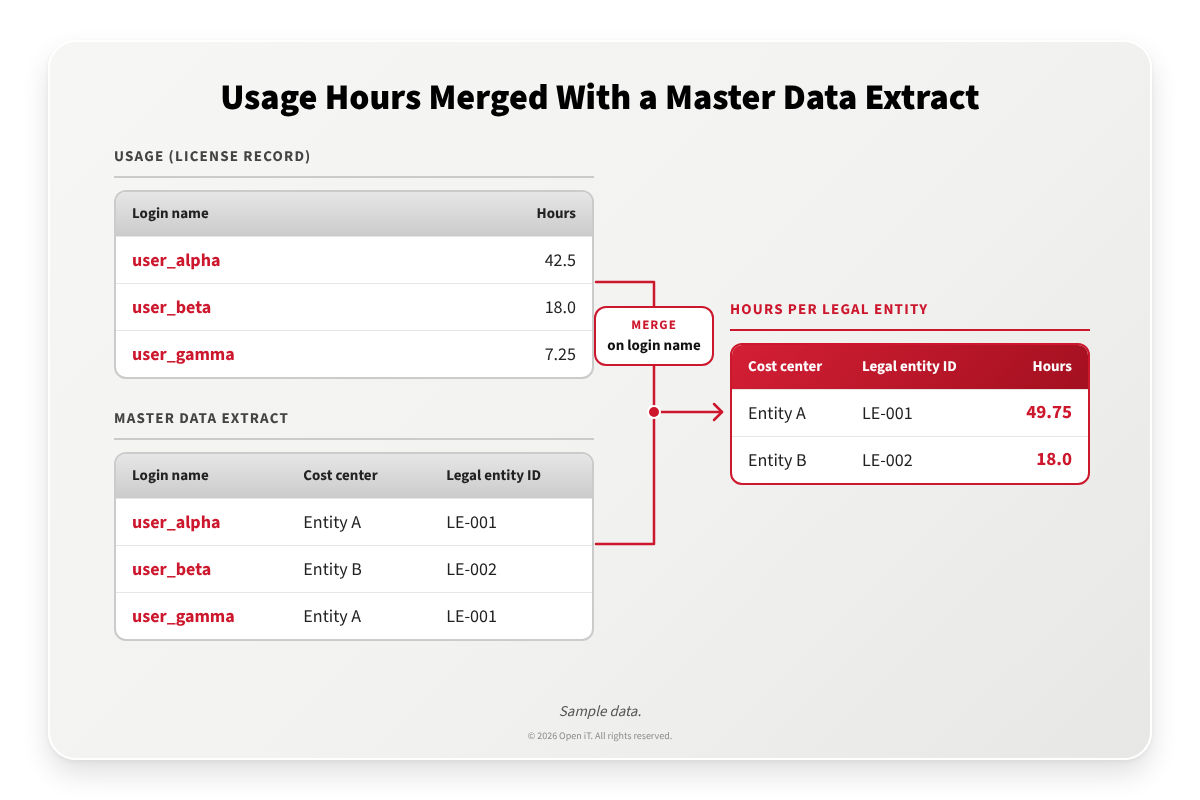
- An extract from the master data system. Finance or HR exports login names with the cost center each person belongs to. Open iT’s mapping accepts a text file as a source, alongside Active Directory.
- A lookup from department to cost center. Keep a short table that maps each department to its cost center, owned by finance.
The first needs the least upkeep, if the identity team already keeps that field current. The third is the quickest to start and the easiest to let go stale. If the department field in your directory is free text or out of date, start with the second. It’s the list finance already trusts.
Open iT has built the second route for an engineering company that charges software to its legal entities. The company’s master data system exports a file with three columns: login name, cost center and legal entity ID. Here the cost center is the legal entity itself. Usage from the license record, measured as elapsed hours per user, is merged with that file on the login name. Each hour then carries a legal entity, ready to be priced.
One person can belong to several groups at once, such as a department, an office and a project. Open iT’s multi-group mapping writes all of them from one source, so the same data can be reported by any of them.
The people the directory doesn’t know
At the semiconductor manufacturer, three groups sit outside the clean join:
- Contractors in the directory. They have accounts, but they work for a program, not a department. If your directory fills in the employee type field, it tells them apart, so their usage can go to the program that hired them.
- Outside engineers and suppliers without accounts in your directory. If a contract manufacturer reviews models in Teamcenter Visualization with credentials you issued, keep a text file that maps those accounts to the supplier program, and give it an owner.
- Engineers on several projects in one day. No directory field can say which project an hour belonged to. Users register the project they’re working on, through an application launcher or a project ID setting, and their usage carries that code.
From joined hours to an invoice
The join gives you hours per cost center. Pricing them needs one more list, the cost catalog. For each vendor license, it holds the applications, the metric it’s charged on (such as elapsed time or distinct users per day) and the monthly or unit cost. Only licenses with a cost in the catalog belong in the chargeback.
In the legal-entity example, the joined data feeds three reports in Excel:
- an overall summary of cost per vendor for every user group
- a detailed view of cost and usage hours per legal entity for every day of the month, for one vendor license at a time, such as a global AspenTech process simulation pool
- a legal entity summary of usage and cost, split by application
The team held back the cost until the joined hours matched the figures the company already had. That order matters: fix the hours first, then price them.
Check the join before the first invoice
Run last year’s usage through the finished map. This is the showback step from the IT chargeback process, aimed at the data rather than the rates. Look for three things:
- Usage with no department. Each one is a login name the join missed.
- Departments with no cost center. Each one is a gap in finance’s lookup.
- Cost centers that look too high or too low against what their budget holders expect. Ask them to check the names listed under their cost center.
Fix those, rerun, and only then send the first invoice.
Where LicenseAnalyzer and LicensePlanner fit
LicenseAnalyzer™ meters engineering software across 100+ license managers and cloud services and records who used which application, on which computer, and for how long. Its mapping connects to Active Directory or reads a text file, refreshes the chosen fields nightly, and can keep their history. It writes the result as maps from each user to the groups you charge: department, location, project or legal entity.
LicensePlanner™, its plugin, uses those maps to allocate cost by cost center, department or project and produces the invoices for showback and chargeback. See how it works as IT chargeback software, or read about IT chargeback at Open iT.
Perguntas mais frequentes
How do you link software license usage to Active Directory and cost centers?
Collect usage with each user’s login name, pull department, division and location from Active Directory keyed on the same name, and map departments or an HR cost center field to finance’s cost center codes. Run past usage through the map and fix unmatched users before billing.
What is the join key between license usage and Active Directory?
Usually the login name, held in Active Directory as sAMAccountName. Where a license service identifies users by email, add a second source keyed on the email address.
Why keep history in the user-to-cost-center map?
Without history, a person’s past usage moves with them when they change department. With history, each hour stays with the department they belonged to when they used the license.
How do you charge contractors and suppliers who aren't in the directory?
Map their accounts to the program or supplier contract that pays for them, using a text file with an owner who keeps it current.
Map your license usage to your cost centers
Your license servers already know who used what. Schedule a live demo and we’ll show how LicenseAnalyzer and LicensePlanner join that record to your directory and your cost centers.
This series: IT chargeback best practices · The IT chargeback process · IT chargeback model examples