
- Managed usage acts on idle sessions while they run. It doesn’t touch installs or entitlements.
- The license manager decides what can be managed. Level 3 works with FlexNet, LM-X, IBM LUM and RLM.
- In a simulation pool, that takes in Ansys, MSC Nastran, on-premises Altair and MATLAB. Dassault Systèmes applications served by DSLS stay measure-only.
Managed software license usage is rule-based control of engineering sessions while they run. When a session sits idle, Open iT LicenseAnalyzer™ suspends or closes it under a policy engineering agreed, so its license can go back to the pool. It's the third LicenseAnalyzer level, after counting checkouts and separating active use from idle use.
This post closes a four-part series. How license harvesting works showed how an idle session gets spotted. Suspend or reclaim? covered what each action does to it. License harvesting policy for aerospace and defense engineering teams argued for measuring before you write rules. This one defines the term, maps the aerospace and defense applications it can act on, and marks where it stops. For a tour of the features, see LicenseAnalyzer Level 3.
A solver pool at three in the afternoon
The design review is tomorrow at nine. Two analysts are waiting on an Ansys Fluent license, and the license server says the pool is full. Down the hall, a Fluent window has been open since lunch with nobody at the keyboard. A HyperMesh session has sat on a workstation since yesterday. A Nastran license sits with a session whose owner went home.
Every one of those sessions counts as a checkout. At renewal, checkouts are what the peak is built from.
Write down two numbers you already own: the licenses on your contract, and the sessions that were being worked at your busiest hour. Managed usage works the gap between them. What you’re after: an analyst gets a solver license when they need one, and renewal stops paying for open windows. The peak becomes a number you can defend to finance and to engineering.
Three ways to count the same license
| O que se vê | Nível | Open iT name |
|---|---|---|
| Which licenses are checked out, by whom, and for how long | Nível 1 | Utilização em tempo de execução |
| Which of those sessions are being worked, and which sit idle | Nível 2 | Utilização verdadeiramente activa |
| What happens to the idle sessions, under rules you set | Nível 3 | Uso Gerido |
Level 1 is software metering: it meters checked-out licenses. Level 2 checks whether an application is truly being used, which gives you the second number above. Level 3 acts on what Level 2 finds. It’s the part of software license optimization that happens while sessions run.
The data shows idle hours. Nothing acts on them
Once you’ve measured, you’ll see licenses held by sessions that aren’t doing any work. The hard part is finding something that can act on them.
The license server counts checkouts. ServiceNow’s engineering license management already pulls usage data from Open iT LicenseAnalyzer. It describes the pool the same way: “If a license is available, the application starts and the number of available licenses decreases by one. When the user exits the application, the license returns to the pool.”
An idle session never exits. ServiceNow’s reclamation rules work on something else: software rights that are underused or unused, reclaimed so they can be reallocated. So one tool counts the checkout and another reallocates the entitlement, and the session that’s open right now keeps its license.
What managed usage does to an idle session
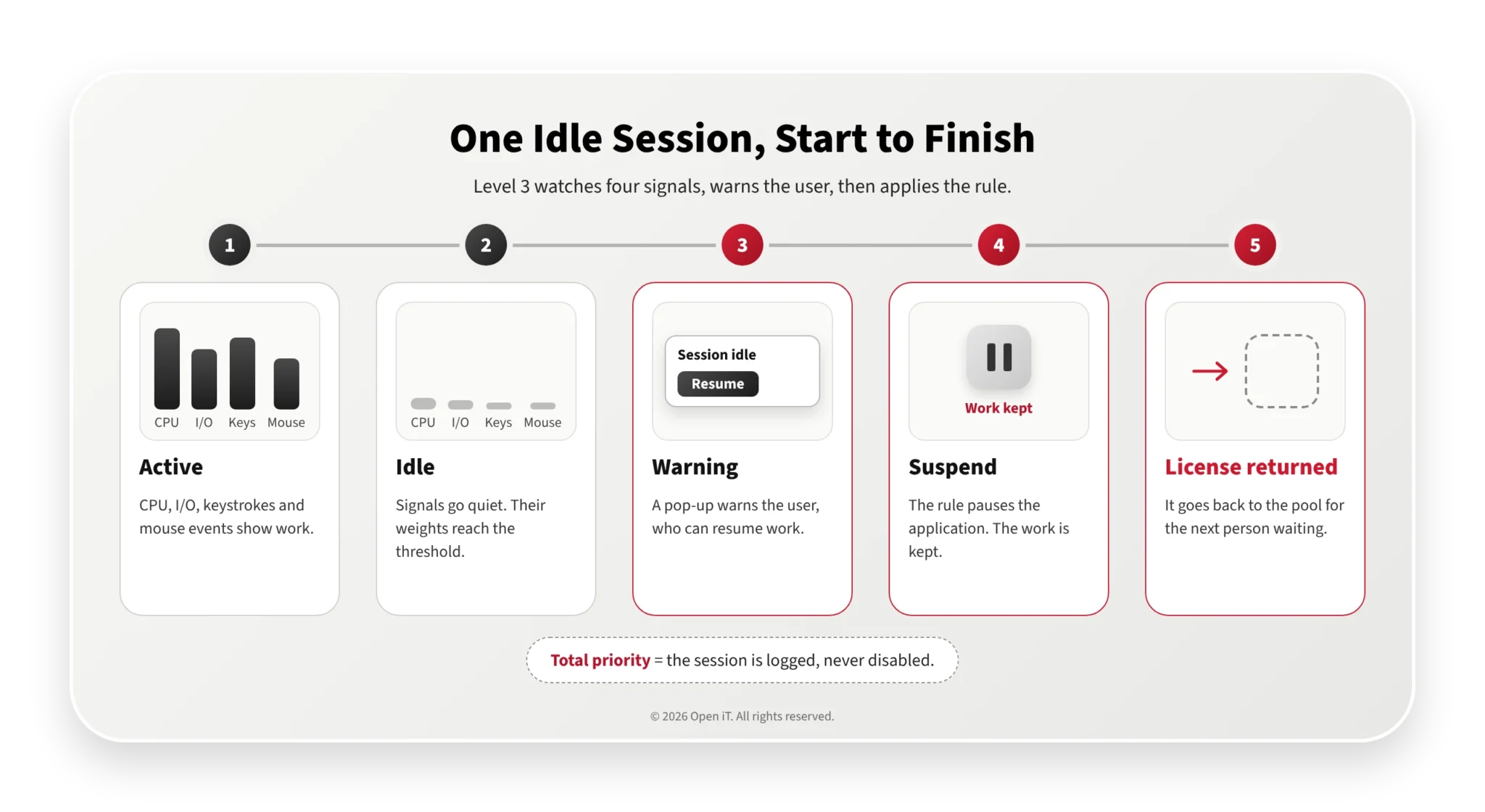
Level 3 watches each session for four signals: CPU load, I/O activity, keystrokes and mouse events. Each quiet signal adds a weight. When the weights reach a set threshold, the session counts as idle.
Then your rules take over. You write them per application, and you can limit them to certain weekdays and times of day. Each rule picks one of four actions:
- Log: record the session and leave it alone.
- Suspend: pause the application.
- Terminate: close the application.
- Standby: put the machine to sleep. This works on physical Windows machines only.
Before Level 3 acts, the user gets a pop-up warning and can resume work. For Ansys Workbench and Ansys SpaceClaim, Open iT ships save scripts that save the work before a suspend or close. For other applications, you can write one or ask Open iT to.
Priorities adjust the rules for specific applications, users, groups and hosts. High priority doubles the timeout. Low priority halves it. Total priority means the session is logged but never disabled. Suspend or reclaim? explains how a suspend differs from a close.
Which aerospace and defense applications can be managed
Coverage depends on the application, the action you configure and the license manager that serves it. Level 3’s documentation lists four supported license managers: FlexNet, LM-X, IBM LUM and RLM.
| Candidatura | License manager (vendor documentation) | Managed usage |
|---|---|---|
| Ansys Mechanical, Fluent, CFX, Electronics Desktop, SpaceClaim | FlexNet (vendor daemon ansyslmd) | Can be managed. Save scripts ship for Workbench and SpaceClaim |
| LS-DYNA | Ansys license manager or LSTC license manager, depending on purchase | Depends on licensing. Can be managed on the Ansys license manager |
| MSC Nastran | FLEXlm license server | Can be managed |
| Altair HyperWorks, OptiStruct | Altair License Management (derived from LM-X), or managed Altair Licensing in the cloud | Depends on licensing. Can be managed on-premises |
| MATLAB | FlexNet | Can be managed |
| Interactive IBM LSF jobs | IBM LSF (job scheduler) | Can be managed (Unix only) |
| Abaqus and other Dassault Systèmes applications on DSLS | DSLS (Abaqus’s default in current releases) | Measure only |
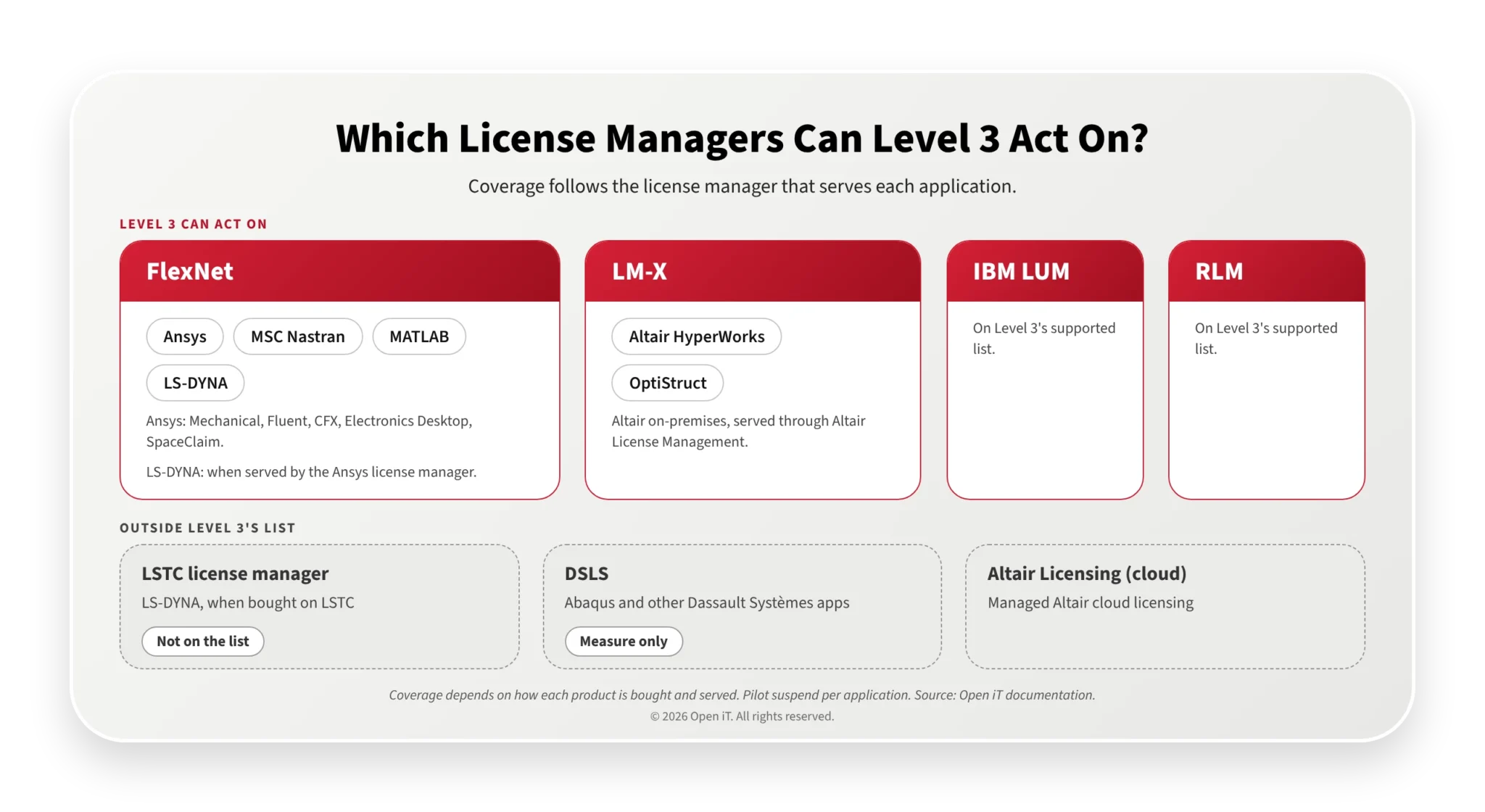
Treat the table as a starting point, not a guarantee. What Level 3 can do at your site also depends on how each product was bought and is served, and on how the application behaves under the action you choose. Check the license server and validate the workflow for each application before you roll out a rule. For vendor background, see our guides to Ansys license management and Altair licenses.
Where managed usage stops
Suspend doesn’t behave the same everywhere. Open iT’s documentation says: “The ability to regain the license and resume operation depends on the type of applications and license servers.” Where a suspend doesn’t free the license, set the rule to terminate. Pilot each application before you count on suspend.
Long solves need care. CPU load is one of the idle signals, so you can weight it to keep a computing solve active while nobody touches the mouse. Tune those weights in log mode, and give dedicated solver hosts total priority. Interactive IBM LSF jobs can be managed too, on Unix only.
Start in log mode, then write the first rules
Level 3 can run with every rule set to log. It records each session and disables nothing. Open iT’s documentation recommends it: “Logging while experimenting with this can be helpful.”
A week or two of log data shows which applications hold licenses through idle stretches, and at what times of day. It also shows which hosts and groups run long solves that belong on total priority.
Then switch one application to suspend for one group, and check that its license comes back to the pool. Widen the rules from there. License harvesting policy for aerospace and defense engineering teams covers how to get engineering to agree to them.
Perguntas mais frequentes
What is managed software license usage?
Managed software license usage applies rules to engineering sessions while they run. When a session sits idle, it’s suspended or closed under an agreed policy, so its license can go back to the pool. It’s the third level of Open iT LicenseAnalyzer, called Managed Usage.
Is managed usage the same as license harvesting?
They overlap. Open iT defines license harvesting as the automated process of reclaiming unused or idle software licenses. Managed usage is the LicenseAnalyzer level that does it, and it also covers log-only monitoring, priorities and standby.
Can managed usage act on CATIA?
Only when CATIA is served by a license manager Level 3 supports: FlexNet, LM-X, IBM LUM or RLM. On DSLS, Level 3 can’t act on it, but Level 1 can still meter its usage.
Will managed usage interrupt a running solve?
Not if you give solver applications or hosts total priority. Level 3 logs them but never disables them. Elsewhere, CPU load counts as activity, so test the thresholds in log mode first.
Does managed usage replace ServiceNow Software Asset Management?
No. ServiceNow’s engineering license management collects license usage, denials and user activity from Open iT LicenseAnalyzer. Managed usage acts on the idle sessions that data shows. ServiceNow’s reclamation rules reallocate software rights.
Back to three in the afternoon
With managed usage in place, the Fluent window left open since lunch gets a warning, then a suspend, and its license goes back to the pool. One of the two analysts waiting for it gets a license before the design review. At the next renewal, the peak counts sessions that were worked.
See what your own pool looks like before your next renewal, and before you write a rule. Ask Open iT about a Level 1 usage assessment.