

Industries
Engineering license management by industry
Open iT meters how engineering and technical software licenses are used, by user and feature, in six industries: automotive, aerospace and defense, energy, mining, engineering and manufacturing, semiconductor, and government, education and research. It reads license managers, license servers and workstations, covers more than 6,000 applications, and has metered engineering software since 1999.
The license problem changes from one industry to the next. A carmaker is choosing between perpetual and subscription. A defense program runs on a network with no internet connection. A chip design team pays per feature, not per seat.
Choose your industry
Automobilindustrie
Perpetual or subscription? See which CAD and CAE seats to keep, convert or drop before the vendor’s offer arrives.
CATIA, SOLIDWORKS, Creo, Abaqus, Ansys, MATLAB
Engineering software license management for automotive
Aerospace & Defense
Enterprise network, connected program subnetworks and closed areas: Open iT meters each where it sits, within your security governance.
Ansys, Abaqus, LS-DYNA, CATIA, SOLIDWORKS
Engineering software asset management for aerospace and defense
Energie
Renew reservoir, drilling, process and power software on your own usage record, not the vendor’s.
Petrel, tNavigator, PetEx (PROSPER, GAP, MBAL), Halliburton suite, AVEVA, ETAP
Engineering software license management for energy
Engineering & Manufacturing
How many licenses do your engineers actually need, and which project should pay for them?
Autodesk, Bentley, Trimble Tekla, AVEVA, Hexagon SmartPlant, Siemens NX
Engineering software license management for engineering and manufacturing firms
Semiconductor & EDA
One tool launch is a dozen feature checkouts. Measure EDA licenses by feature and token, across every design center.
Tools served by FlexNet, RLM, LM-X and DSLS
EDA license management
Government, Education & Research
The evidence behind the license budget you submit: what was used, what wasn’t, and what the next cycle needs.
CATIA, SOLIDWORKS, Creo, Abaqus, Ansys, MATLAB
Software license budget justification for government, education and research
What stays the same in every industry
Open iT works in three steps, and you can stop at any of them.
Alongside that, CLIMS™ gives your administrators one console for every license server, with server-down and denial alerts. LicensePlanner™ charges software cost to the project, program or department that used it. Open iT runs on-premises, in the cloud or hybrid, and is certified to ISO/IEC 27001:2022.
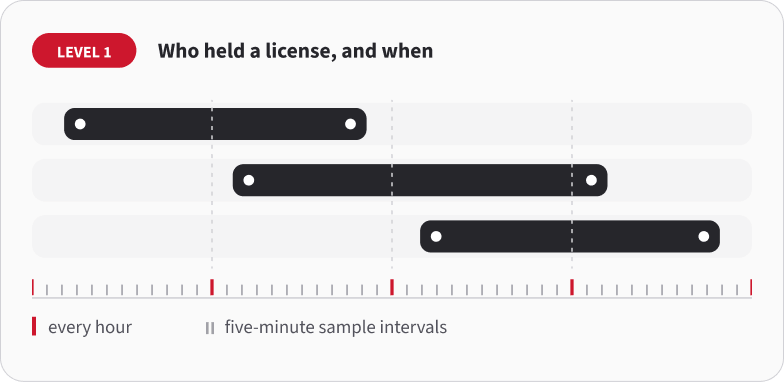
1. Who held a license, and when.
Open iT reads your license servers every hour, at five-minute sample intervals. This is the record the license manager already writes. Open iT calls it Level 1.
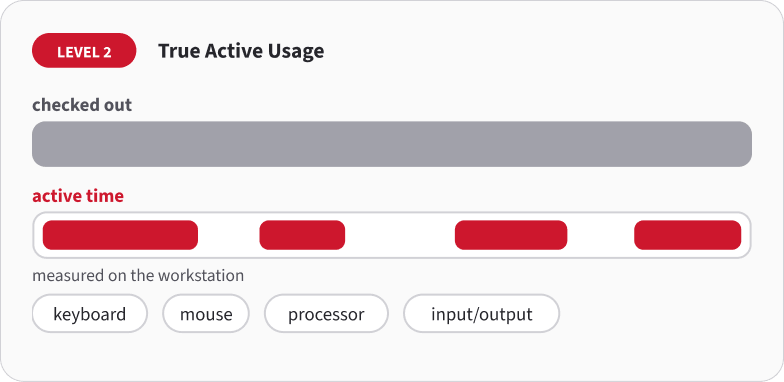
2. Whether anyone has been using the license.
A checked-out license isn’t a used one. Open iT checks keyboard, mouse, processor and input/output activity on the workstation, so you see active time against checkout time. This is Level 2, True Active Usage.
3. Getting idle licenses back (license harvesting).
Open iT can log, put on standby, suspend or close an idle session on FlexLM, LM-X, LUM and RLM. Suspend is the usual choice: the engineer’s work stays on screen and the license goes back to the pool. This is Level 3.
Questions people ask
Does Open iT work the same way in every industry?
The measurement is the same: license server record, active use on the workstation, and reclaiming idle licenses. What changes is the deployment and the report.
Can Open iT use the license history we already have?
For many applications, yes. Open iT can read the license logs you already keep, so your usage history starts before the install. Bring two numbers: how many seats you own and when the next renewal is due.
What is the difference between a license checked out and a license used?
A checkout is recorded when the application starts and released when it closes. Everything in between counts, including hours the tool sat open unattended. True Active Usage separates the two by measuring keyboard, mouse, processor and input/output activity on the workstation during the checkout.
Which applications and license managers does Open iT support?
Coverage depends on the license manager you run. Open iT meters more than 6,000 applications across 100 named license manager configurations, including FlexNet, RLM, LM-X and DSLS. Tell us which managers you run and we'll confirm coverage against your estate.
Does Open iT replace our SAM platform?
No. Open iT measures the engineering and technical license estate. Entitlements, purchase orders and allocation workflows stay in your SAM platform. The two join through the ServiceNow integration, and reports also go to Power BI, Excel or Tableau.
Next step
Choose how you want to evaluate Open iT:
Fast-Track-Cloud-Testversion
Set it up yourself with your own FlexNet license data and see Open iT dashboards hands-on.
Proof of Concept
Open iT monitors selected license servers and applications in your own environment, and you get a findings report.
Wertnachweis
A full usage and cost analysis that ends in a documented ROI and savings case.
Was jede Bewertung umfasst
Vergleichen Sie den Einrichtungsaufwand, den Umfang der Bereitstellung, die abgedeckten Produkte und die erwarteten Ergebnisse.
| Kriterien | Fast-Track-Cloud-Testversion | Proof of Concept | Wertnachweis |
|---|---|---|---|
| Kosten und Einrichtung | |||
| Kostenlose Option | |||
| Verwendet Ihre echten Daten | |||
| Einrichtung im Selbstbedienungsmodus | |||
| Von Open iT geleitete Einrichtung | |||
| Einsatz | |||
| Vor Ort | |||
| Wolke | |||
| Zur Bewertung verfügbare Funktionen | |||
| Erfassung der Laufzeitnutzung (Stufe 1) | |||
| Analyse der aktiven vs. inaktiven Nutzung (Stufe 2) | |||
| Automatisierte Lizenzerfassung (Stufe 3) | |||
| Weitere Open-iT-Module | |||
| Plugins und Kostenintegrationen | |||
| Ergebnisse | |||
| Abschlussbericht zum Projekt, einschließlich Empfehlungen | |||
| Erkenntnisse und Ergebnisse zur Nutzung | |||
| Bericht zur ROI- und Einsparungsanalyse | |||
| Verfügbare Produkte | |||
| LicenseAnalyzer Stufe 1 | |||
| LicenseAnalyzer Stufe 2 | |||
| LicenseAnalyzer Stufe 3 | |||
| ComputeAnalyzer | |||
| StorageAnalyzer | |||
| CLIMS | |||
| LicensePredictor | |||
| LicensePlanner | |||
| Im Leistungsumfang enthaltene Leistungen im Einzelnen | |||
| Anleitung / Grundausbildung | |||
| Beratungstermine | |||
| Fortbildung | |||
| Abschlussbericht zum Projekt, einschließlich Empfehlungen | |||
| Bericht zur ROI- und Einsparungsanalyse | |||
4-STÜNDIGER WORKSHOP ZU EINSPARMÖGLICHKEITEN BEI VERTRÄGEN UND LIZENZEN
Noch nicht bereit für die Bereitstellung? Fangen Sie hier an.
Erhalten Sie von Experten fundierte Einblicke in Ihre Softwareverträge – in einer gezielten Sitzung, die Einsparpotenziale und Verlängerungsrisiken aufzeigt, ganz ohne den Einsatz von Tools.
- Bereiten Sie sich mit klareren Einblicken auf anstehende Vertragsverlängerungen vor
- Vertragsannahmen anhand der erwarteten Nachfrage überprüfen
- Lassen Sie sich von Experten beraten, bevor Sie Entscheidungen zur Lizenzierung treffen
- Erhalten Sie einen nach Prioritäten geordneten Überblick über Ihre besten Einsparmöglichkeiten
- Erstellen Sie einen klaren 30- bis 90-tägigen Aktionsplan
- Erfahren Sie genau, was Sie vor Ihrer nächsten Verlängerung überprüfen müssen