

Industries
Engineering license management by industry
Open iT meters how engineering and technical software licenses are used, by user and feature, in six industries: automotive, aerospace and defense, energy, mining, engineering and manufacturing, semiconductor, and government, education and research. It reads license managers, license servers and workstations, covers more than 6,000 applications, and has metered engineering software since 1999.
The license problem changes from one industry to the next. A carmaker is choosing between perpetual and subscription. A defense program runs on a network with no internet connection. A chip design team pays per feature, not per seat.
Choose your industry
Automobile
Perpetual or subscription? See which CAD and CAE seats to keep, convert or drop before the vendor’s offer arrives.
CATIA, SOLIDWORKS, Creo, Abaqus, Ansys, MATLAB
Engineering software license management for automotive
Aerospace & Defense
Enterprise network, connected program subnetworks and closed areas: Open iT meters each where it sits, within your security governance.
Ansys, Abaqus, LS-DYNA, CATIA, SOLIDWORKS
Engineering software asset management for aerospace and defense
L'énergie
Renew reservoir, drilling, process and power software on your own usage record, not the vendor’s.
Petrel, tNavigator, PetEx (PROSPER, GAP, MBAL), Halliburton suite, AVEVA, ETAP
Engineering software license management for energy
Engineering & Manufacturing
How many licenses do your engineers actually need, and which project should pay for them?
Autodesk, Bentley, Trimble Tekla, AVEVA, Hexagon SmartPlant, Siemens NX
Engineering software license management for engineering and manufacturing firms
Semiconductor & EDA
One tool launch is a dozen feature checkouts. Measure EDA licenses by feature and token, across every design center.
Tools served by FlexNet, RLM, LM-X and DSLS
EDA license management
Government, Education & Research
The evidence behind the license budget you submit: what was used, what wasn’t, and what the next cycle needs.
CATIA, SOLIDWORKS, Creo, Abaqus, Ansys, MATLAB
Software license budget justification for government, education and research
What stays the same in every industry
Open iT works in three steps, and you can stop at any of them.
Alongside that, CLIMS™ gives your administrators one console for every license server, with server-down and denial alerts. LicensePlanner™ charges software cost to the project, program or department that used it. Open iT runs on-premises, in the cloud or hybrid, and is certified to ISO/IEC 27001:2022.
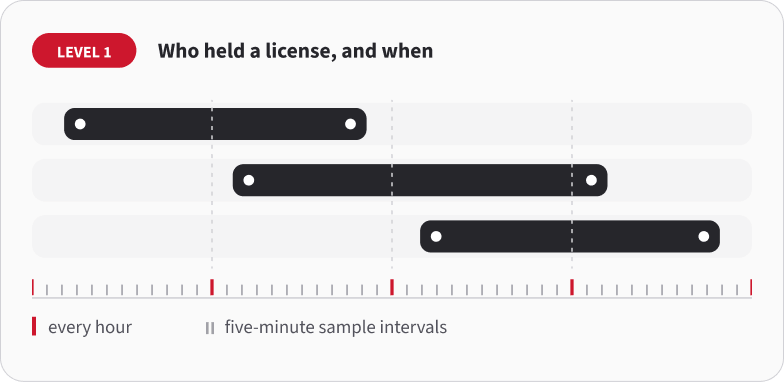
1. Who held a license, and when.
Open iT reads your license servers every hour, at five-minute sample intervals. This is the record the license manager already writes. Open iT calls it Level 1.
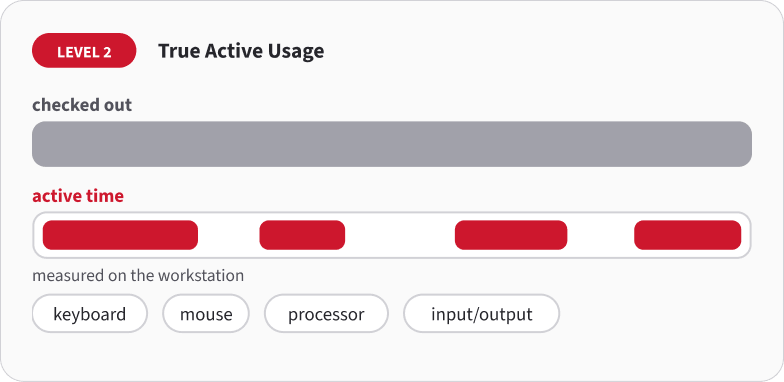
2. Whether anyone has been using the license.
A checked-out license isn’t a used one. Open iT checks keyboard, mouse, processor and input/output activity on the workstation, so you see active time against checkout time. This is Level 2, True Active Usage.
3. Getting idle licenses back (license harvesting).
Open iT can log, put on standby, suspend or close an idle session on FlexLM, LM-X, LUM and RLM. Suspend is the usual choice: the engineer’s work stays on screen and the license goes back to the pool. This is Level 3.
Questions people ask
Does Open iT work the same way in every industry?
The measurement is the same: license server record, active use on the workstation, and reclaiming idle licenses. What changes is the deployment and the report.
Can Open iT use the license history we already have?
For many applications, yes. Open iT can read the license logs you already keep, so your usage history starts before the install. Bring two numbers: how many seats you own and when the next renewal is due.
What is the difference between a license checked out and a license used?
A checkout is recorded when the application starts and released when it closes. Everything in between counts, including hours the tool sat open unattended. True Active Usage separates the two by measuring keyboard, mouse, processor and input/output activity on the workstation during the checkout.
Which applications and license managers does Open iT support?
Coverage depends on the license manager you run. Open iT meters more than 6,000 applications across 100 named license manager configurations, including FlexNet, RLM, LM-X and DSLS. Tell us which managers you run and we'll confirm coverage against your estate.
Does Open iT replace our SAM platform?
No. Open iT measures the engineering and technical license estate. Entitlements, purchase orders and allocation workflows stay in your SAM platform. The two join through the ServiceNow integration, and reports also go to Power BI, Excel or Tableau.
Next step
Choose how you want to evaluate Open iT:
Essai accéléré du cloud
Set it up yourself with your own FlexNet license data and see Open iT dashboards hands-on.
Preuve de concept
Open iT monitors selected license servers and applications in your own environment, and you get a findings report.
Preuve de valeur
A full usage and cost analysis that ends in a documented ROI and savings case.
Ce que comprend chaque évaluation
Comparez l'effort de mise en place, la portée du déploiement, les produits concernés et les résultats attendus.
| Critères | Essai accéléré du cloud | Preuve de concept | Preuve de valeur |
|---|---|---|---|
| Coût et configuration | |||
| Option gratuite | |||
| Utilise vos données réelles | |||
| Configuration en libre-service | |||
| Configuration pilotée par Open iT | |||
| Déploiement | |||
| Sur site | |||
| Nuage | |||
| Fonctionnalités disponibles à des fins d'évaluation | |||
| Mesure de l'utilisation en temps réel (niveau 1) | |||
| Analyse de l'utilisation active par rapport à l'utilisation inactive (niveau 2) | |||
| Collecte automatisée des licences (niveau 3) | |||
| Autres modules Open iT | |||
| Plugins et intégrations de coûts | |||
| Résultats | |||
| Rapport de clôture du projet, comprenant des recommandations | |||
| Informations et conclusions sur l'utilisation | |||
| Rapport d'analyse du retour sur investissement et des économies réalisées | |||
| Produits disponibles | |||
| LicenseAnalyzer Niveau 1 | |||
| LicenseAnalyzer Niveau 2 | |||
| LicenseAnalyzer niveau 3 | |||
| Analyseur de calcul | |||
| Analyseur de stockage | |||
| CLIMS | |||
| Prédicteur de licence | |||
| Planificateur de licence | |||
| Liste détaillée des services inclus | |||
| Guide pas à pas / Formation de base | |||
| Séances de consultation | |||
| Formation avancée | |||
| Rapport de clôture du projet, comprenant des recommandations | |||
| Rapport d'analyse du retour sur investissement et des économies réalisées | |||
ATELIER DE 4 HEURES SUR LES ÉCONOMIES RÉALISABLES EN MATIÈRE DE CONTRATS ET DE LICENCES
Vous n'êtes pas prêt à déployer la solution ? Commencez par ici.
Bénéficiez des conseils d'experts pour y voir plus clair dans vos contrats logiciels, lors d'une session ciblée qui met en évidence les opportunités d'économies et les risques liés au renouvellement, sans avoir besoin d'outil particulier.
- Préparez-vous aux prochains renouvellements grâce à une vision plus claire de la situation
- Vérifier la cohérence des hypothèses contractuelles par rapport à la demande prévue
- Demandez conseil à des experts avant de prendre des décisions en matière de licences
- Repartez avec une vue d'ensemble classée par ordre de priorité de vos principales opportunités d'économies
- Élaborez un plan d'action clair sur 30 à 90 jours
- Sachez exactement ce qu'il faut vérifier avant votre prochain renouvellement