


Este documento fornece informações sobre como navegar e utilizar a página Ligações no separador Administração do Open iT Analysis Server.
Introdução #
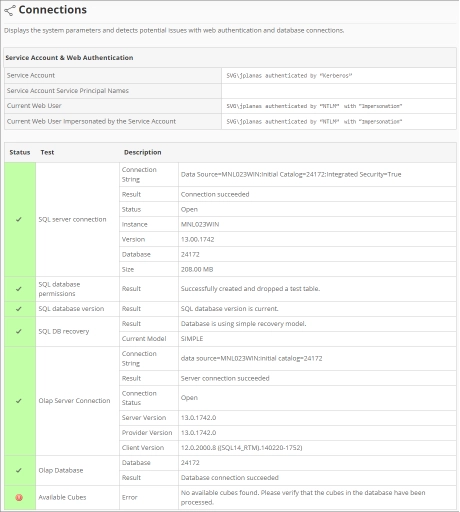
A página Ligações contém vários detalhes sobre o banco de dados atual e as ligações web do Open iT Analysis Server.
Siga estas instruções para navegar para a página:
- Abra a interface web do Open iT Analysis Server usando um navegador da web.
- Passe o cursor sobre o separador Administração. Aguarde até aparecerem as sub-abas.
- Clique no separador Ligações.
Nota: Clicar no separador Administração também redireciona para a página Ligações.
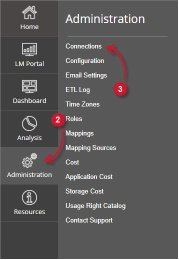
A página Ligações deve ser apresentada.
Requisitos #
Certifique-se de que cumpre os seguintes requisitos antes de utilizar a página Ligações:
- A base de dados SQL foi criada com sucesso.
- Direitos administrativos do utilizador atual da Web.
Conta de serviço e autenticação web #
Esta tabela contém as seguintes informações:

- Conta de serviço – o nome de utilizador e o tipo de autenticação usados para executar serviços em segundo plano para o Analysis Server.
- Nome principal da conta de serviço – um identificador exclusivo usado pela autenticação Kerberos para associar a conta de serviço à instância do serviço.
- Utilizador Web atual – o nome de utilizador do utilizador que está atualmente a aceder à interface web com o tipo de autenticação.
- Utilizador Web atual representado pela conta de serviço – o nome de utilizador do utilizador Web atual representado pela conta de serviço.
Ligações à base de dados #
Esta tabela contém as seguintes informações:
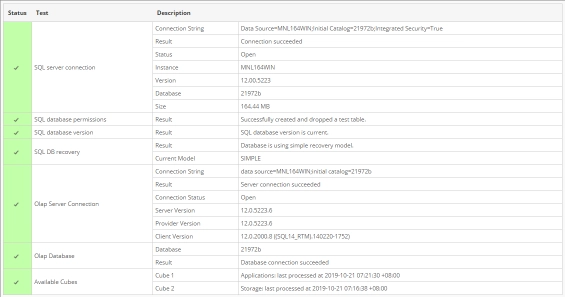
- Status – mostra um visto (verde) se o status de um determinado teste for válido ou uma cruz (vermelho) se o teste tiver erros.
- Teste – contém vários testes relacionados com ligações a bases de dados:
- Conexão com o SQL Server
- Cadeia de ligação – uma cadeia utilizada para ligar ao SQL Server.
- Resultado – mostra o estado ao ligar ao SQL Server utilizando a cadeia de ligação.
- Status – mostra o estado atual da ligação ao SQL Server, se está aberta ou fechada.
- Instância – nome da instância usado para se conectar ao SQL Server.
- Versão – mostra a versão do SQL Server.
- Base de dados – o nome da base de dados SQL.
- Tamanho – o tamanho atual da base de dados SQL.
- Permissão de base de dados SQL
- Resultado – mostra o estado da permissão da conta de serviço para a base de dados.
- Versão da base de dados SQL
- Resultado – mostra o estado atual do esquema da base de dados implementado.
- Recuperação de banco de dados SQL
- Resultado – mostra o estado da recuperação da base de dados utilizada.
- Modelo atual – uma string que representa a recuperação da base de dados atualmente utilizada.
- Ligação ao servidor Olap
- Cadeia de ligação – utilizada para ligar ao SQL Server Analysis Services.
- Resultado – mostra o estado ao ligar ao SQL Server Analysis Services utilizando a cadeia de ligação.
- Estado da ligação – mostra o estado da ligação atual ao SQL Server Analysis Services, se está aberta ou fechada.
- Versão do servidor – mostra a versão do SQL Server Analysis Services.
- Versão do provedor – mostra a versão do provedor OLAP usado pelo SQL Server.
- Versão do cliente – mostra a versão do cliente SQL que está a aceder ao SQL Server Analysis Services.
- Base de dados Olap
- Base de dados – o nome da base de dados do SQL Server Analysis Services.
- Resultado – mostra o estado da ligação à base de dados OLAP.
- Cubos disponíveis – lista de cubos OLAP implementados disponíveis. Indica o nome e a última data e hora de processamento.
- Conexão com o SQL Server
Para obter assistência ou suporte de configuração adicional, contacte a equipa de suporte da Open iT.
Para obter referências adicionais, pode visitar a nossa página Documentação.