

LicenseAnalyzer™
Engineering license management software that aligns licenses with business needs.
Raise the utilization of your most expensive engineering software, stop buying licenses you’ll never use and renew on evidence. Meter 6,000+ license-managed applications, plus standalone and SaaS software. Simulate named-user, local or global concurrent, token and pay-per-use costs before you change a license server or agreement.
Leader in the QKS SPARK Matrix™ for Software Asset Management Tools, Q3 2025
ISO/IEC 27001:2022 certified, verified by BARR
Trusted by Fortune 100 companies
Serving enterprises since 1999
Higher utilization, lower cost, better renewals.

Level 1 · Runtime Usage
Higher utilization, lower cost, better renewals.
Who, what and when

Level 2 · True Active Usage
Buy and renew on documented need.
Actual use, not just checkouts

Level 3 · Managed Usage
Free up your most expensive licenses, automatically.
Idle licenses released automatically

Reports and planning
Move to the license model that fits how you work.
Simulate before you sign
Proven where engineering software costs the most.
L'énergie
$12M to $9.5M
a year on subsurface modeling licenses, with use going from 75% idle to 75% active.
Énergie Supermajor
Aérospatiale et défense
47%
lower annual IT costs for one of its most expensive engineering applications.
Avio Aero
Ingénierie et construction
Jusqu'à 25 %
of overall software spend saved on unused licenses.
Burns & McDonnell
L'énergie
20%
cut from the subsurface software budget.
Devon Energy
Management saved as much as 25% of the overall software spend on unutilized licenses alone.
Michael Allen, Burns & McDonnell
TrueUse™ turns license-feature and application activity into use of the commercial products you buy. You see which products you used, how many at once, and what that use would cost under another agreement.
Note: Ansys HFSS, SIwave and Electronics Desktop PrepPost all use the same electronics_desktop feature. TrueUse works out which product was actually run. It needs activity measurement on the machines where your applications are installed.
Why enterprises choose Open iT
Engineering specialists
Built for engineering software.
100+ license managers and cloud services, 6,000+ license-managed applications, built-in save scripts for Petrel, Ansys and Hexagon, and support for IBM LSF clusters.
TrueUse™
Use of the products you buy.
Reports on the commercial products in your agreements, not just the license features a server checks out, and connects checkouts to real activity.
Enterprise-ready
Fits how your IT runs.
SaaS or on-premises. Windows, Unix and macOS. Single sign-on with Microsoft Entra ID or Okta. Power BI, Excel and Tableau. ServiceNow SAM Pro. ISO/IEC 27001:2022 certified.
Level 1 · Runtime Usage
Software license tracking: know who uses which license, and when.
See who checked out which license, and when, across your license servers and vendor cloud portals, plus peak use, denials and the licenses you pay for but rarely check out.

Concurrent use against licenses available
Size renewals to real peak demand.
Peak demand next to what you own.
Denial reports
Tell a real shortage from a distribution problem.
Who was refused a license, when and why.
Vendor portal and API collection
Get cloud licenses and license servers in one report.
Cloud licenses in the same reports as your license servers.
Level 2 · True Active Usage
Software usage monitoring: buy and renew on documented need.
Measurement on the machines that run your applications shows whether a checked-out license is actually in use. TrueUse™ and idle-license reports run on this data. Across our customers, we typically find 20 to 40% of checked-out licenses sitting idle.
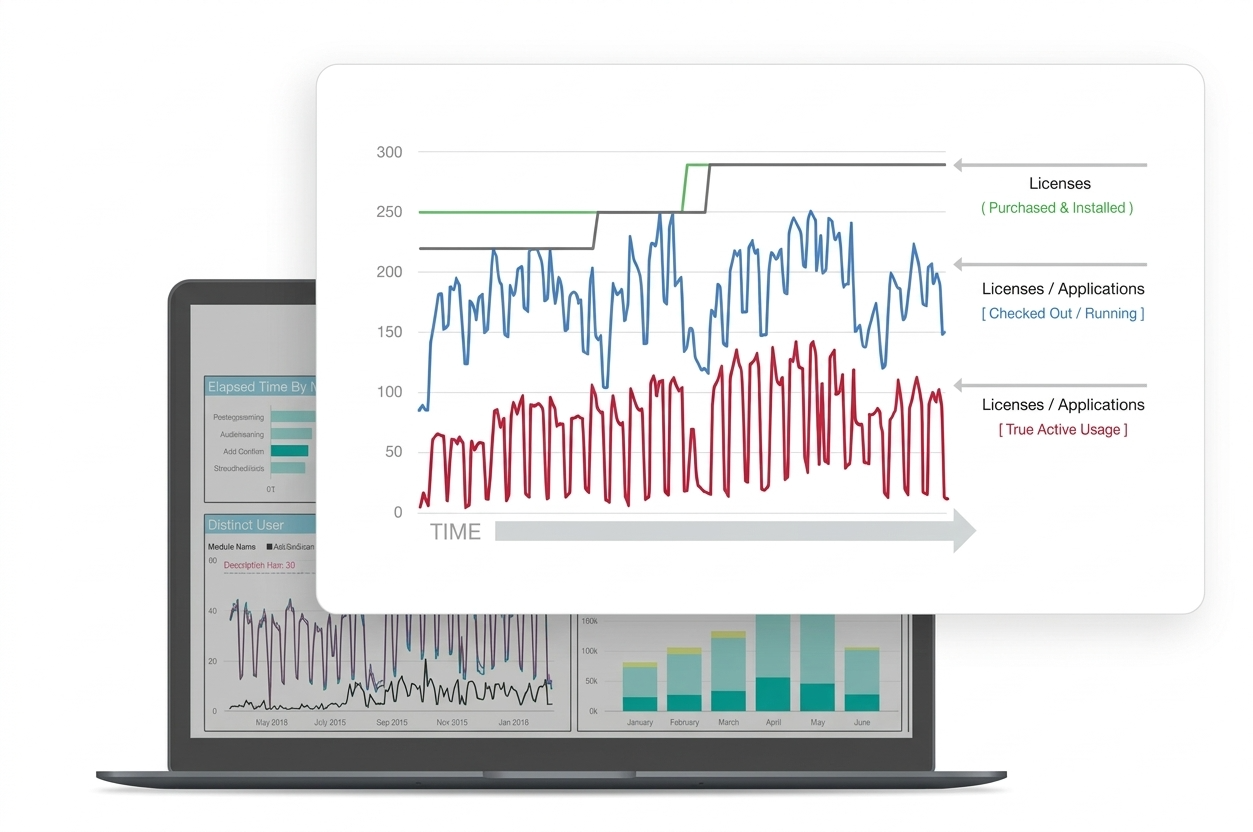
Checkouts matched to activity
Know which checkouts were real work.
Every Level 1 checkout linked to whether the application was in use.
TrueUse™
Report on the products you buy, with the true peak across sites.
License features matched to commercial products, on one usage timeline.
Live active vs inactive view
Watch the active share of each license, live.
Active and inactive use, per license, as it happens.
Level 3 · Managed Usage
Free up your most expensive licenses, automatically.
Release idle licenses automatically, with a warning first. Users get a pop-up and can cancel. If they don’t, the license goes back to the pool, and the application is suspended or closed the way you set it up.
Automatic actions work with FlexNet (FlexLM), LM-X, IBM LUM and RLM license managers.

Suspend and resume
Free the license without losing the session.
Petrel and ANSYS Workbench keep their state and resume once a license is free.
Work saved before closing
Save open work before closing, with built-in and custom scripts.
Built-in save scripts for Petrel, Ansys SpaceClaim, Ansys Workbench and Hexagon Smart 3D. Custom actions cover other Windows applications.
Priorities by user, host and group
Decide whose idle licenses are released first.
Rules ranked from high to low priority.
Reports and planning
Move to the license model that fits how you work.
Bring your own numbers to renewal. Compare peak and average use, denials and idle licenses by user, site or project. With TrueUse™, get the true peak across sites and simulate named-user, concurrent, token or pay-per-use licensing before you sign.
Cloud licensing
Cloud licensing, tracked too.
With cloud licensing, a vendor’s cloud service, portal or API serves or reports your licenses instead of your own license server. LicenseAnalyzer tracks Autodesk Cloud, AVEVA Cloud, Bentley Cloud, Esri Cloud, SOLIDWORKS Cloud, Altium365 and more than 30 others in the same reports as your license servers.
ServiceNow
See engineering license usage inside ServiceNow SAM Pro.
SAM Pro manages your software entitlements and costs. Open iT adds the engineering license usage and active use behind them, from your license servers and the workstations that run your applications, in SAM Pro dashboards. Together they show which engineering software is over-licensed or underused.
Already using Open iT? Add Open iT LicenseAnalyzer. New to Open iT? Start with Open iT LicenseAnalyzer Full Stack.
View all LicenseAnalyzer features
Every capability by level, plus the enterprise features, with what each gives you.
Level 1 · Runtime Usage Know who uses which license, and when.
Know current use and full history, without manual checks.
License server polling every hour from 5-minute samples, and log parsing.
Get cloud licenses and license servers in one report.
Vendor portal and API collection.
Size renewals to real peak demand.
Concurrent use against licenses available.
Tell a real shortage from a distribution problem.
Denial reports: who was refused a license, when and why.
Measure how long each application run lasts.
Elapsed time reports.
Know who holds which license right now.
Real-time License Monitor, where your license manager supports it.
Catch shortages and expiries before users complain.
Alerts for sustained 100% use, long checkouts and expiring licenses.
Track the licensing models you run in one tool.
Concurrent, token-based, named-user, reserved, borrowed and dongle licenses.
Get set up faster on common license managers.
Automatic setup detection for DSLS, FlexNet, LM-X, LS-DYNA, RLM and SlickEdit.
Level 2 · True Active Usage Buy and renew on documented need.
Spot applications that hold a license but do no work.
Activity measurement on Windows, Unix and macOS.
Define idle the way each application is actually used.
Idle thresholds per application.
Know which checkouts were real work.
Every Level 1 checkout matched to activity.
Watch the active share of each license, live.
Live active vs inactive view.
Tell users when a license sits idle.
A pop-up once an application passes its idle threshold.
Report on the products you buy, with the true peak across sites.
TrueUse™: features matched to commercial products on one usage timeline.
Measure how much of each session was real work.
Work, break and event reports.
Cover the applications you run, wherever they run.
Standalone or server-based applications, in the cloud or on-premises.
Level 3 · Managed Usage Free up your most expensive licenses, automatically.
Choose how firmly to act on each application.
Four actions: log, standby, suspend or terminate.
Give users a warning period you control.
A pop-up users can cancel, with a grace period you choose.
Free the license without losing the session.
Suspend and resume for Petrel and ANSYS Workbench, once a license is free.
Save open work before closing, with built-in and custom scripts.
Petrel, Ansys SpaceClaim, Ansys Workbench and Hexagon Smart 3D. Custom actions for other Windows applications.
Put the license back in the pool for the next user.
License removal.
Decide whose idle licenses are released first.
Priorities by user, host and group.
Control licenses that are billed by the day.
Scheduled release at a set time for vendors that bill by the calendar day.
Keep software you don't allow from running.
Blocking of prohibited applications.
Cover interactive jobs on IBM LSF clusters too.
Idle interactive jobs on IBM LSF clusters found and released.
Enterprise Fits how your IT runs.
Deploy the way your IT runs.
SaaS or on-premises.
Cover Windows, Unix and macOS.
Activity measurement on all three.
Sign in with your identity provider.
Single sign-on via SAML 2.0 with Microsoft Entra ID or Okta.
Report in the tools you already use.
Power BI, Excel and Tableau connections.
Add your software inventory.
Microsoft SCCM / MECM inventory collection.
Match applications to one catalog.
SSAD, Open iT's normalized software catalog.
See engineering usage in ServiceNow SAM Pro.
Two apps on the ServiceNow Store.
Work with an ISO 27001-certified vendor.
ISO/IEC 27001:2022, verified by BARR.
Automatic actions in Level 3 work with FlexNet (FlexLM), LM-X, IBM LUM and RLM license managers.
Extend LicenseAnalyzer with plug-ins.
Ask questions, forecast demand, charge costs back and manage license servers with Open iT plug-ins.
Ouvrir iT Insight
Ask your license data a question.
Type a question in plain English with Open iT Insight now in preview, or connect your own AI assistant through MCP. The answer comes from your usage data.

Plug-in
LicensePredictor™
Forecast license demand from your usage history. See whether you’re heading for a shortage or carrying seats you won’t need.

Plug-in
LicensePlanner™
Charge software back to the teams that use it. Estimated, budgeted and actual spend in one view, so cost allocation follows real use.

Plug-in
CLIMS™
Run your license servers from one place. Manage license files, option files and daemons in one portal, with version tracking and rollback.
See how LicenseAnalyzer would work in your estate.
Walk through TrueUse, idle detection and automatic suspension with an Open iT specialist, and find the setup that fits your estate.
Questions about LicenseAnalyzer
Who uses LicenseAnalyzer?
Engineering-intensive enterprises, including Fortune 100 companies, in energy, mining, engineering and manufacturing, IT and semiconductor, aerospace and defense, government and education, automotive, and engineering and construction. Read the customer stories.
Which license managers does LicenseAnalyzer support?
100+ license managers and cloud services, including FlexNet License Manager (FlexLM), FlexNet Embedded License Manager, Dassault Systemes License Server (DSLS), LM-X License Manager, Reprise License Manager (RLM), Sentinel HASP License Manager, Sentinel RMS License Manager, CodeMeter License Manager, IBM License Use Management (LUM), Autodesk Cloud, AVEVA Cloud and Bentley Cloud. See all supported license managers and cloud services.
What is the difference between a checked-out license and one in use?
A license server only knows a seat is taken. LicenseAnalyzer's Level 2 also measures application activity on the machines that run your software, so you can see whether anyone is working in the application or it's sitting idle.
Can I try LicenseAnalyzer for free?
Yes. The trial is free for 30 days and runs in the cloud. You set it up yourself on one license manager of your choice and get reports on who checked out which license, and when.
Open iT est-il certifié ISO 27001 ?
Yes. Open iT is ISO/IEC 27001:2022 certified, verified independently by BARR.
Does LicenseAnalyzer work with ServiceNow?
Yes, through two apps on the ServiceNow Store. If you already use Open iT, Open iT LicenseAnalyzer shows engineering license usage and active use inside ServiceNow SAM Pro. If you're new to Open iT, Open iT LicenseAnalyzer Full Stack adds complete engineering and technical license management, integrated with SAM Pro. Read about the ServiceNow integration.
How is Open iT different from other license monitoring tools?
Open iT's LicenseAnalyzer includes TrueUse™, which reports use of the commercial products you buy, not only the license features a server checks out. It matches features to the vendor's price book, separates checkout time from real activity, and builds one usage timeline before it calculates the peak. TrueUse works with activity measurement on the machines that run your applications.
How is LicenseAnalyzer Go different from LicenseAnalyzer?
LicenseAnalyzer Go monitors and reports at feature level. You see what happens to each feature and can rename features one-to-one so they're easier to read. It runs only as SaaS, with built-in reports you can export to Excel and Power BI. LicenseAnalyzer, with activity measurement, adds TrueUse™: it groups features into the commercial products you buy and connects checkouts to real activity, so you see the true peak and can test license optimization scenarios. LicenseAnalyzer also supports plug-ins, ad hoc and scheduled reports and ServiceNow integration, and runs as SaaS or on-premises.
See TrueUse on a live demo.