


This document provides information on how to navigate and use the Partition Manager page under the Open iT Analysis Server Administration tab.
導入#
The Partition Manager page contains various functionalities to configure and setup available data partitions in the OLAP cube. The page is only visible to users with Open iT Analysis Server Administrative rights and is hidden by default.
Only SQL Server editions Developer, Enterprise and Business Intelligence (BI) support data partitions.
Enabling Cube Partitioning #
Follow these steps to enable or disable OLAP cube partitioning:
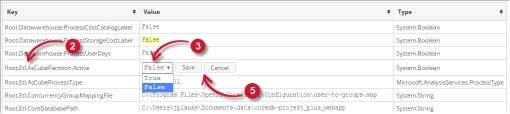
- Go to the Configuration page of Analysis Server web interface.
- Locate the configuration key Root.Etl.AsCubePartition.Active.
- 値をクリックすると、ドロップダウンに変わります。
- 有効にするには値をTrueにする。
- Saveをクリックして変更を適用します。
- をクリックする。 リセット・セッション ボタンをクリックします。

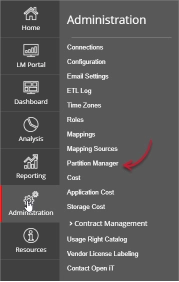
図 2.分析サーバーの管理セッションのリセット - を確認する。 Partition Manager タブは以下で表示され、アクセス可能です アドミニストレーション タブ

Figure 3. Analysis Server Administration: Partition Manager Tab

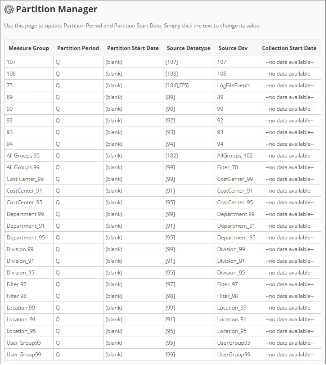
The Partition Manager page should be displayed.
Use the following descriptions to properly configure the Partition Start Date of each item:
- Measure Group – the name that uniquely identifies the predefined measure group in the OLAP cube.
- Partition Period – the predefined period included in the data partition of the measure group.
- Partition Start Date – the start date that identifies the start of data partition of the measure group.
- Source Datatype – the source of the measure group from the Open iT data aggregations.
- Source Dsv – the name of the source table or view in the SQL database.
- Collection Start Date – the start date of the available data.
要件 #
Ensure to meet the following requirements before using the Partition Manager page:
- SQLデータベースとOLAPデータベースが正常に作成されました。
- Prepared list of start dates of each partition for configuration.
- 現在のウェブユーザーの管理権限。
Configuring Partition Manager #
Follow these instructions to configure the Partition Start Date:
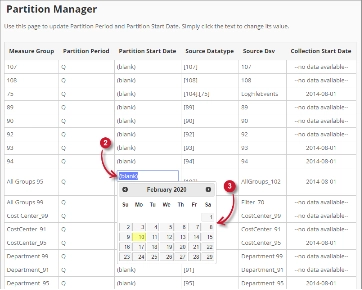
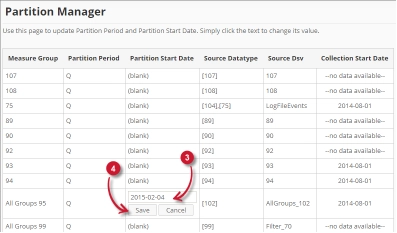
- Look for the measure group to configure from the list.
- Click the Partition Start Date column value. This should transform into textbox and a calendar should appear.
- Choose from the calendar the desired start date of the partition.

Figure 6. Analysis Server Administration Save Partition Manager
Once clicked, the selected date should automatically be posted in the textbox with the format YYYY-MM-DD. - Saveをクリックして変更を適用します。
トラブルシューティング #
This part provides the possible work around for a known issue in the Partition Manager page.
ローカルホスト以外からのアクセス時に表示されるエラーページ #
There will be times that when accessing the Partition Manager page remotely or via hostname, it displays an error page.
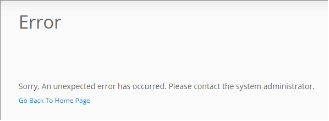
この問題のトラブルシューティングには、以下の提案を使用してください:
ウェブブラウザのコンソールエラーのチェック #
以下の手順に従って、ウェブブラウザのコンソールでエラーをチェックしてください:
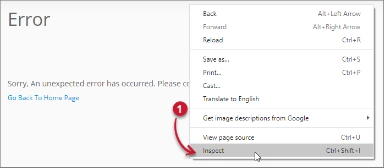
- In the Partition Manager ページ内の任意の場所で右クリックし 検査.

Figure 8. Analysis Server Partition Manager Page Troubleshooting: Error page displayed – Inspect
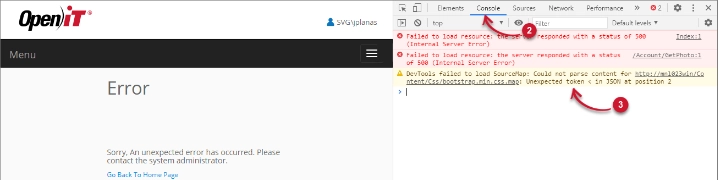
について 開発ツール が現れるはずだ。 - 選ぶ コンソール ツールの利用可能なタブから選択します。
コンソールは、エラーを含むウェブ・ブラウザのトランザクションを一覧表示する。
Figure 9. Analysis Server Partition Manager Page Troubleshooting: Error page displayed – Console - Errors in the console may sometimes be too technical, for immediate response, send the error detail to support@openit.com.
ローカルホストからウェブサイトにアクセスする #
サーバーの実際のエラーメッセージを確認するには、Open iT Analysis Server をホストしているマシンに移動し、ブラウザでhttp://localhost にアクセスします。実際のエラーメッセージが表示されるはずです。