- A recusa de uma licença pode ter três causas possíveis — uma escassez real, um lugar atribuído e deixado inativo, ou um servidor que não conseguiu atribuir nada — e apenas uma delas implica a necessidade de comprar.
- As equipas responsáveis pelo licenciamento referem-se a esta distinção como «recusas verdadeiras» e «recusas falsas». Para as distinguir, são necessárias duas perspetivas do mesmo momento, e não um conjunto maior de licenças.
- As recusas da Mitta Oy devem-se a um servidor de licenças com falhas e, em alguns casos, à ausência de uma linha de servidor ou de um nome de anfitrião no ficheiro de licenças, pelo que a equipa anterior tinha vindo a adquirir licenças para corrigir uma falha no servidor.
Quatro e-mails de recusa antes das nove de uma segunda-feira: dois geocientistas sem acesso ao Petrel, um responsável por um reservatório a perguntar por que razão não há licenças do tNavigator e um pedido que falhou às 10h42, sem qualquer explicação. O registo indica uma recusa. Não indica o motivo, e é o motivo que decide tudo — se a resposta correta é uma ordem de compra ou um ticket de assistência, e se o dinheiro gasto este ano serve para adquirir capacidade ou para encobrir uma falha.
As licenças continuavam a ser recusadas, por isso a equipa comprou mais. Sem dados de utilização, a compra era a única opção de que dispunham.
O servidor estava avariado. A Mitta Oy, uma empresa finlandesa de consultoria para o setor da construção, descobriu isso depois de substituir o seu servidor de licenças e de ter deixado de monitorizar a utilização. As recusas não se deviam a uma procura elevada. Deviam-se a um servidor avariado que não conseguia atribuir licenças e, em alguns casos, à falta de uma linha de servidor ou de um nome de anfitrião no ficheiro de licenças. A empresa tinha vindo a adquirir licenças para resolver uma avaria no servidor.
Setor diferente, mesmo erro, e num contexto petrotécnico esse erro custa muito mais por posto de trabalho. Cinco perguntas determinam se a próxima ferramenta que comprar lhe permitirá identificar o erro que está a cometer.
1. Trata-se de uma falta de stock, de um módulo retido ou de um servidor avariado?
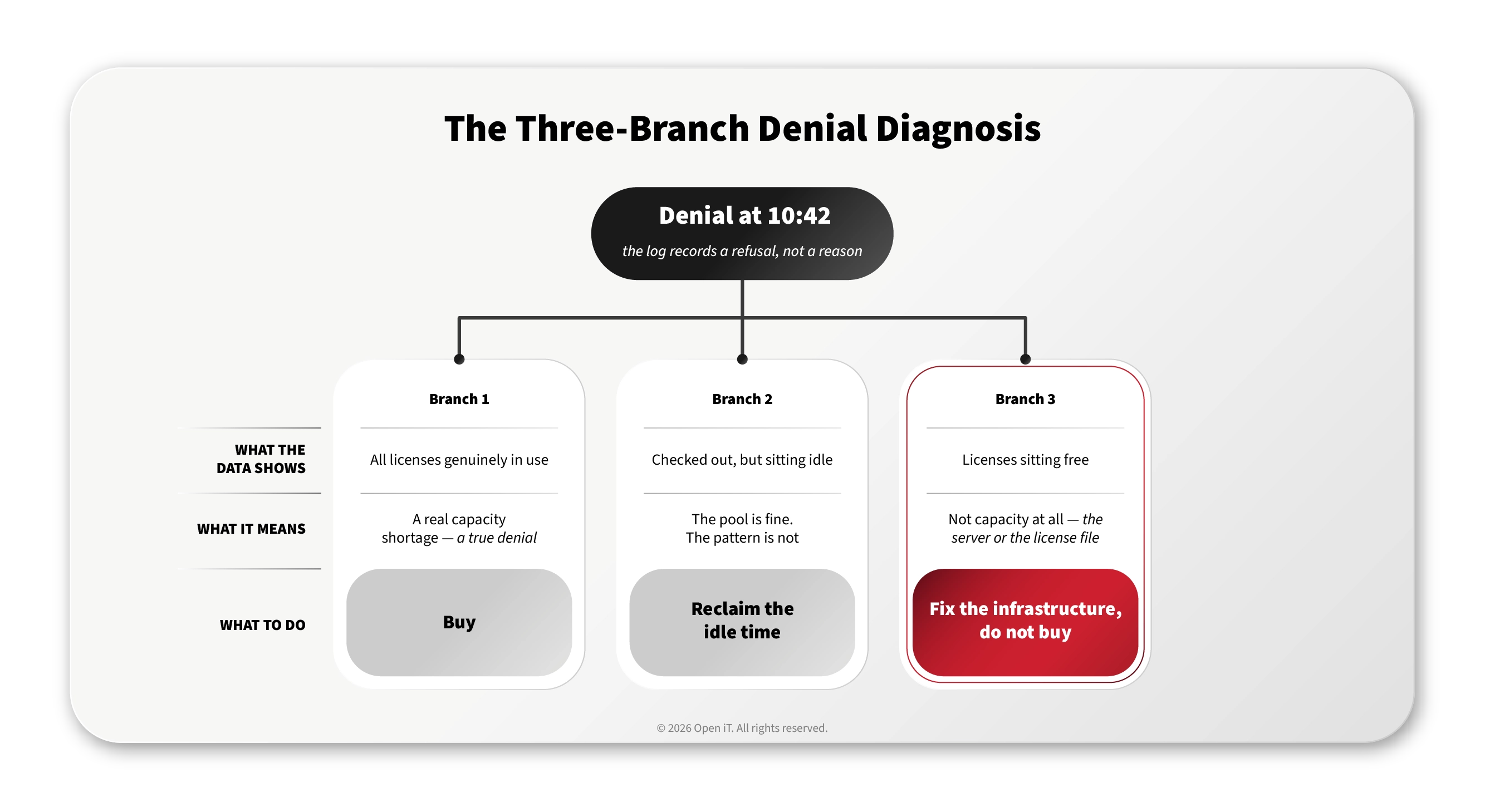
Uma mensagem de recusa indica que um pedido falhou às 10h42. Não explica o motivo. Existem três respostas, que conduzem a três ações diferentes, e apenas uma delas é uma compra.
Na linguagem do setor, isto é conhecido como «recusas verdadeiras» e «recusas falsas». Uma recusa verdadeira é um pedido que falhou porque a licença estava efetivamente esgotada. Uma recusa falsa é um pedido que falhou apesar de ainda haver licenças disponíveis no conjunto — que ficaram por utilizar ou que nunca chegaram a ser atribuídas. Quase todas as recusas que um departamento de licenciamento recebe são registadas como sendo do primeiro tipo, porque o registo não permite distinguir entre as duas.
| O que os dados revelam | O que isso significa | O que fazer |
|---|---|---|
| Recusas e todas as licenças efetivamente em uso | Uma verdadeira escassez de capacidade – uma verdadeira negação | Comprar |
| Recusas, licenças emitidas mas sem utilização | A piscina está bem. O padrão não está. | Aproveite o tempo ocioso |
| Recusas enquanto as licenças permanecem por atribuir | Não tem nada a ver com a capacidade – nem do servidor nem do ficheiro de licença | Melhorem as infraestruturas, não comprem |
A terceira linha é aquela que não se consegue ver de uma só vez. Os Relatórios de Recusa indicam que um pedido falhou e quem foi bloqueado. O Portal de Monitorização de Licenças em tempo real indica que havia uma licença disponível naquele momento. A discrepância entre estes dois é o sinal. A Mitta baseia-se nessa visualização em tempo real, em vez de alertas por e-mail, porque, dado o seu volume, o painel de controlo é suficiente.
Depois, a correção, que é uma tarefa do servidor e não uma aquisição. CLIMS Proporciona-lhe o estado do daemon do fornecedor, a saída da consola e os registos de depuração num navegador, em vez de uma sessão RDP por servidor, a visualização e edição do ficheiro de licença, a comparação semântica para identificar a linha que faltava e a deteção de tríades para um conjunto de três servidores de alta disponibilidade.
Assim que a Mitta conseguiu avaliar a utilização real, verificou-se que uma aplicação tinha sido dimensionada para 130 licenças simultâneas, face a um pico observado de cerca de 30 utilizadores, e só o reajuste do dimensionamento foi estimado em 30 000 a 40 000 euros por ano. O número de licenças da Autodesk reduziu-se até em metade, sem qualquer impacto na produtividade. Os conjuntos de licenças reduzidos tornam o diagnóstico mais difícil, e não mais fácil: duas licenças caras partilhadas por quatro pessoas significam que uma licença ocupada implica a recusa de acesso a outra pessoa. Marko Ukkola, na altura diretor de TI da Mitta, recomenda a monitorização da utilização precisamente por esta razão — ajuda, nas suas palavras, «a detetar servidores de licenças instáveis».
Consideremos o caso intermédio, em que as licenças estão atribuídas e inativas. O Petrel torna isso uma característica estrutural: mais de setenta módulos licenciáveis individualmente, um arranque lento e uma equipa de trabalho que já sofreu restrições no passado, pelo que as pessoas reservam o que possam vir a precisar, em vez do que estão prestes a utilizar. A acumulação de módulos é racional do ponto de vista da secretária onde ocorre. Em todo o setor da engenharia, a percentagem de tempo inativo das licenças retiradas situa-se normalmente entre 20% e 40%, o que, por si só, é suficiente para alterar uma decisão de compra.
Para isso, são necessários dois tipos de medição, e a Open iT comercializa-os em níveis. O primeiro analisa os registos do servidor de licenças: quem teve o acesso recusado e quando, quais as licenças que foram atribuídas sem que houvesse ninguém ao teclado e quais as licenças emprestadas que permaneceram ativas após o término do trabalho. Este sistema consulta os gestores de licenças de hora a hora e recolhe amostras a cada cinco minutos. O segundo acede diretamente à própria máquina e mede se uma licença em uso está efetivamente a ser utilizada, o que dá origem ao Relatório de Rácio de Trabalho: tempo ativo em relação ao tempo total de utilização, para cada aplicação e cada módulo.
Apenas o primeiro caso, uma verdadeira escassez, resulta numa compra. É também aquele que todos presumem estar a enfrentar.
2. Qual dos vossos gestores de licenças é que ele veria, na realidade?
O FlexNet é o que importa em primeiro lugar, porque é nele que o Petrel funciona. Oitenta aplicações e sete tipos de servidores constituem um parque petrotécnico normal, e o portfólio costuma estar organizado numa folha de cálculo partilhada.
O LicenseAnalyzer™da Open iT lê o gestor responsável pela atribuição das licenças, e é assim que consegue abranger mais de 6 000 aplicações em mais de 90 gestores: inclui o FlexNet e o Petrel.
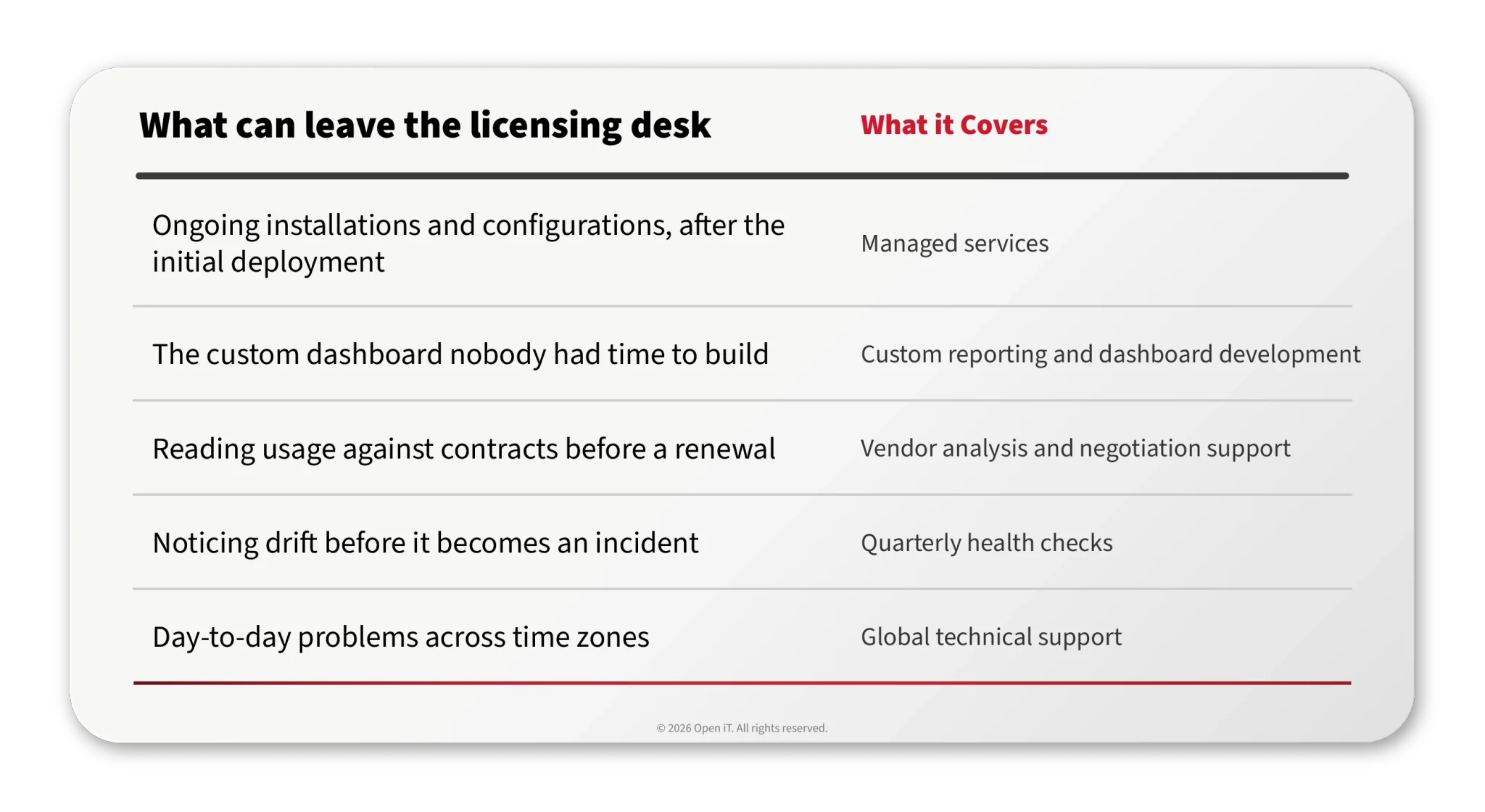
| O que ganha com isso | Quais são os gestores que o fazem? |
|---|---|
| Utilização simultânea, tempo decorrido e uma visualização em tempo real de quem tem o quê | tNavigator, Petroleum Experts (PetEx), DUG Insight, Seequent, Itasca, Geoactive, Esri Cloud |
| Recusas: quem foi recusado e quando | A FlexNet e, consequentemente, a Petrel, além da Encom, da Fekete, da Peloton e da Zetaware |
| Apenas histórico, a partir de ficheiros de registo, sem visualização em tempo real | Zetaware |
| Devolver automaticamente um lugar vago à piscina, em vez de se limitar a comunicá-lo | FlexLM, LM-X, LUM e RLM |
| Uma consola para iniciar, parar, ficheiros de opções e datas de validade | A CLIMS administra 12 LMs, entre os quais o PetEx e o tNavigator |
3. Quem realiza o trabalho, antes e depois da entrada em funcionamento?
A fase de entrada em funcionamento é aquela em que as ferramentas se tornam um projeto paralelo de alguém. A formação fica por fazer, ninguém se responsabiliza pelos relatórios, o painel de controlo continua na lista de objetivos um ano depois e os dados de utilização voltam a ser um pedido que demora dias a ser atendido.
Por isso, pergunte a qualquer fornecedor como é o primeiro mês e o que é que se recebe por escrito no final de cada etapa. O nosso processo tem cinco etapas.
- Arranque e planeamento. Antes de qualquer instalação: verificação dos pré-requisitos de hardware, software e rede com base numa lista de preparação; definição do âmbito e do calendário acordados com as partes interessadas; elaboração de atas e registo das ações a realizar. É nesta fase que se verifica se o espaço necessário indicado abaixo constitui um problema para si, e fica a saber isso connosco, em vez de só depois de ter efetuado a encomenda.
- Configuração técnica e integração. Instalação e configuração do Servidor Central e do Servidor de Análise, seguidas da verificação da conectividade e da recolha de dados, com um relatório de instalação. Implementação dos clientes nas estações de trabalho por si designadas, configurados de acordo com os seus requisitos, verificação da comunicação cliente-servidor e fornecimento de um resumo. A verificação é a parte que importa, porque é aí que se confirma que os números com base nos quais está prestes a tomar decisões estão a chegar.
- Formação e transferência de conhecimentos. Sessões destinadas às pessoas que irão gerir o sistema e às que irão ler os relatórios, com manuais e guias, e registo de presenças para que se saiba quem recebeu efetivamente a formação. Existem cursos públicos de quatro dias, ministrados separadamente, caso pretenda aprofundar os conhecimentos: «Relatórios e Análise de Software de Engenharia», de 1 a 4 de setembro de 2026, e «Administração e Otimização de Software de Engenharia», de 8 a 11 de setembro de 2026, ambos online.
- Otimização e desenvolvimento de casos de utilização. Nesse contexto, os relatórios são orientados para as suas questões, em vez de para as apresentadas na demonstração – qual o relatório que deve ser enviado ao Departamento Financeiro, qual o limiar que justifica um alerta, quais as dez aplicações que devem ser avaliadas antes das restantes setenta.
- Apoio e parceria contínuos. Entrega de um relatório final, da documentação e dos contactos de apoio indicados, bem como da compilação das lições aprendidas. E depois, a parte que se prolonga por anos.
O que iria utilizar é bastante comum. Windows Server 2016 ou posterior, SQL Server com Analysis Services, IIS e .NET, uma conta de serviço e um conjunto de aplicações, além do Core Client nas máquinas anfitriãs com direitos de administrador para o instalar. Não se trata de um cluster. É a pilha de software que o seu técnico de Windows e SQL já utiliza, e é precisamente essa a ideia; além disso, a versão 10.2 adicionou suporte completo ao Azure SQL Server, pelo que esta migrará quando o resto do departamento de TI migrar.
Nos anos que se seguiram, a resposta que importa não é o nível de suporte. É onde o mapeamento se encontra.
Os fornecedores renomeiam e reestruturam funcionalidades, e alguém tem de manter o mapeamento entre uma funcionalidade da licença e o que foi adquirido — o que se torna particularmente importante quando uma aplicação inclui setenta módulos que abrangem código comercial, de terceiros e desenvolvido internamente. O Open iT configura esse mapeamento como parte da manutenção e do suporte e mantém-no no SSAD, de forma centralizada, em vez de ser recodificado no ambiente de cada cliente. Ninguém da sua parte se encarrega da sua manutenção.
Além disso, o trabalho pode ficar a cargo da nossa empresa, em vez de depender de pessoal que não tem. Tudo o que consta nesta tabela pode ser adquirido separadamente, em pacote ou item a item.
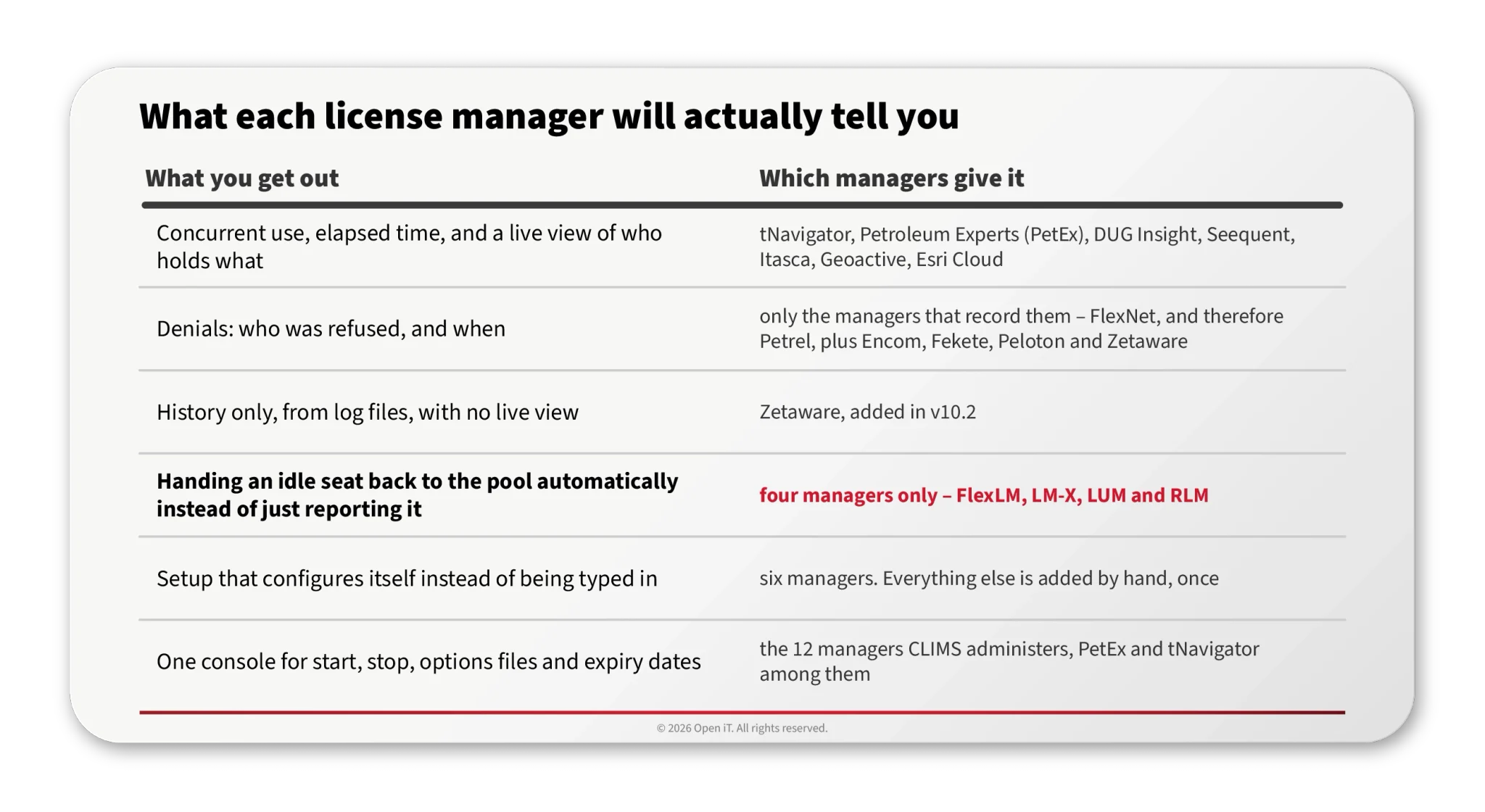
| Trabalhos de licenciamento que podem ser transferidos para o Open iT | O que abrange |
|---|---|
| Instalações e configurações contínuas, após a implementação inicial | Serviços geridos |
| O painel personalizado que ninguém teve tempo de criar | Desenvolvimento de relatórios personalizados e painéis de controlo |
| Análise do consumo em relação aos contratos antes de uma renovação | Análise de fornecedores e apoio à negociação |
| Detetar desvios antes de se transformarem num incidente | Exames de saúde trimestrais |
| Problemas do dia-a-dia em diferentes fusos horários | Assistência técnica global |
Os relatórios são gerados através do Excel, do Power BI, do Tableau e do SSRS nativo, eo LicensePlanner™distribui os custos com base na utilização efetiva, em vez de no número de colaboradores.
Nesta situação, «apoio» não significa que alguém atenda o telefone. Significa que o trabalho nunca chega à secretária.
4. O que acontece a uma sessão às 3 da manhã?
Esta é a questão das operações de poço, e pode pôr fim à conversa. A objeção raramente tem a ver com a perda de trabalho, uma vez que o salvamento automático trata disso. Tem a ver com o reacesso: voltar a iniciar sessão, selecionar novamente os módulos, carregar dados, reconstruir a visualização, no momento em que uma decisão está pendente.
A escala determina a solução. No Mitta, a solução para um lugar reservado é um telefonema – é possível ver quem o tem e onde, pelo que se pede a essa pessoa que o liberte por algumas horas. Com várias centenas de utilizadores do Petrel em três fusos horários, um telefonema não é uma solução viável.
Com o Open iT, é possível recuperar uma sessão inativa de quatro formas — registo, modo de espera, suspensão e encerramento — em quatro níveis de prioridade de regras, com condições relacionadas com a hora do dia e o dia da semana, de modo que um período de operações de poço às 3 da manhã seja excluído por regra e não por confiança. A suspensão é a opção que mais importa. A licença volta para o conjunto de licenças disponíveis e o trabalho permanece no ecrã, com um script de gravação automática pré-configurado fornecido para o Petrel. Reabrir o Petrel demora a um engenheiro entre 20 a 30 minutos, razão pela qual a suspensão é preferível ao encerramento.
A função «Terminate» existe. A decisão de a ativar ou não é sua, não nossa.
5. O que é que o vosso conselho de trabalhadores e a equipa de segurança vão precisar de saber?
É na medição que é enviada para a máquina que tudo isto se decide. Para distinguir uma sessão inativa de uma ativa, são instalados coletores leves nas máquinas anfitriãs, e esses coletores medem a utilização da CPU, as operações de E/S, as teclas premidas e a interação com o rato. Na maioria das organizações do setor energético, essa frase tem de ser aprovada por um conselho de trabalhadores, por uma política de ética ou por ambos, e assim deve ser.
Assim, os controlos são concebidos para essa reunião e não para uma ficha técnica. Os nomes de utilizador podem ser anonimizados, de forma reversível ou irreversível. O acesso é controlado por função e, separadamente, ao nível dos próprios dados do cubo OLAP, pelo que o conteúdo de um relatório depende de quem o abriu. A análise de tendências que nunca identifica um indivíduo é a forma normal de proceder, e é essa a diferença entre um programa de avaliação que avança e outro que fica parado na fase de revisão.
Três respostas a uma recusa, e apenas uma delas é a compra. São os dados que as distinguem. O apoio é o que garante que esses dados continuem a chegar quando a pessoa que os configurou está de licença.
Obter o Open iT
Comece por perguntar qual a divisão: quais dos seus gestores de licenças serão geridos, quais serão monitorizados, quais servirão apenas para fins históricos e quais não serão nem uma coisa nem outra.