


This document provides information on how to navigate and use the Partition Manager page under the Open iT Analysis Server Administration tab.
Introdução #
The Partition Manager page contains various functionalities to configure and setup available data partitions in the OLAP cube. The page is only visible to users with Open iT Analysis Server Administrative rights and is hidden by default.
Only SQL Server editions Developer, Enterprise and Business Intelligence (BI) support data partitions.
Enabling Cube Partitioning #
Follow these steps to enable or disable OLAP cube partitioning:
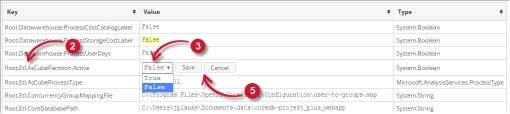
- Go to the Configuration page of Analysis Server web interface.
- Locate the configuration key Root.Etl.AsCubePartition.Active.
- Clique no valor e este deve transformar-se num menu pendente.
- Definir o valor como True para ativar.
- Clique em Guardar para aplicar as alterações.
- Clique no botão Reiniciar a sessão localizado na parte inferior da tabela de configuração.

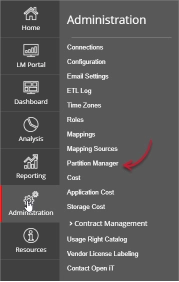
Figura 2. Administração do Analysis Server: Reiniciar sessão - Confirmar que o Partition Manager A guia está visível e acessível em Administração tab.

Figure 3. Analysis Server Administration: Partition Manager Tab

The Partition Manager page should be displayed.
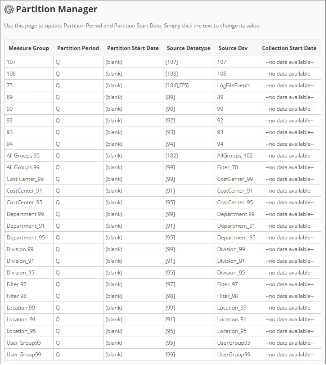
Use the following descriptions to properly configure the Partition Start Date of each item:
- Measure Group – the name that uniquely identifies the predefined measure group in the OLAP cube.
- Partition Period – the predefined period included in the data partition of the measure group.
- Partition Start Date – the start date that identifies the start of data partition of the measure group.
- Source Datatype – the source of the measure group from the Open iT data aggregations.
- Source Dsv – the name of the source table or view in the SQL database.
- Collection Start Date – the start date of the available data.
Requisitos #
Ensure to meet the following requirements before using the Partition Manager page:
- As bases de dados SQL e OLAP são criadas com sucesso.
- Prepared list of start dates of each partition for configuration.
- Direitos administrativos do utilizador atual da Web.
Configuring Partition Manager #
Follow these instructions to configure the Partition Start Date:
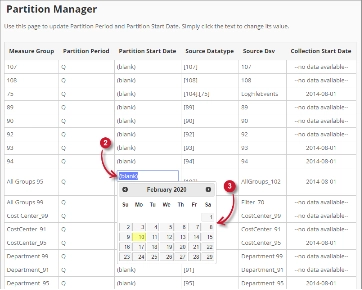
- Look for the measure group to configure from the list.
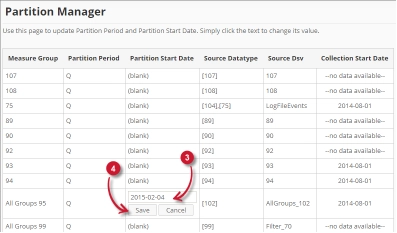
- Click the Partition Start Date column value. This should transform into textbox and a calendar should appear.
- Choose from the calendar the desired start date of the partition.

Figure 6. Analysis Server Administration Save Partition Manager
Once clicked, the selected date should automatically be posted in the textbox with the format YYYY-MM-DD. - Clique em Guardar para aplicar as alterações.
Resolução de problemas #
This part provides the possible work around for a known issue in the Partition Manager page.
Página de erro apresentada quando o acesso não é feito no localhost #
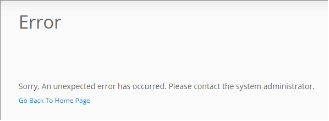
There will be times that when accessing the Partition Manager page remotely or via hostname, it displays an error page.
Utilize as seguintes sugestões para solucionar este problema:
Verificar se existem erros na consola do navegador Web #
Siga estas instruções para verificar se existem erros na consola do navegador Web:
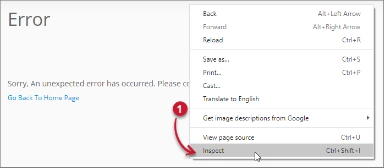
- In the Partition Manager página, clique com o botão direito do rato em qualquer parte da página e selecione Inspecionar.

Figure 8. Analysis Server Partition Manager Page Troubleshooting: Error page displayed – Inspect
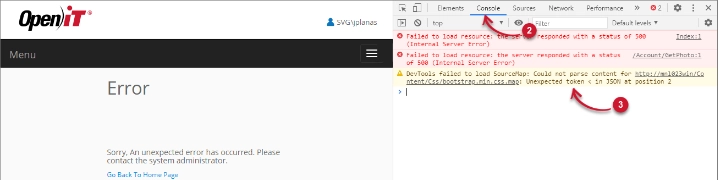
O Ferramentas para programadores deve aparecer. - Escolher Consola a partir dos separadores disponíveis da ferramenta.
A consola lista as transacções do navegador Web, incluindo os erros.
Figure 9. Analysis Server Partition Manager Page Troubleshooting: Error page displayed – Console - Errors in the console may sometimes be too technical, for immediate response, send the error detail to support@openit.com.
Aceder ao sítio web através de localhost #
Para ver a mensagem de erro real do servidor, vá para a máquina que aloja o Servidor de Análise Open iT e, em seguida, aceda a http://localhost num browser. A mensagem de erro real deve ser exibida.