
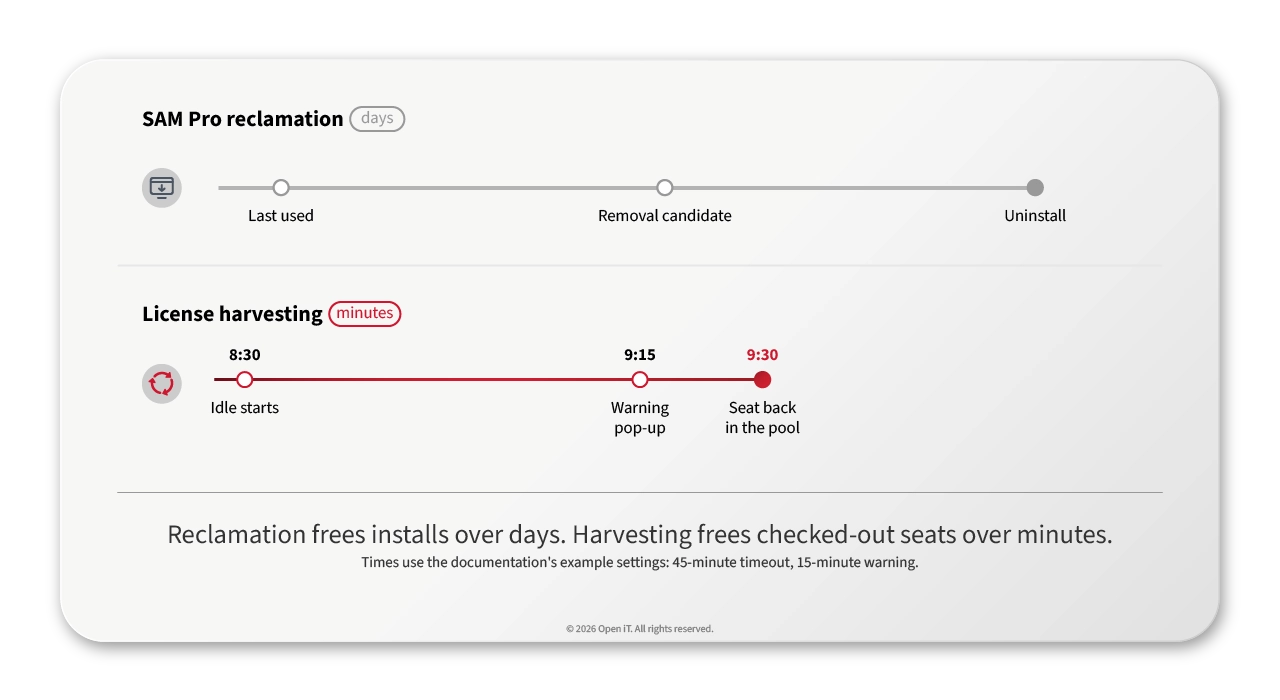
- Software license harvesting is reclamation for live sessions. It frees a checked-out floating seat from an idle session in minutes, where SAM Pro reclamation removes installed software over days.
- Idle detection reads keyboard, mouse, CPU and I/O against per-application thresholds. A log-only mode lets you set those thresholds from your own data before any seat moves.
- Engineers get a warning window to cancel, and save-state options (suspend, automatic save, standby) put the seat back in the pool without losing the work.
At 9:40 on a Tuesday, a stress engineer opens Ansys and gets the message nobody wants to see: no licenses available. The pool is full, yet one of those seats is checked out to a colleague who has been in a design review since 8:30, the application open and untouched. Reclamation rules built for installed software won't catch it, because they count idle time in days. This seat has been idle for 70 minutes, and the next engineer in line is the one paying for it.
If you run ServiceNow SAM Pro, you’d call that seat a reclamation candidate. Your rules won’t see it in time.
You know how many CATIA, Ansys and MATLAB seats you own. Do you know how many are checked out right now by someone who isn’t there? When the pool looks full, the obvious fix is to buy more seats. Sometimes the seats you need are already yours, sitting open in an empty office.
License harvesting closes that gap. Think of it as reclamation for live sessions. Software on the engineer’s machine watches for real activity. When a session goes idle, it warns the user. If nobody answers, it saves or suspends the work and hands the floating license back to the pool for the next engineer.
License harvesting vs license reclamation: same goal, different clock
You already know reclamation. In SAM Pro, a reclamation rule looks at how many hours someone has used a product and when they last used it. When a title crosses the rule’s limits, SAM Pro creates a removal candidate. The software then comes off the machine through your distribution tool or a task, and you can let the user approve or deny it first.
That works for installed software. Reclamation doesn’t reach the shared seats. CATIA, Ansys and MATLAB can all be licensed as floating seats handed out by a license server. For CATIA, that server is IBM LUM or DSLS. An engineer checks a seat out when the application starts and gives it back when it closes. The seat is busy because the application is open, not because it’s installed.
| Aspect | SAM Pro reclamation | License harvesting |
|---|---|---|
| What it frees | An installed title | A checked-out seat |
| Signal | Usage hours, last-used date | Keyboard, mouse, CPU and I/O activity |
| Clock | Days | Minutes |
| Action | Uninstall through distribution or a task | Suspend, save and close, or standby |
| What the user loses | The install | Nothing, if save-state is set |
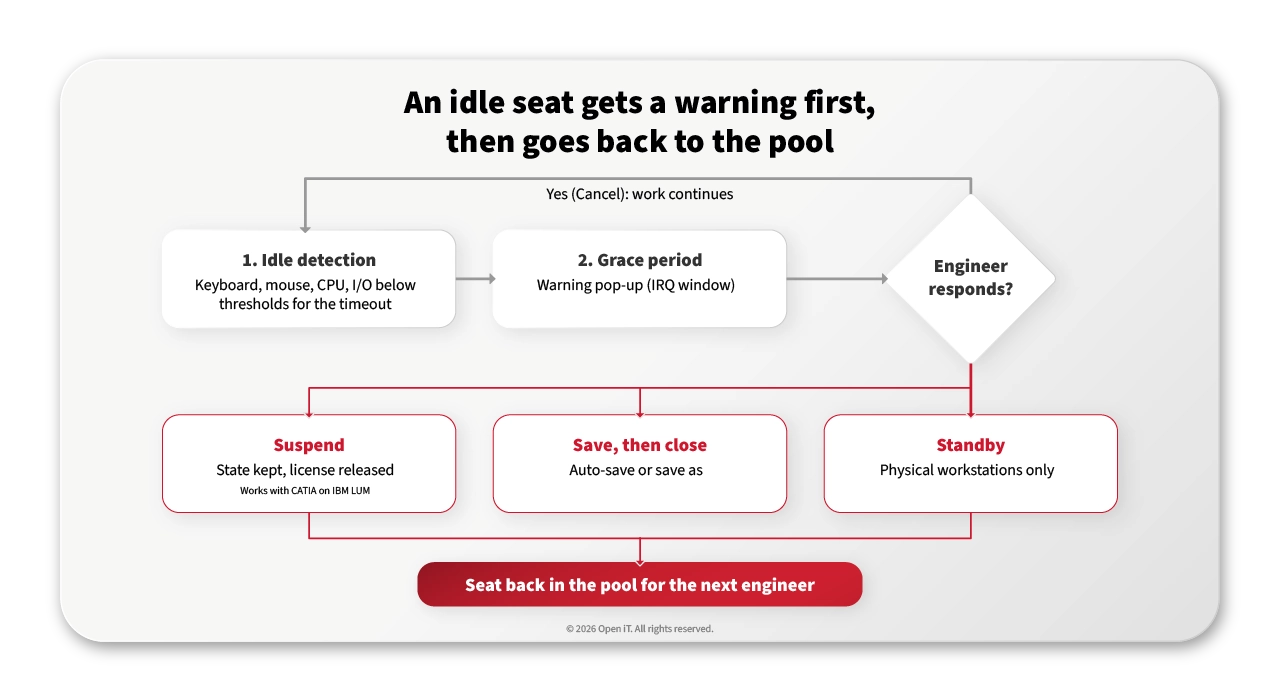
Harvesting has three moving parts: idle detection, a grace period and save-state.
Idle license detection: telling “thinking” from “gone”
Open iT’s LicenseAnalyzer™ Level 3 puts small collectors on the engineer’s machine, next to the application. They watch four signals: keyboard, mouse, CPU and I/O. On Unix hosts it’s CPU and I/O. Each signal gets a threshold and a weight. When activity stays below the thresholds, the weights add up to a verdict: idle.
CPU and I/O are the signals that protect your analysts. A solver can run for hours with nobody at the mouse. That session is busy, not idle, and the CPU load says so.
Then there’s the timeout: how long a session has to stay quiet before anything happens. Open iT’s documentation uses 45 minutes as its example. A phone call or a coffee doesn’t count.
Want evidence before action? Start in log mode. Level 3 measures every session and changes nothing. You set the thresholds from your own data, application by application, before a single seat moves. Our guide to safe and flexible software license optimization covers the tuning.
Grace periods: nobody loses a seat without warning
An idle verdict doesn’t take anything away. It starts a warning window. Open iT’s configuration calls this the IRQ time (the interactive request), and the documentation’s example is 15 minutes.
During that window the engineer sees a pop-up. It offers Suspend or Cancel, or Terminate or Cancel, depending on how you’ve set up the application. Cancel means “I’m still here”, and work carries on.
You also decide who’s in scope. Priorities can be set by host, user or group, with four rule levels: total, high, normal and low. So a team in a deadline crunch can be left alone while the rest of the estate is harvested.
It’s the same idea as letting a user approve or deny a SAM Pro reclamation request. It just happens in minutes, on the engineer’s own screen.
Some vendors bill by the calendar day. For those, Level 3 can harvest on a schedule: chosen users at a chosen time, with a pop-up first.
How long should the window be for a long simulation run, or a cleared program? That’s a policy question. We’ll answer it in an upcoming post on why aerospace and defense teams set harvesting rules differently.
Save-state: the seat comes back, the work stays
Now the real worry: what happens to the work? Level 3 gives you three answers.
- Suspend. The license goes back to the pool, but the application stays open in its current state. The engineer resumes later without reloading the model. Reopening a large application such as Ansys Workbench can cost an engineer 5 to 15 minutes. Suspend skips that.
- Save, then close. Before Level 3 terminates an application, it can save the work automatically or run a “save as” action, so nothing gets overwritten. Save scripts for Ansys Workbench and SpaceClaim are built in.
- Standby. On a physical workstation, Level 3 can put the host into standby mode instead.
When an engineer comes back to a suspended session, the application needs a license again. If one’s free, work carries on. If the pool is full, a pop-up names the features that are short.
And one honest limit. Harvesting frees shared seats. A named-user license belongs to one person, so closing their idle session frees nothing for a colleague.
Suspend or reclaim? That’s a policy choice of its own, and our next post, Suspend vs Reclaim takes it apart.
Where this shows up in ServiceNow SAM Pro
Harvesting runs on the engineers’ machines, but the numbers land where you already work. Open iT LicenseAnalyzer is a ServiceNow Store app. It writes engineering usage data into SAM Pro’s tables, and the Engineering License Overview dashboard shows license position and usage for your engineering applications. The data refreshes daily.
“Open iT collects and analyzes the detailed signals that are unique to engineering software. Concurrent usage, availability, sessions, denials, and historical patterns across license management technologies, and supporting active optimization, like harvesting,” said Evan Orgel, Senior Advisory Solution Consultant for Asset Management, ServiceNow in the Beyond the Dashboard webinar.
Four questions to ask any harvesting tool
If you’re comparing tools, these four questions separate reporting from harvesting.
- Does it act on the idle seat, or explain the denial afterwards? Some tools only explain a denial after it happens. Level 3 acts on the idle session itself: warn, then suspend or close, then hand the seat back.
- Does it cover the license manager your software runs on?
- Can it keep the work, or only close the application? Look for suspend, automatic save and per-application save scripts.
- Can you watch before you act? A log-only mode lets you prove the thresholds on your own data first.
FAQ
Is license harvesting the same as ServiceNow SAM Pro reclamation?
No, though they share a goal. SAM Pro reclamation removes installed software after a period without use, counted in days. License harvesting frees a checked-out floating seat from an idle running session, counted in minutes, after it warns the user and saves or suspends their work.
Will license harvesting interrupt a running simulation?
Open iT LicenseAnalyzer Level 3 counts CPU and I/O activity, not just keyboard and mouse. A solver that’s working with nobody at the desk registers as activity against the thresholds you set. Start in log mode to check those thresholds on real sessions before any action is taken.
What happens if no license is free when an engineer resumes a suspended session?
The application needs a license again to resume. If the pool is full, Open iT shows a pop-up naming the features that don’t have enough licenses, so the engineer knows why they’re waiting.
Does license harvesting work on named-user licenses?
Harvesting frees shared, floating seats that any engineer can check out. A named-user license is assigned to one person, so closing that person’s idle session doesn’t free a seat for anyone else.
Back to 9:40
Take the documentation’s example settings: a 45-minute timeout and a 15-minute warning. The seat left open at 8:30 would have gone back to the pool at 9:30. That’s ten minutes before the denial.
Want to see it on your own estate? Talk to Open iT about running Level 3 on one application first. You’ll see which seats sit idle before a single one moves.