

Simulation & Analysis (CAE)
20 to 40 percent of engineering licenses are idle right now. Simulation is where that costs the most.
Open iT measures True Active Usage across ANSYS, Abaqus, NASTRAN, LS-DYNA and Altair HyperWorks, so the idle half goes back to the pool instead of onto the renewal.
- Tell a running solve from a parked window
- Recover an idle seat without losing the session
- Free the licenses that interactive LSF jobs hold but don’t use
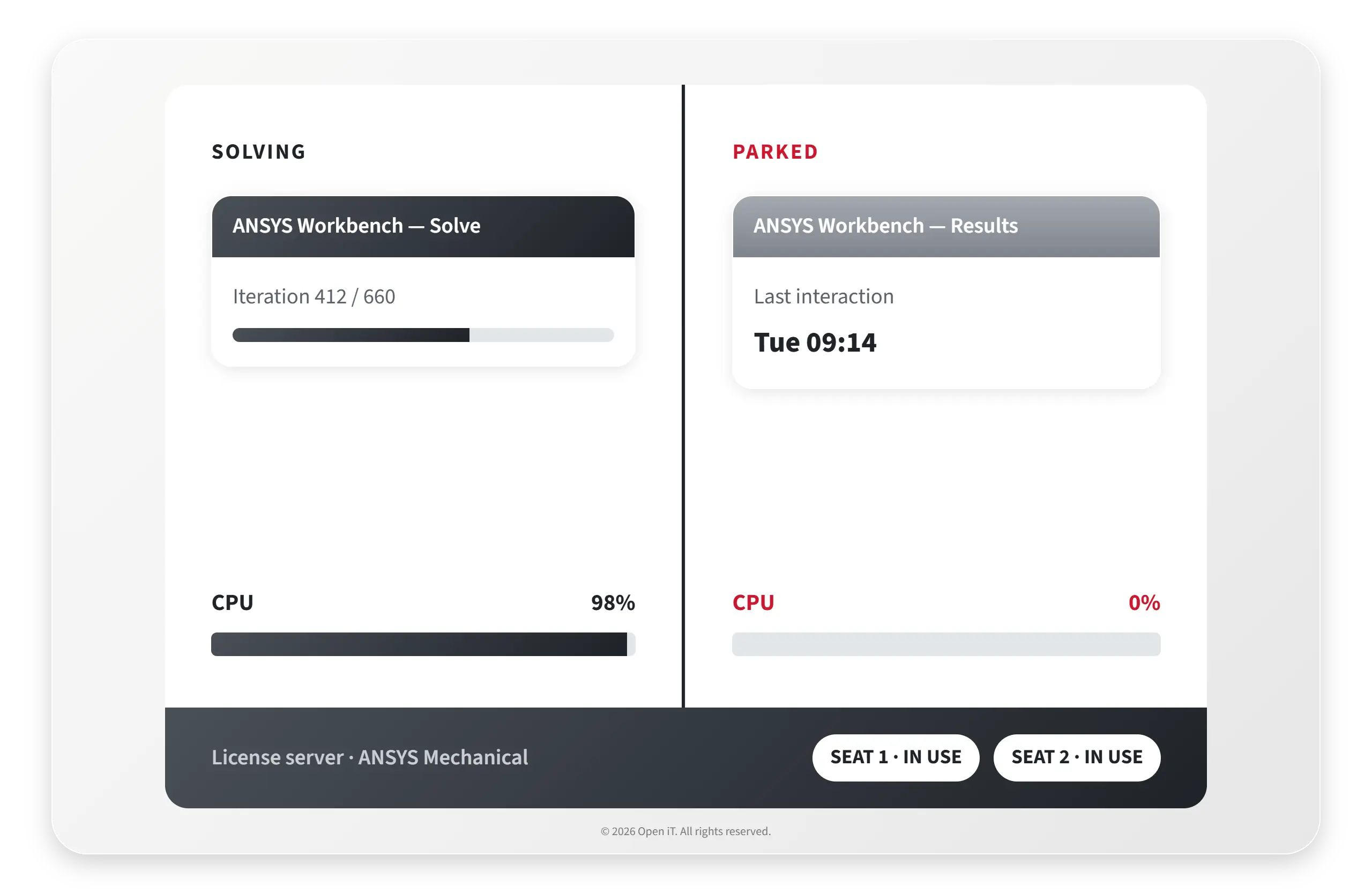
The solver isn't what wastes the license. The window left open beside it is.
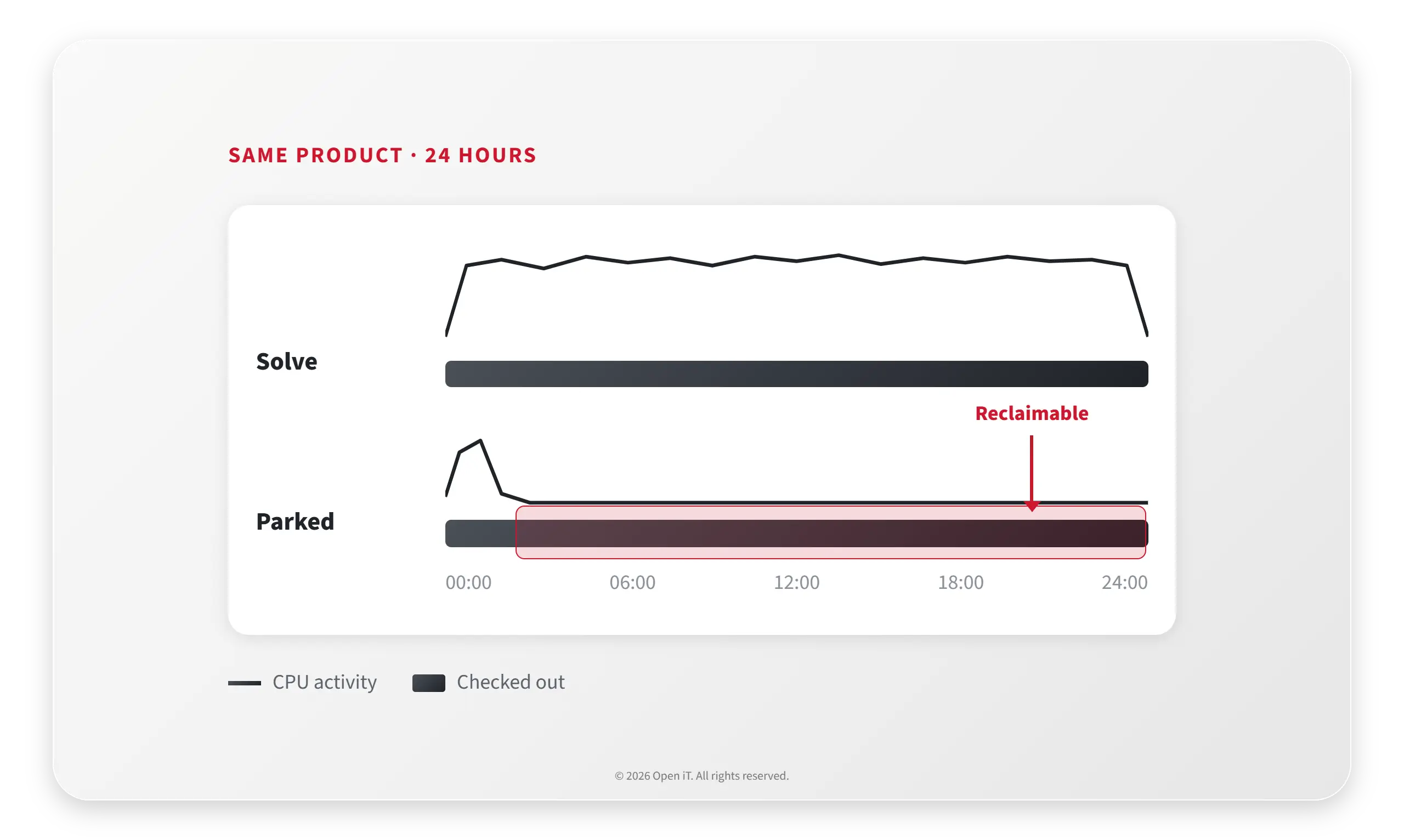
A simulation program runs three things against one pool. Batch solves hold a license for hours and earn it. Interactive sessions in ANSYS Workbench or HyperMesh build the model, read the results, then stay open through the weekend. Interactive jobs on IBM LSF reserve a license for the whole wall-clock window whether anyone is at the keyboard or not. Your license manager records all three the same way.
That’s the most expensive line in the software budget, renewed in full every year, because nothing in the checkout record says which half was working.
What Open iT Does
1
See the solve, not just the checkout.
Level 2 reads keyboard, mouse, CPU and I/O activity against parameters tuned per application, so a running solve registers as genuine work and a results window left open doesn’t. That’s what True Active Usage measures, on Windows, Unix and macOS.
2
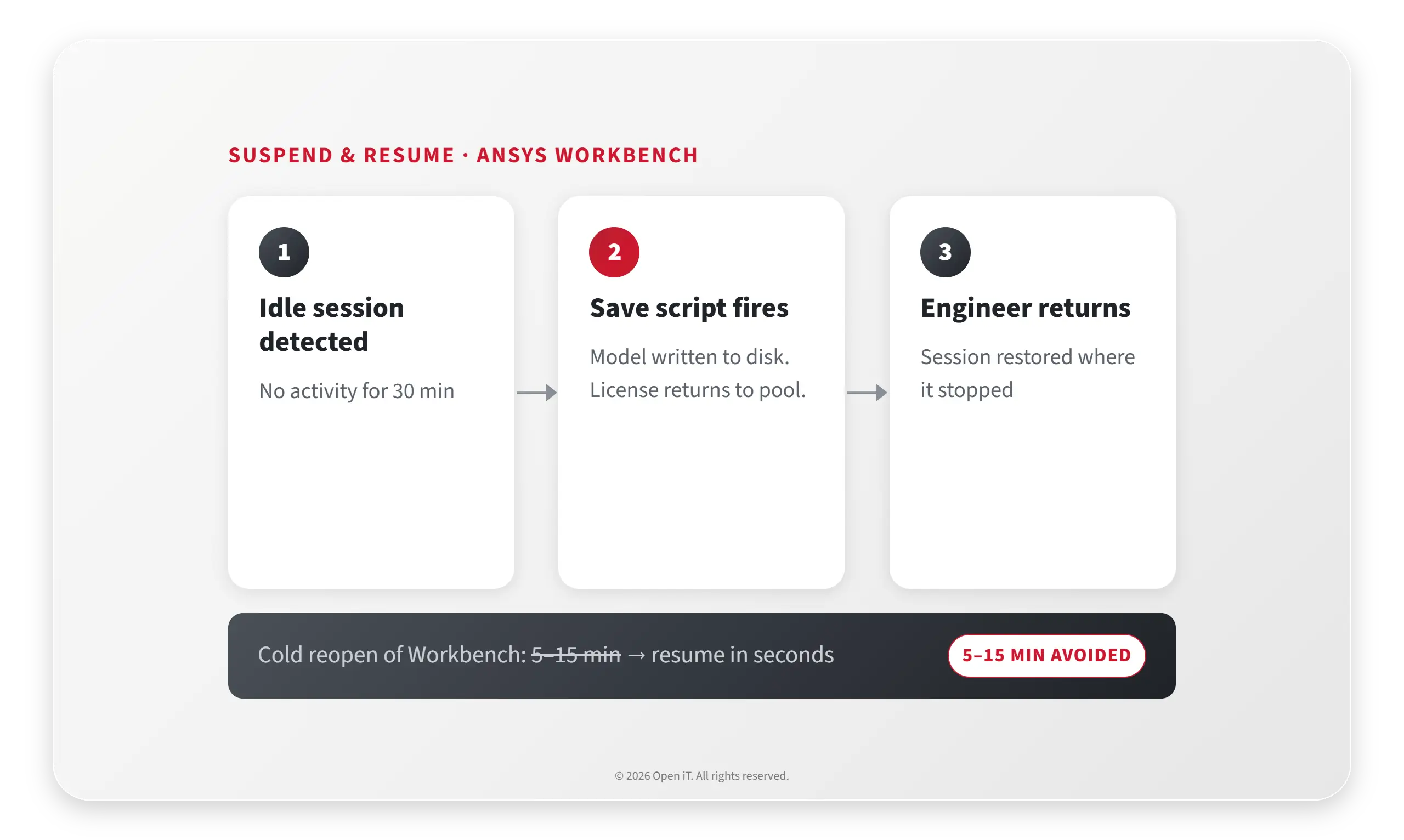
Hand the seat back and keep the work.
Level 3 suspends an idle session, returns the license to the pool, and restores the session state when the engineer comes back. Save scripts ship pre-built for ANSYS Workbench and ANSYS SpaceClaim, so the model is written to disk before the license moves. Reopening ANSYS Workbench cold costs 5 to 15 minutes. Suspend and resume skips that, which is why engineers stop objecting after the first week.
3
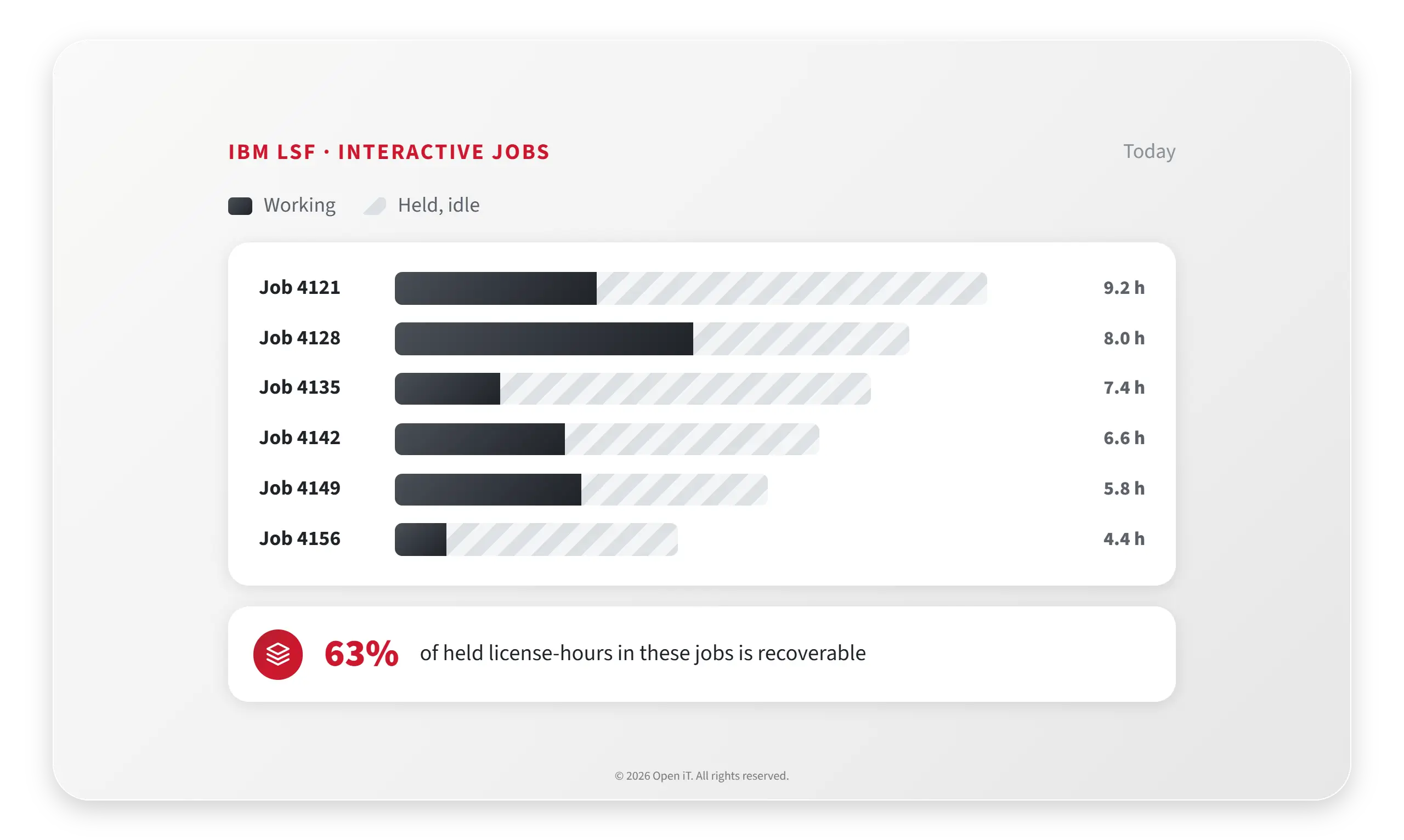
Reclaim the licenses inside interactive LSF jobs.
Level 3 covers interactive jobs on IBM LSF, where the license is held for the length of the job rather than the length of the work. On an HPC-heavy program that’s usually the largest single block of recoverable capacity in the estate, and the one nobody has looked at.
4
Renew per version, per program.
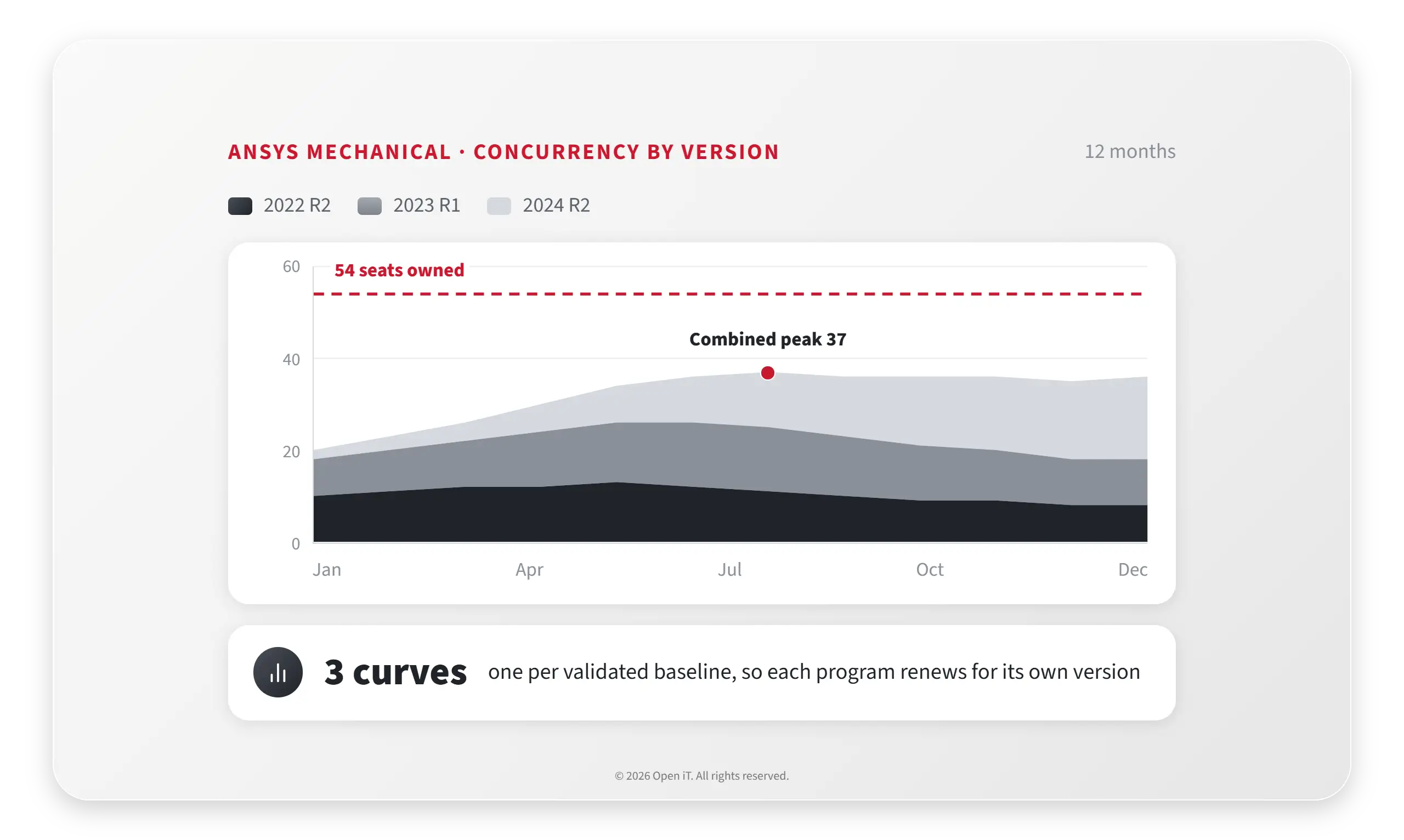
Usage is reported by application version, so three programs on three validated baselines of the same solver show up as three demand curves rather than one total. Take twelve months of concurrent peak into the renewal instead of a seat count.
Have questions? Talk to a licensing specialist.
Ansys Idle-Seat Calculator
Your FlexNet server records a seat as in use the moment it is checked out, whether a solve is running or a results window has been parked since Tuesday. Estimate how much of your Ansys pool is recoverable from numbers on your own license server.
Concurrent licenses of the feature you are sizing. lmstat: “Total of N licenses issued”.
Highest simultaneous checkouts over your review window, 12 months if you have it.
Mean checkouts during covered hours. Leave equal to peak if you don’t know it, which is the conservative reading.
Advanced (optional)
Your call. Sizing to the bare peak leaves nothing for growth or a bad week.
RESERVE lines for groups or users in your .opt file. Enter 0 if you don’t reserve.
recoverable at renewal, with your buffer applied
- Held on an average shift hour
- Swing up to peak
- Never used at the same time
- Needed at peak plus buffer
- 0 seats
- Share of the pool you can hand back
- 0%
- Utilization of paid capacity
- 0%
How this is calculated
Every figure is arithmetic on what you entered. No benchmark, no industry average, no assumed price.
- Never used at the same time = seats − ceil(peak × (1 + buffer)). Peak concurrency is the highest number of seats your estate ever needed at once. Everything above it, less the buffer you chose, was never called on.
- Held but not working = average × parked share. These are seat-equivalents returned to the pool during covered hours if the parked share you set is real. It is zero until somebody measures it.
- Calendar exposure = (168 − shift hours) ÷ 168. The share of paid seat-hours your covered hours never touch. It is context for the renewal conversation, not a seat you can hand back.
- Utilization of paid capacity = (average × shift hours) ÷ (seats × 168). Average demand against what the lease actually bills for.
What this cannot know
- Whether a held seat was working. lmstat reports checkouts. Separating a running solve from a parked window needs activity measured at the workstation (keyboard, mouse, CPU and I/O), not at the license server.
- What your interactive LSF jobs hold. An interactive job reserves the license for the length of the job window, not the length of the work. None of that shows up in a peak figure.
- Whether your peak is real demand or a queue artifact. A peak driven by a single overnight batch wave sizes your pool differently from one driven by forty engineers at 10am.
- Denials. If users were refused a license during the window, your observed peak is a ceiling, not a demand curve.
How these inputs are measured
- Ansys is metered through FlexNet, vendor daemon ansyslmd. Open iT polls the license server with lmutil lmstat every hour at a five-minute sample interval, producing the hourly and concurrency datasets (93) OLAP Raw Hourly, (94) OLAP User Concurrency and (102) OLAP Total Use. That is where seats, peak and average come from.
- Individual checkout and check-in events come from the vendor daemon debug log via flexlogcollector2, aggregated as (75) License Logfile Events.
- Reserved seats are read by parsing the FlexNet options file. The unused portion of each reservation is reported as unused-reserve and trended as Reserved License Utilization.
- Source: Open iT Online Docs 10.2, FlexNet License Manager (docs.openit.com).
For planning discussion only. Figures are arithmetic on the numbers you entered. The share of checked-out time with no solve behind it can only be measured at the workstation.
Frequently Asked Questions
Will harvesting kill a running solve?
No. A solve shows continuous CPU and process activity, so Level 2 records it as active usage and Level 3 never touches it. Only idle sessions are suspended, and the thresholds are agreed with your engineering leads before anything goes live.
Which simulation applications can Open iT meter?
ANSYS and NASTRAN through FlexNet, LS-DYNA, Abaqus through Elan, and the Altair tools including HyperWorks and OptiStruct. Across the product, more than 6,000 applications and 90 or more license managers.
Does the engineer lose unsaved work?
No. Level 3 restores the session state, and the pre-built save scripts for ANSYS Workbench and ANSYS SpaceClaim write the model to disk before the license goes back.
Can this run in a closed area?
Yes. Metering, reporting and analysis all run inside the boundary. See the closed and restricted networks page for the deployment detail.
A six-hour checkout and a two-hour solve cost you the same today. Open iT tells them apart, hands the difference back to the pool, and gives you a concurrency curve per version to renew against.