

Open iT-Hosted EventSoftware Intelligence Forum Thailand 2026
Turning software visibility into business value.
Register Here
Analyst ReportOpen iT Named a Leader in the 2025 QKS SPARK Matrix™
See why we’re a Leader.
Download Full Report

KNOWLEDGE BASE

How can we help?

Table of contents

How to Configure Bentley Cloud in Open iT Collection-LicPoll collection

Key Takeaways
  • Bentley Cloud collection can run on any machine with an Open iT Client or Core Server and an internet connection, using Bentley Cloud credentials supplied by the customer.
  • Running openit_bentleycloud -c -s from OpeniT’s bin directory should return license usage; if it fails, have the customer test their login on the Bentley portal first.

Bentley's cloud licensing keeps its usage data on Bentley's side of the fence — until someone connects Open iT to it. The bridge is a single utility, openit_bentleycloud, run from the bin directory of any Open iT client or Core Server machine with an internet connection and the customer's Bentley Cloud credentials. Once the command returns license usage instead of an error, the rest is familiar territory: configure LicPoll, run confbuilder, and confirm the status file appears in the Licpoll folder.

Requirements #

  1. Open iT client or Core Server machine that has internet connection.
  2. Bentley Cloud credentials –customer’s responsibility

Note: You can do this on any machine that has OpeniT Client or Core. In CPH we put it on their Core Server and as long as the server has internet connection and Open iT Client, it will work.

Steps #

  1. In the command prompt with administrator level, go to OpeniT’s bin directory
  2. Then run this command: openit_bentleycloud -c -s
    1. Ask the customer about the email and the password, if it doesn’t work, let them try to login on their portal first to check if it is working.
  3. After this command, there shouldn’t be an error, but it will show the license usage.
  4. We can now configure Licpoll like we usually do.
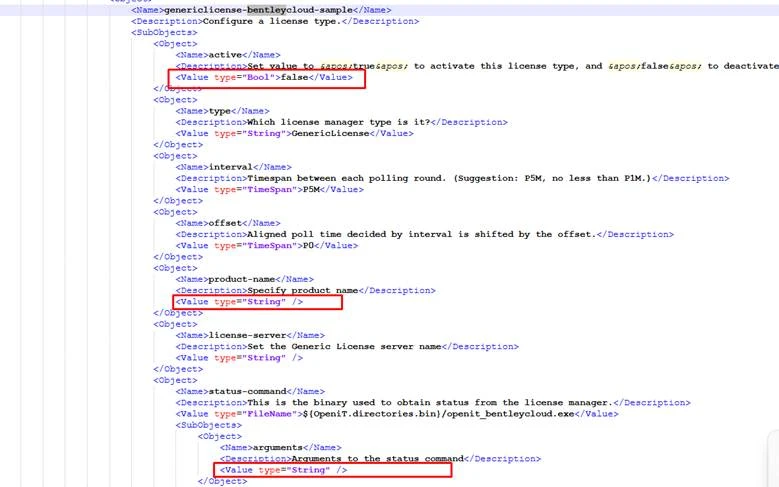
Active = True
Product-name = whatever the customer wants
Arguments = -t “C:\ProgramData\OpeniT\Data\temp\Bentley” – depends on where their data folder is

  • Save and run confbuilder.
  • Run sample collection then see on Licpoll folder the status file.

Other Categories

Auxiliary

Supplementary resources, utilities, or tools that enhance core functionality and support various operational needs.
Explore More

Demo Videos

Short, informative videos showcasing product features, workflows, and best practices through real-world demonstrations.
Explore More

Interface Guides

Step-by-step instructions and visuals explaining how to navigate and use the application’s user interface effectively.
Explore More

License Managers

Documentation and tools for managing, monitoring, and maintaining software licenses across different systems or products.
Explore More

Upgrade

Instructions, best practices, and technical guidance for updating Open iT components to newer versions, ensuring a smooth, secure, and efficient transition with minimal downtime.
Explore More

Looking for More Resources?

Explore additional content through our Customer Portal or Documentation page for anything not covered here.

Scroll to Top

Let's talk

We’ll show you how your business can benefit from Open iT solutions.
Please note:
By submitting this form you are agreeing to receive additional communications from Open iT. Your information will be processed in accordance with our Privacy Notice.