
Learn & Get Support

Knowledge Base

Browse Open iT's knowledge base for setup guides, configuration tips, license manager documentation, and answers to common questions.

How to Hide the Reporting in OpeniT AS

Key Takeaways
  • Moving a report template into a new folder on the SSRS Home page breaks the corresponding Reporting Services link on the Analysis Server Home page.
  • The workaround is to create a new link pointing at the created folder and hide the broken default link by adding style=”visibility: hidden” to it in the Reporting Services editor.

Tidying up the SSRS Home page has a side effect Open iT administrators tend to discover the hard way: move a report template like Annual Usage Overview into a new folder, and the Reporting Services link on the Analysis Server Home page quietly stops working. The fix is a workaround in two moves — create a new link pointing at the created folder, then hide the broken default link with a one-line style change in the Reporting Services editor — so users land directly in the right folder.

The Reporting Services links in AS Home page will no longer work once you created a new folder in the OpeniT SSRS Home page and move the report template to this new folder.
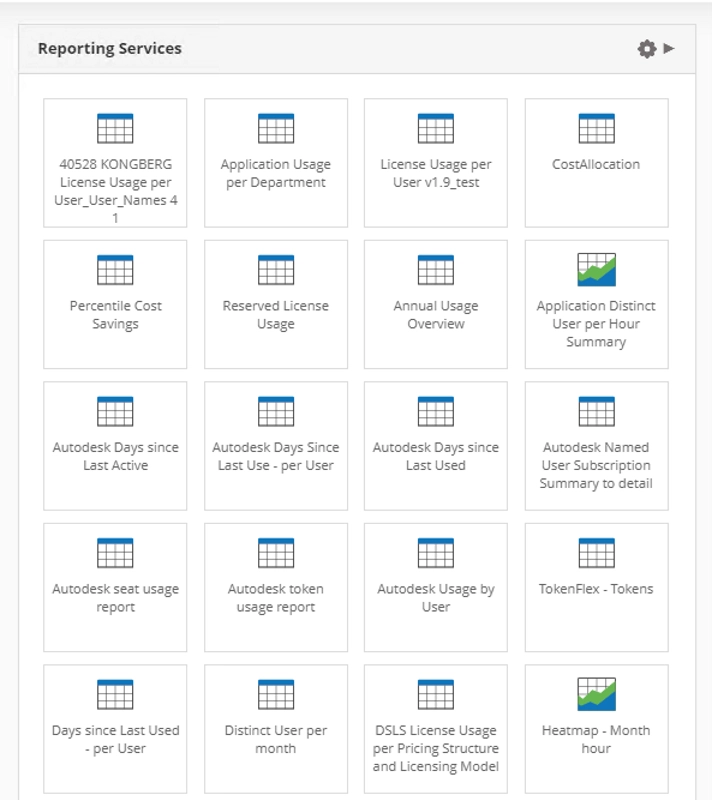
Example: If you are using the report template Annual Usage Overview.


Then you created a new folder in SSRS Home page, like OpeniT.
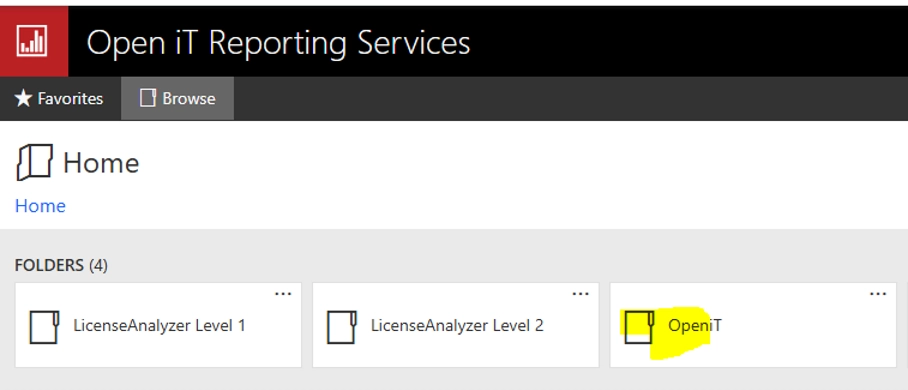
 

Then you moved the  Annual Usage Overview report template inside this new folder, the same report in Home > Reporting Services will no longer work.
 

  • The work around is to create a new link that points to the created folder.
  • Then hide the default Reporting link.
  • To hide the link, add the following syntax in the Reporting Services editor.

    <a href=”http://mnl1371win/reports” target=”blank” style=”visibility: hidden”>Click here to open.</a>
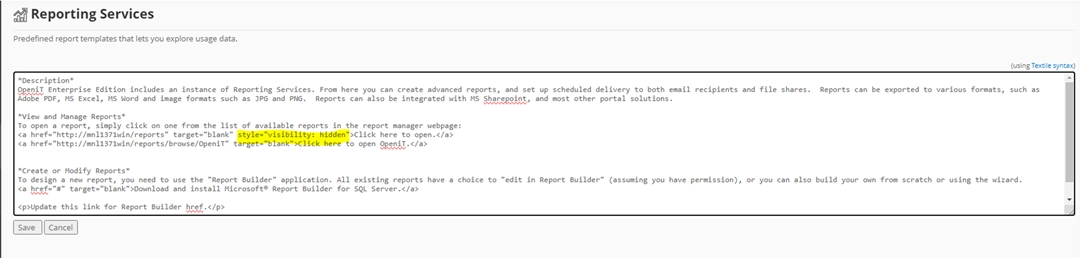
     
  • This will hide the default “Click here to open.” link
  • The resulting display will look like below.
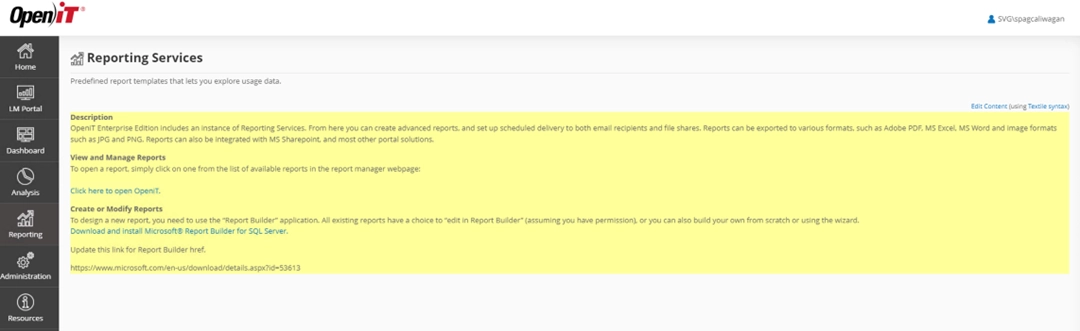
  • Notice that the default link is no longer visible.
  • This will allow the user to directly access the created OpeniT folder without affecting the Reporting Services in the Home page.


Categories

Auxiliary

Supplementary resources, utilities, or tools that enhance core functionality and support various operational needs.

Demo Videos

Short, informative videos showcasing product features, workflows, and best practices through real-world demonstrations.

Interface Guides

Step-by-step instructions and visuals explaining how to navigate and use the application’s user interface effectively.

License Managers

Documentation and tools for managing, monitoring, and maintaining software licenses across different systems or products.

Upgrade

Instructions, best practices, and technical guidance for updating Open iT components to newer versions, ensuring a smooth, secure, and efficient transition with minimal downtime.

Can’t find what you’re looking for?

Visit the Customer Portal for support and downloads, or browse our Documentation for in-depth guides and how-tos.

Scroll to Top

Let's talk

We’ll show you how your business can benefit from Open iT solutions.
Please note:
By submitting this form you are agreeing to receive additional communications from Open iT. Your information will be processed in accordance with our Privacy Notice.