




Overview #
The Open iT SQL database was consuming a significant amount of server disk space due to the volume of accumulated data.
This procedure will first remove all existing data from the Open iT SQL database and then resynchronize the data based on the specified target year.
Environment #
- Open iT Analysis Server
- SQL Server 2008 and higher version
Procedure #
- For safe keeping, please make sure to perform a full database backup before making any changes.
- Navigate to the Open Analysis Server directory in CMD using the OpeniT service account and run OpeniT.Server.Etl.Console.exe truncatefacts

This command triggers the removal of loaded data from the data type tables in the SQL database. - Then run the OpeniT.Server.Etl.Console.exe processsql /fullwipe

Use this parameter to delete all processed and cached data. - After, proceed to shrink the OpeniT SQL Database using the SQL Server Management Studio (SSMS)
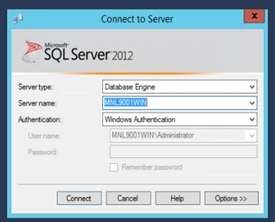
- Connect to the SQL Server Database Engine using SSMS.

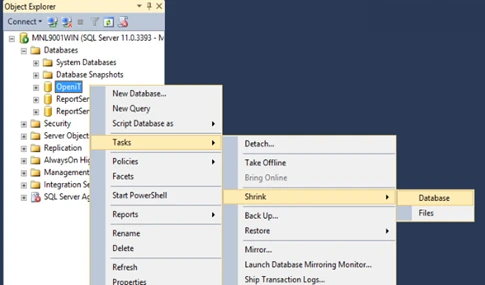
- Go to Databases -> OpeniT [right click the OpeniT Database] -> Tasks -> Shrink -> Database

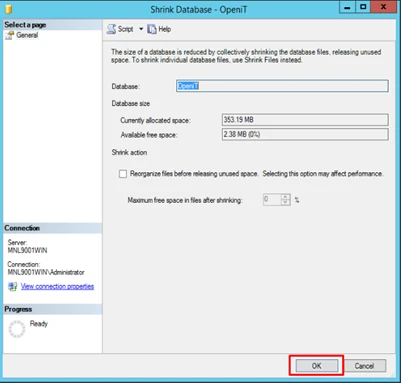
- Click OK to shrink the database.

- SHRINK DATABASE: https://docs.microsoft.com/en-us/sql/relational-databases/databases/shrink-a-database
- Now all the data is wiped in the OpeniT SQL database except for the configurations and dashboards in the Analysis Server WebGUI and you will now have a huge free disk space.
- Next step is to reprocess the core data in the Analysis Server
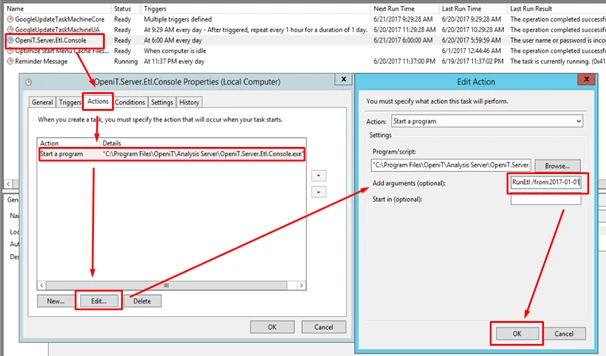
- Open Task Scheduler and edit the properties of OpeniT.Server.Etl.Console task.
Go to Actions > Edit the entry > add /from:2017-01-01 in arguments.
NOTE: /from:2017-01-01 means that all data starting from January 1, 2017 up to present will be processed. Older records prior to 2017 will no longer be included. You can change this to a preferred date.
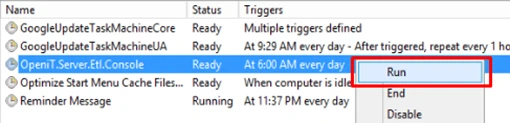
- After saving right click the Openit.Server.Etl.Console task and click Run.



Considerations #
The duration of this process depends on the volume of data being handled and may take several hours or even days to complete.
It is strongly recommended to schedule this procedure in advance and inform users of the potential downtime, as the database will be cleared at the start of the process.
During the ETL execution, SSRS reporting will be unavailable and will resume only after the process is completed.