




Introduction #
Vendor license mapping involves creating a new virtual vendor license alongside the existing ones while ensuring that the correct concurrency is calculated. This process is particularly useful when multiple raw vendor license names correspond to a single vendor license. The new virtual vendor license name should be visible in both the License Monitor and historical reports.
Configuring product-mapping #
To configure the mapping, please follow the following steps.
- Open product-mapping in the Configuration directory, which is by default in C:\Program Files\OpeniT\Core\Configuration.
- Notice that it contains instructions on how to edit the file.
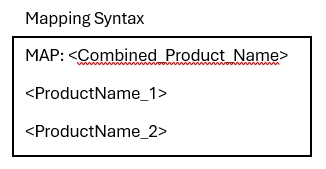
- Specify products to combine with the following syntax:

- Empty lines are allowed — any line beginning with # as the first non-whitespace character is considered a comment. Globbing is also supported, allowing you to use several globbing patterns; however, remember that they are slower than exact matches. To make your mapping files more effective and efficient.
- In the mapping file, entries are case-insensitive, meaning that capitalization variations, such as ‘Vendor License’ and ‘vendor license’, will be recognized as identical. Also, note that leading and trailing spaces are removed from entries.
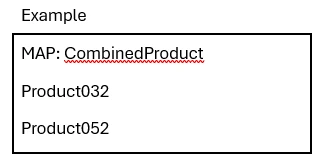
- Example:

- This example combines the usage of Product032 and Product052 and will be gathered through CombinedProduct.
- You can also include custom configurations in this mapping file, such as default mapping, setting date limits on specific mapping entries, or creating nested maps.
- Save the changes.
Advanced Mapping #
This mapping file allows excluding specific products to match general rules for mapping inclusion. It almost has the same behavior as regular mapping except for the following points:
- It uses ADVMAP as keyword.
- It uses a + (plus sign) for inclusions.
- It uses a – (minus sign) for exclusions.
Configuration #
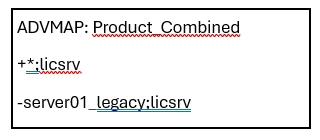
This example triggers the processing to include all products starting with anything and ending with licsrv, and exclude the specific product server01_legacy;licsrv.
The ADVMAP keyword is required to indicate that the entry is for advance mapping. It is recommended to start the entries with the most general match rule followed with the most specific match rules since entries are evaluated from bottom to top.
Proceed with data regeneration after configuring all the necessary mapping files to apply the changes in the real-time and historical reports.