

Analyst ReportOpen iT Named a Leader in the 2025 QKS SPARK Matrix™
See why we’re a Leader.
Download Full Report

KNOWLEDGE BASE

How can we help?

Introduction  #

By default, the maximum licenses can be set by using the –max parameter in the data collection. However, some features have different max available and using the –max parameter alone sets all the features into having a single maximum available license. 
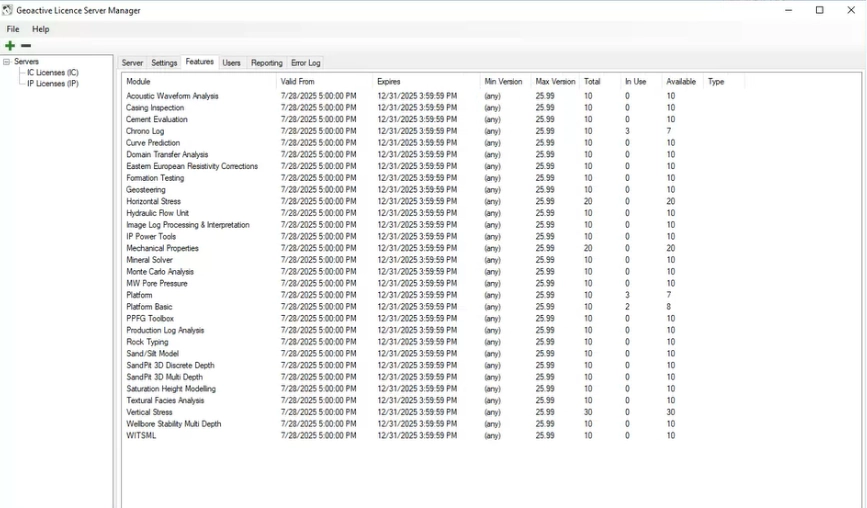
Figure 1. Geoactive License Manager 

Requirements  #

  1. Access to the Core Server machine. 
  1. Access to the Core Server Web Interface 

Configuration  #

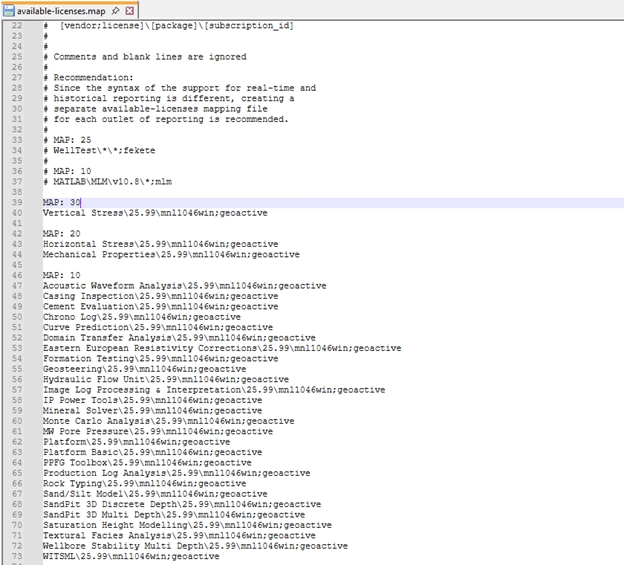
  1. Go to C:\Program Files\OpeniT\Core\Configuration and open the available-licenses.map file 
  1. Add each feature in accordance with the maximum available license shown in the license manager. 
     
  1. Follow the mapping format below: 
    #  MAP: [number of licenses] 
    #  [feature1]\[version]\[product1] 
  1. Save the file. 
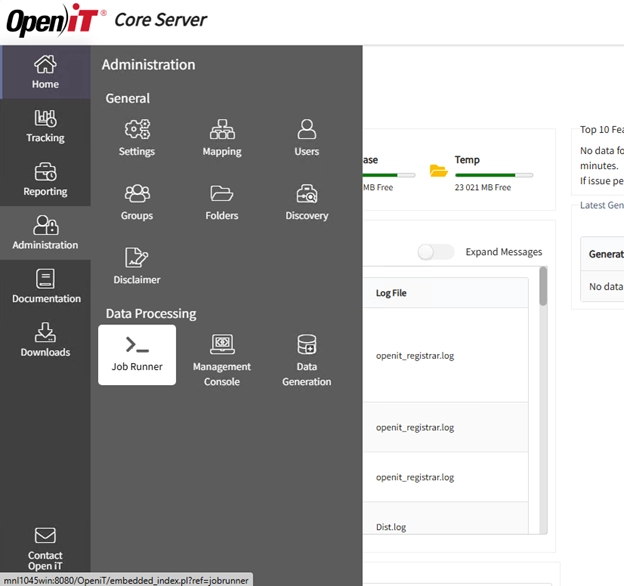
  1. Go to Core Server Web Interface 
  1. Navigate to Administration > Job Runner
     
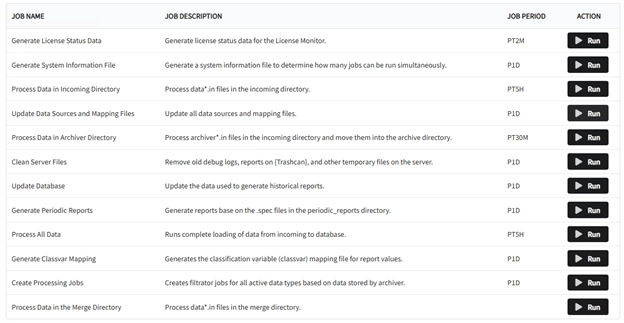
  1. Run the Update Data Sources and Mapping Files Job 
  1. To check for the changes, run Generate License Status Data and then go to Tracking > License Monitor 
  1. The features should now have the updated maximum Available License 

For assistance or further configuration support, please contact your Open iT support team.

For additional references, you may visit our Documentation page.

Other Categories

Demo Videos

Short, informative videos showcasing product features, workflows, and best practices through real-world demonstrations.
Explore More

Interface Guides

Step-by-step instructions and visuals explaining how to navigate and use the application’s user interface effectively.
Explore More

License Managers

Documentation and tools for managing, monitoring, and maintaining software licenses across different systems or products.
Explore More

Upgrade

Instructions, best practices, and technical guidance for updating Open iT components to newer versions, ensuring a smooth, secure, and efficient transition with minimal downtime.
Explore More

Looking for More Resources?

Explore additional content through our Customer Portal or Documentation page for anything not covered here.

Scroll to Top

Let's talk

We’ll show you how your business can benefit from Open iT solutions.
Please note:
By submitting this form you are agreeing to receive additional communications from Open iT. Your information will be processed in accordance with our Privacy Notice.

Let's talk

We’ll show you how your business can benefit from Open iT solutions.
Please note:
By submitting this form you are agreeing to receive additional communications from Open iT. Your information will be processed in accordance with our Privacy Notice.

Let's talk

We’ll show you how your business can benefit from Open iT solutions.
Please note:
By submitting this form you are agreeing to receive additional communications from Open iT. Your information will be processed in accordance with our Privacy Notice.