



This document provides information on how to navigate and use the Connections page under the Open iT Analysis Server Administration tab.
Introduction #
The Connections page contains various details about the current database and web connections of Open iT Analysis Server.
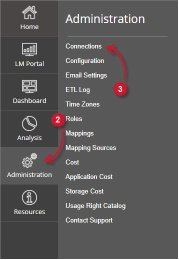
Follow these instructions to navigate to the page:
- Open the Open iT Analysis Server web interface using a web browser.
- Hover the cursor over Administration tab. Wait till the sub-tabs appear.
- Click the Connections tab.
Note: Clicking the Administration tab also redirects to the Connections page.
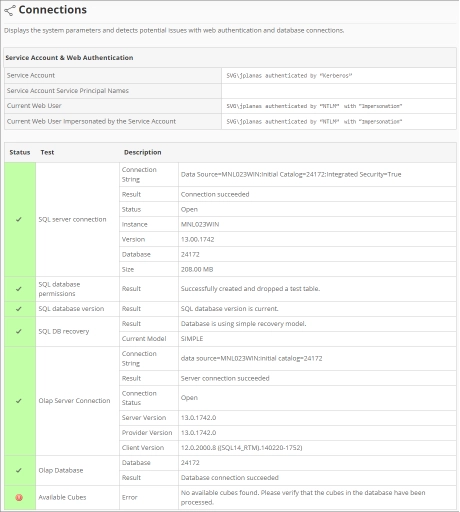
The Connections page should be displayed.
Requirements #
Ensure to meet the following requirements before using the Connections page:
- SQL database is successfully created.
- Administrative rights of the current web user.
Service Account and Web Authentication #
This table contains the following information:

- Service Account – the username and authentication type used to run background services for Analysis Server.
- Service Account Service Principal Name – a unique identifier used by Kerberos authentication to associate the service account to the service instance.
- Current Web User – the username of the user currently accessing the web interface with authentication type.
- Current Web user Impersonated by the Service Account – the username of the current web user impersonated by the service account.
Database Connections #
This table contains the following information:
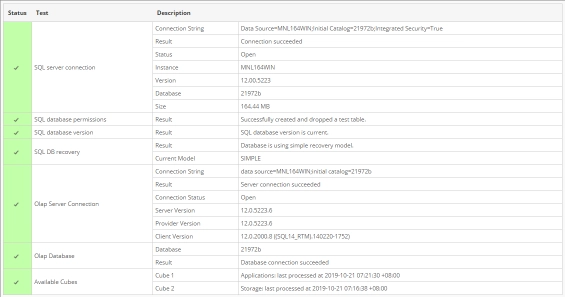
- Status – shows check (green) if the status of a certain test is valid or cross (red) if the test has errors.
- Test – contains various tests related to database connections:
- SQL Server connection
- Connection String – a string used to connect to SQL Server.
- Result – shows the status when connecting to SQL Server using the connection string.
- Status – shows the current connection status to the SQL Server if it is open or closed.
- Instance – instance name used to connect to SQL Server.
- Version – shows the version of the SQL Server.
- Database – the SQL database name.
- Size – the current size of the SQL database.
- SQL database permission
- Result – shows the status of the permission of the service account to the database.
- SQL database version
- Result – shows the current status of the database schema deployed.
- SQL DB recovery
- Result – shows the status of the database recovery used.
- Current Model – a string representing the currently used database recovery.
- Olap Server Connection
- Connection String – used to connect to SQL Server Analysis Services.
- Result – shows the status when connecting to SQL Server Analysis Services using the connection string.
- Connection Status – shows the status of the current connection to the SQL Server Analysis Services if it is open or closed.
- Server Version – shows the version of the SQL Server Analysis Services.
- Provider Version – shows the version of the OLAP provider used by the SQL Server.
- Client Version – shows the version of the SQL client accessing the the SQL Server Analysis Services.
- Olap Database
- Database – the SQL Server Analysis Services database name.
- Result – shows the connection status to the OLAP database.
- Available Cubes – list of available deployed OLAP cubes. It gives the name and the last date and time of processing.
- SQL Server connection
For assistance or further configuration support, please contact your Open iT support team.
For additional references, you may visit our Documentation page.