



This document provides information on how to navigate and use the Contact Support page under the Open iT Analysis Server Administration tab.
Introduction #
The Contact Open iT page contains contact details of the Open iT Support team. Use this page when assistance from Open iT is needed. The page is only visible to users with Administrative rights to Open iT Analysis Server.
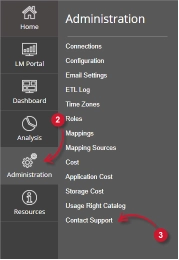
Follow these instructions to navigate to the page:
- Open the Open iT Analysis Server web interface using a web browser.
- Hover the cursor over Administration tab. Wait till the sub-tabs appear.
- Click the Contact Open iT tab.

Figure 1. Analysis Server Administration: Contact Support Navigation
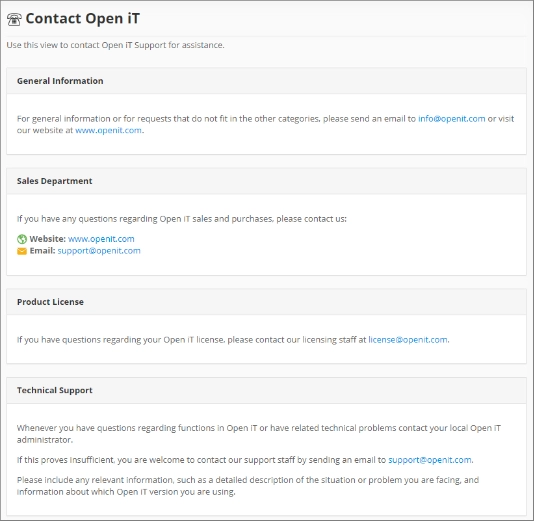
The Contact Open iT page should be displayed.
Figure 2. Analysis Server Administration Contact Support
Requirements #
Ensure to meet the following requirements before using the Contact Support page:
- SQL database is successfully created.
- Administrative rights of the current web user.
- Installed electronic mailing platform.
- Details of the issue that needs assistance.
Sending an Email #
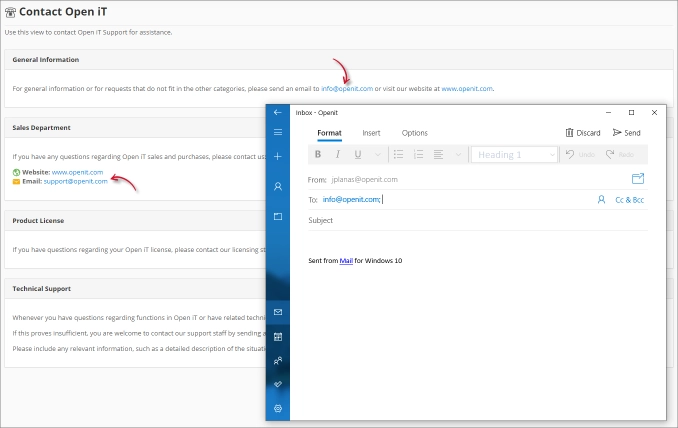
To send an email to Open iT for a specific request or assistance, click the provided email addresses in the page to initialize the installed electronic mailing platform. Compose the email and provide all the details of the request or issue that needs assistance.
Troubleshooting #
This part provides the possible work around for a known issue in the Contact Support page.
Error page displayed when accessing not in localhost #
There will be times that when accessing the Contact Support page remotely or via hostname, it displays an error page.
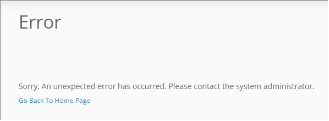
Use the following suggestions to troubleshoot this issue:
Check for Web Browser Console Errors #
Follow these instructions to check for errors in the web browser console:
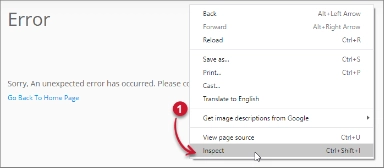
- In the Contact Support page, right click anywhere inside the page and choose Inspect.

Figure 5. Analysis Server Contact Support Page Troubleshooting: Error page displayed – Inspect
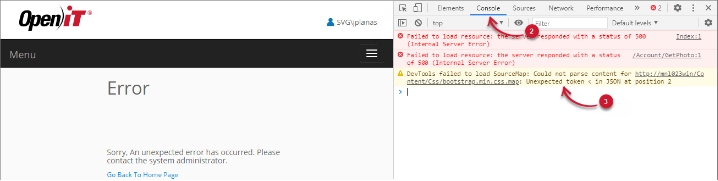
The Developer Tools should appear. - Choose Console from the available tabs of the tool.
The console lists web browser transactions including errors.
Figure 6. Analysis Server Contact Support Page Troubleshooting: Error page displayed – Console - Errors in the console may sometimes be too technical, for immediate response, send the error detail to support@openit.com.
Access the website through localhost #
To see the server’s real error message, go to the machine hosting the Open iT Analysis Server, then access http://localhost on a browser. The real error message should be displayed.